Chaos Trend AI (Sidewalk Collision): The Bump Video, Starring You
A stranger bumps into you and your coffee, sunglasses and phone fly into slow motion. One photo of you is all it takes.
Updated : Page published.

1Add your photo
What you'll get
Front-facing, well-lit selfies work best. One face per photo.
2Place
3Choose quality
By generating you confirm you have permission to use the people in your photos. Terms
No subscription needed · Ready in 4–6 minutes · Failed renders are free
The Chaos Trend, also called sidewalk collision, is a 10-second AI video in which a person is bumped by a stranger on a busy street and their coffee, sunglasses and phone fly into slow motion; videosi makes it from one photo of you.
- Fast facts
- First seen
- Stage
- Just starting
- Started on
- TikTok
- Sound
- No single confirmed sound; most clips use their own original sound, some use a slowed remix.
- Meaning
- The Chaos Trend, also called sidewalk collision, is a short AI video in which a person on a busy street is bumped into by a stranger and their coffee, sunglasses and phone fly into slow-motion close-ups.
- Related trends
- Explosion Walk AI, Plug Walk AI Filter
Page updates
- November 8, 2026 — Page published.
The Chaos Trend AI prompt and model
Chaos Trend AI is made with Seedance 2.0 / 2.5 (you pick the tier) by ByteDance. The prompt behind it has 5 parts, and the timing is what makes or breaks it.
- Model
- Seedance 2.0 / 2.5 (you pick the tier)
- Mode
- Photo + motion reference to video
- Length
- 10 seconds, 9:16 or 16:9
- Input
- 1 photo
- Identity swap Your photo is the only source for the face, hair, build and outfit of the person who walks, held identical in every frame.
- Motion reference A short clip of the original collision supplies the low walk, the bump, the slow-motion close-ups and the fall.
- Place and belongings The place you pick decides the street and what flies: coffee, sunglasses and a phone, or a handbag, a camera and a watch.
- Stranger rule The person who bumps into you stays a stranger with their back turned, so no second face is invented.
- Clean objects Cups, phones and bags are plain, with no brand names or text, so the slow-motion close-ups stay readable.
Replace the woman with curly dark hair, a light-blue shirt and a burgundy tie in Video 1 with the person from Image 1. Keep everything else from Video 1 as it is…
Why it goes wrong when you do it yourself
- Written by hand without a motion reference, the bump is soft and the objects drift instead of bursting, so the slow-motion close-ups lose their snap.
- The model tends to keep the original walker's curly hair or outfit unless the swap is spelled out, so the person looks like a mix.
- Logos on cups and phones turn into garbled text in close-up; plain objects survive the zoom.
- The stranger who bumps you often gets a face and a second hero shot, which pulls the focus off you.
More videos from this trend
Trend inspiration · not a selectable template
How to make your Chaos Trend AI video
Upload one photo of yourself
Face to the camera, head and shoulders in frame, even light. The clothes in your photo are the clothes you wear in the video.
Pick the place
A shopping mall, Tokyo at night or Rome at sunset. Each has its own street and its own set of belongings that fly.
Press Generate
The bump, the slow-motion close-ups and the fall are built in. A 10-second video is ready in a few minutes.
Post it with the sound
The MP4 downloads with the trend's original sound and no watermark. Add the AI label when you post, or swap the track in TikTok or CapCut.
What is the Chaos Trend AI trend?
Updated · videosi is an independent tool. It is not affiliated with TikTok, Instagram, YouTube, or with the owners of any trend, song, game or brand named on its pages.
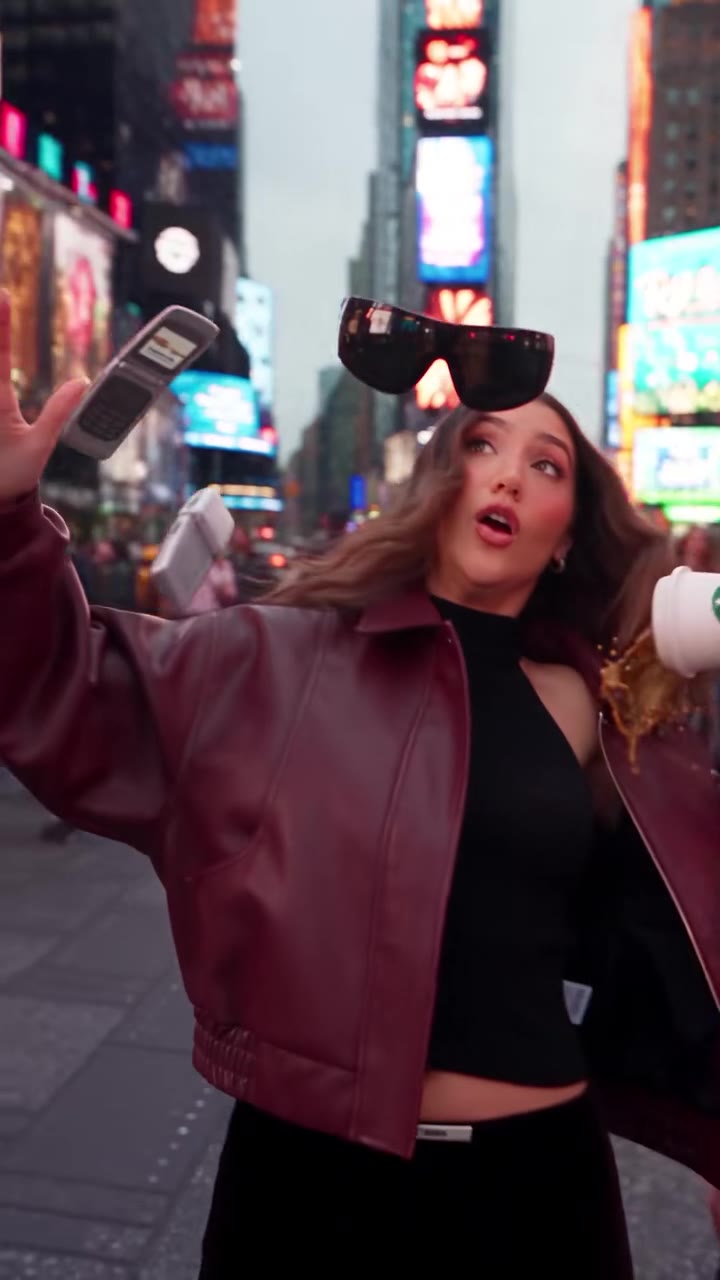
The Chaos Trend video, also called sidewalk collision, is a ten-second clip that starts low on the pavement. A person walks toward the camera with sunglasses on, a phone at their ear and a takeaway coffee in the other hand. A stranger in a dark suit passes too close, and the bump sends everything into the air. The camera then follows each object in slow motion: sunglasses spinning past the lens, a cup shedding droplets, a flip phone turning to show its keys. It ends on the person, startled, before they hit the floor.
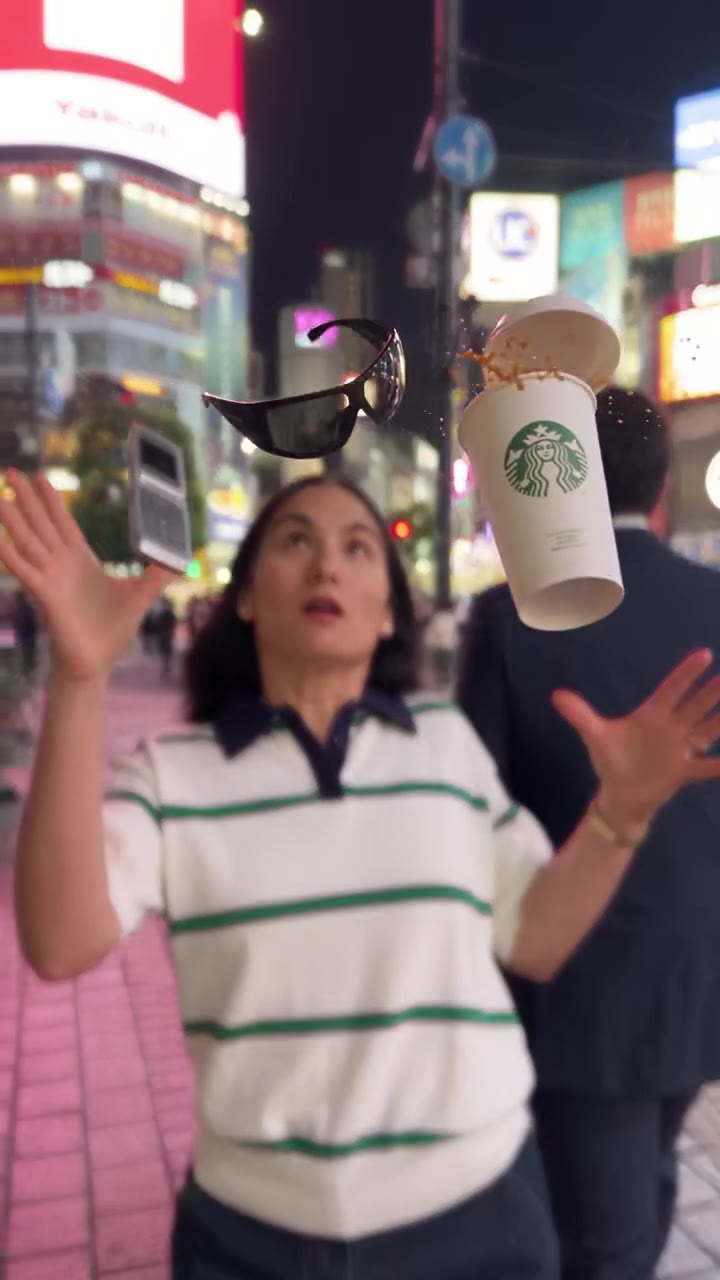
The trend started on TikTok as the Chaos Trend. The earliest clip found for this page was posted on 31 August 2026 by a Brazilian creator with the hashtag ChaosTrend, and more Brazilian creators and CapCut tutorials followed within days (2 to 4 September). Most of its TikTok activity came in September. The same clip was remade in Times Square, Tokyo's Shibuya crossing and in front of the Colosseum in Rome. In early November, AI template sites began listing it as sidewalk collision, so both names are now in use.
Almost none of these clips are filmed. They are made by an AI video model from a photo or an AI-generated person, plus a reference clip that supplies the walk, the bump and the slow-motion close-ups.
videosi makes the same video from one photo of you. You pick the place, the model swaps you in for the walker and keeps the shots and the timing, and you download a 10-second MP4 with the original sound of the reference clip. The Chaos Trend had its first TikTok peak in September 2026 and is picking up again in November under the sidewalk collision name, so this page covers both.
Chaos Trend AI: shot by shot
- 0–2 s
Low walk
The camera sits near the floor and tilts up from shoes and legs to the face as the person walks toward the lens.
- 2–3.5 s
Sunglasses, phone, coffee
The person strolls on with sunglasses, a phone at one ear and a takeaway cup in the other hand, crowds behind.
- 3.5–5 s
The bump
A stranger in a dark suit passes close and walks into them. Arms fly up and the belongings burst into the air.
- 5–8.5 s
Slow-motion close-ups
The camera follows each object as it spins near the lens: sunglasses, the cup with droplets hanging, the flip phone.
- 8.5–9.5 s
Hanging in the air
Back on the person, wide-eyed, with the objects still floating above their head.
- 9.5–10 s
The fall
The person drops to the floor as the sunglasses, cup and phone land around them.
Tips for a better result
Show your face and shoulders
The video opens on your shoes and legs and only reaches your face after a few seconds. A sharp photo with face and shoulders keeps the likeness through the movement.
Skip sunglasses and hats in the photo
The video puts sunglasses on you and sends them flying. A photo that already has glasses or a hat can leave the model unsure what is yours.
Wear something you like in motion
Your outfit is what the person wears in the whole clip, including the fall to the floor. Plain, well-fitted clothes survive the spin best.
Choose a clear, single-person photo
A photo with other people in it can add extra walkers. Crop to yourself before you upload.
Good to know before you make a Chaos Trend AI video
- The likeness can drift while the camera is low and fast, in the first two seconds and the final fall.
- The stranger and the crowd are invented, and the flying objects can differ from the reference, for example a cup with no lid.
- The original sound of the reference clip is added to the downloaded video. Replace it in TikTok or CapCut if you want another track.
- Wild bumps and falls look real, so label the video as AI when you post it.
Chaos Trend AI ideas and prompts
| Idea | Prompt | |
|---|---|---|
| Shopping mall | A bright glass-roofed mall corridor, sunglasses, a cup of coffee and a flip phone fly into the air. | |
| Tokyo at night | A neon-lit pink pavement in Tokyo at night with the same sunglasses, cup and phone. | |
| Rome at sunset | A cobbled square in front of the Colosseum, with a leather handbag, a film camera and a watch in the air. |
Chaos Trend AI: questions
What is the Chaos Trend AI video?
The Chaos Trend, which began on TikTok on 31 August 2026 and is now also called sidewalk collision, is a 10-second AI video in which someone walks down a busy street, a stranger bumps into them and their coffee, sunglasses and phone fly into slow-motion close-ups. videosi makes your own version from one photo, with no prompt to write.
How do I make the Chaos Trend AI video from one photo?
Upload one photo of yourself to videosi, pick a place (mall, Tokyo at night or Rome at sunset) and press Generate. videosi writes the prompt, adds the bump, the flying objects and the fall, and returns a 10-second video. Nothing needs to be typed, and the MP4 downloads without a watermark.
What does the Chaos Trend mean on TikTok?
On TikTok, the Chaos Trend means a short AI clip that turns an ordinary walk into a collision, and videosi makes it from one photo. The person is hit by a passer-by and everything they carry bursts into the air. The name comes from the hashtag ChaosTrend, used by Brazilian creators from 31 August 2026. AI template sites now also call it sidewalk collision.
Is there a website or generator for the Chaos Trend?
Yes. videosi (videosi.io) is a web tool that makes the Chaos Trend video from one photo. The walk, the bump, the slow-motion close-ups and the fall are built in, so you choose only the photo and the place. A standard 10-second video (Standard model, 720p) is 9 credits.
Is there a Chaos Trend template on CapCut, TikTok or Dreamina?
Several apps list templates for it, some under the name sidewalk collision, and they change often, so check inside them. videosi is independent and not affiliated with TikTok, CapCut or Dreamina. The videosi Chaos Trend video is made on the web: upload a photo and download an MP4 that already has the trend's original sound.
What is the Chaos Trend AI prompt, and which model makes it?
videosi uses ByteDance Seedance 2.0 (the Mini tier by default, higher tiers on request). The model gets your photo and a short reference clip of the collision, and a prompt that swaps the person and keeps the shots, timing and slow-motion. The full prompt is not published.
How much does a Chaos Trend AI video cost on videosi?
A standard 10-second Chaos Trend video on videosi costs 9 credits (Standard model, 720p). Higher tiers cost more per video, and a failed render returns its credits. Credit packs and plans are listed on the pricing page; the credits do not expire.
Why does my Chaos Trend video not look like me?
Your videosi Chaos Trend video usually looks off because of one of these: a small or angled face, sunglasses in the photo, or a photo cropped tight to the face. Use a sharp, evenly lit photo that shows your face and upper body. The video starts at the shoes and the face only appears after a few seconds, so some drift in the likeness is normal.
What song or sound is used in the Chaos Trend?
There is no single confirmed song. The earliest clip, from 31 August 2026, uses its own original sound, and later versions use original sounds or remixed tracks. videosi adds the original sound of the reference clip to your video, or you can replace it with any trending audio in TikTok or CapCut.
Is the Chaos Trend still trending?
The Chaos Trend had its first wave on TikTok from 31 August 2026, mostly in Brazil, with most activity in September. In early November 2026 AI template sites began promoting it as sidewalk collision. As of 8 November 2026 it is in that second, early wave, and videosi can make it today.
Can I use a photo of someone else or a pet?
Yes, videosi takes a photo of yourself, a friend or family member who agrees, or a pet. Only upload photos of people you have permission to use. A pet can replace the walker, but a four-legged animal does not hold a phone or coffee, so the result looks different from the person version.
Do I need to label a Chaos Trend video as AI?
Yes, label every videosi Chaos Trend video as AI when you post it, as TikTok, Instagram and YouTube ask for realistic AI video. The clip shows a bump with spilled coffee and no injury. Do not present it as real footage of a person being hit.
Trending this week
All trends this week




Make your Chaos Trend AI video
Upload a photo and press Generate. 10 credits, refunded if it fails.
Get the next trend first
One email when new trends land on videosi, about once a week. Unsubscribe in one click.
See videosi first on Google
Add videosi as a preferred source and our trend pages show up first in your Top Stories and AI answers on Google.