BigXthaPlug Give It All AI: The From The Block Mic, Starring You
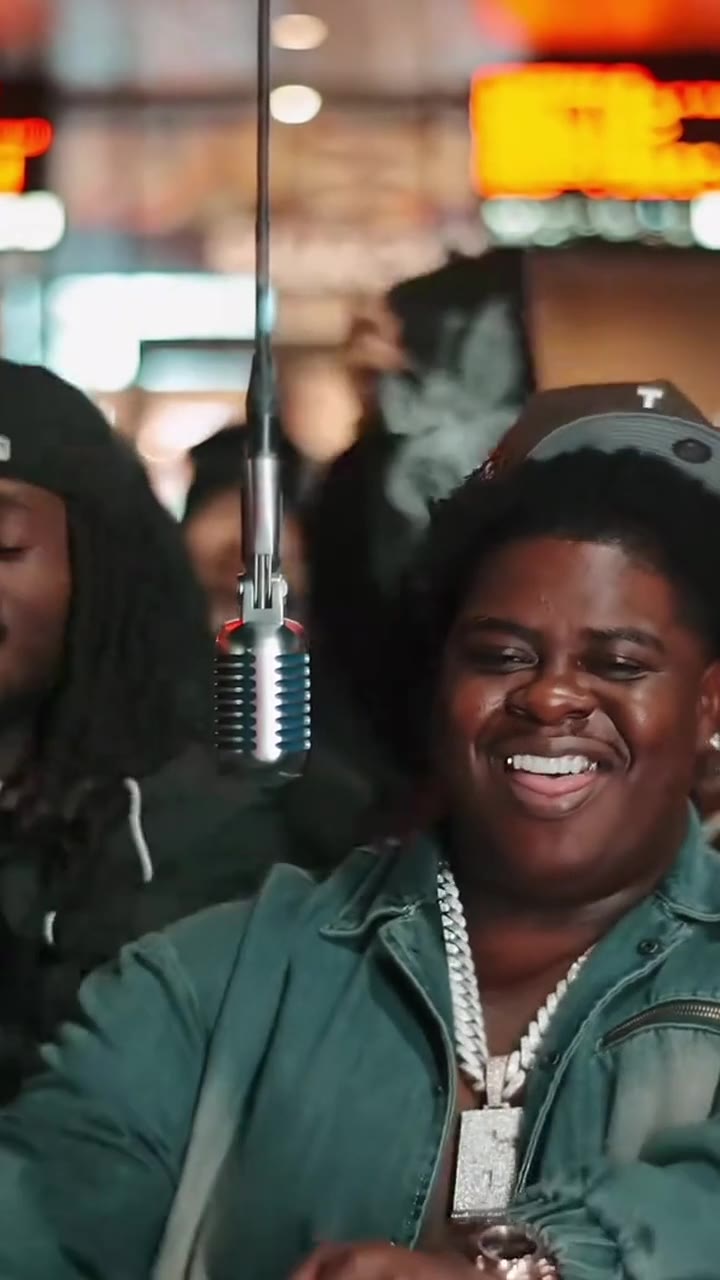
You take BigXthaPlug's spot at the hanging vintage mic, grinning through the Give It All hook while a packed crowd moves behind you. One photo of you is all it takes.
Updated : Page published.
1Add your photo
What you'll get
Front-facing, well-lit selfies work best. One face per photo.
2Choose quality
By generating you confirm you have permission to use the people in your photos. Terms
No subscription needed · Ready in 4–6 minutes · Failed renders are free
The BigXthaPlug Give It All AI trend is a 12-second clip in which you replace BigXthaPlug at the hanging microphone of his From The Block performance of Give It All, grinning, waving and clapping to the hook in front of a packed crowd; videosi makes it from one photo of you.
- Fast facts
- First seen
- Stage
- Just starting
- Started on
- TikTok (unconfirmed)
- Sound
- Give It All — BigXthaPlug
- Meaning
- The BigXthaPlug Give It All AI trend is a TikTok trend in which people use AI to put themselves in BigXthaPlug's place at the hanging microphone of his From The Block performance of "Give It All".
- Related trends
- AI Rap Video, Tiny Desk AI, Stage Singing AI Effect, Plug Walk AI Filter
Page updates
- November 11, 2026 — Page published.
The BigXthaPlug Give It All AI prompt and model
BigXthaPlug Give It All AI is made with Seedance 2.0 / 2.5 (you pick the tier) by ByteDance. The prompt behind it has 5 parts, and the timing is what makes or breaks it.
- Model
- Seedance 2.0 / 2.5 (you pick the tier)
- Mode
- Photo + motion reference to video
- Length
- 12 seconds, 9:16, 1:1 or 16:9
- Input
- 1 photo
- Who is replaced Only the performer at the hanging microphone is swapped for the person in your photo; the crowd stays as it is.
- What leaves with him His cap, chain, rings and watch are named so none of them survive; your own hair and outfit come from the photo.
- Motion reference The 12-second opening of the real performance supplies the two camera angles, the crowd, the neon and the timing.
- Performance line One sentence describes the grin, the raised hand, the arm over the crowd and the clapping, without asking the model to copy the original man.
- Likeness The prompt keeps your face shape, build and age from your photo instead of drifting toward the original performer.
Replace the large man in the teal denim work jacket, grey cap, iced-out silver chain, rings and watch at the hanging vintage microphone with the person from your photo.…
Why it goes wrong when you do it yourself
- Typing "BigXthaPlug Give It All" into a video model gets you a generic rap stage; the From The Block look (hanging chrome mic, neon, crowd pressed close) only comes from a real motion reference.
- A prompt that says "move like the man in the video" tends to keep the original performer instead of swapping him out, so the swap and the moves have to be written separately.
- The close-up from the side is where likeness slips: the face is large and turned away, and the model can drift toward the original performer's face and build.
- Rappers' jewellery is sticky: unless the chain, rings and watch are named, models often leave them on the new person.
More videos from this trend
Trend inspiration · not a selectable template
How to make your BigXthaPlug Give It All AI video
Upload one photo of yourself
Face to the camera, head to waist, even light. The outfit in the photo is the outfit you perform in.
Pick the format
9:16 for TikTok, Reels and Shorts, or 1:1 and 16:9. There is nothing else to choose: the scene is the From The Block mic.
Generate and download
Press Generate and the 12-second clip is rendered for you, an MP4 with the opening of Give It All already on it.
Post it with the trend sound
Label the clip as AI-generated when you post. You can keep the sound that is on it or pick "Give It All" in the TikTok sound library.
What is the BigXthaPlug Give It All AI trend?
Updated · videosi is an independent tool. It is not affiliated with TikTok, Instagram, YouTube, or with the owners of any trend, song, game or brand named on its pages.
The BigXthaPlug Give It All AI trend takes one moment from the Dallas rapper's From The Block performance of "Give It All": he stands at a hanging vintage microphone in a teal denim work jacket and a heavy silver chain, grinning with his arms folded while a packed crowd bounces behind him under neon lights, then throws an arm out over the room, claps and sings the hook to the camera. In the AI version, someone else stands at that microphone.
"Give It All" is a track on BigXthaPlug's album Better Over Time, released on 30 October 2026; he had been teasing it on TikTok since 20 October. Reposts of the From The Block performance started circulating on TikTok around 4 November 2026, and the earliest AI remakes we found, with people swapping themselves in for him at the mic, are dated 7 November 2026. On TikTok people also lip-sync and dance to the "give it all to me" hook without any AI.
The AI trend is only just starting to spread: our radar first flagged it on 11 November 2026, and most of the AI clips we found so far are app tutorials rather than posts by ordinary fans. View counts for the AI versions are unconfirmed.
On this page you upload one photo and videosi puts you at the hanging microphone with the crowd, the neon and the camera moves of the original, with the song's opening already on the clip. Your face, hair and outfit come from your photo.
BigXthaPlug Give It All AI: shot by shot
- 0-2.5 s
At the mic
Wide shot under the neon: you stand at the hanging vintage microphone with your arms folded, grinning, the crowd packed in behind you.
- 2.5-5 s
The hook
You nod and mouth the "give it all to me" hook into the mic as the people behind you bounce and film on their phones.
- 5-6.4 s
Hand up
One hand comes up past your face and you lean into the mic as the next line of the song starts.
- 6.4-8.3 s
Arm out
The camera cuts in close from the side: you stretch an arm out over the crowd and clap along.
- 8.3-11.8 s
To the camera
The camera swings round to the front and you sing straight past the mic, waving your hands to the beat until the clip ends.
Tips for a better result
Show your upper body
Half the clip is a waist-up shot with your arms moving. A head-to-waist photo gives the model your real build and clothes; a tight selfie leaves it to invent them.
Face the camera
A clear, front-facing face with no sunglasses or mask holds up best when the camera swings in close from the side.
Wear what you want on stage
Your clothes come from the photo, not from BigXthaPlug's denim jacket and chain. A jacket, a jersey or a bold colour reads well against the dark crowd.
Warm indoor light blends in
The scene is lit by warm neon. A photo taken indoors or in soft shade fits better than harsh midday sun or a flash.
Good to know before you make a BigXthaPlug Give It All AI video
- Your mouth moves with the performance but is not synced word for word to the lyrics; the song is added after the video is made.
- The sound on the clip is the opening of the live performance and includes one mild swear word.
- Only the performer is replaced. The crowd behind you stays as people in the original, and their faces may shift slightly.
- This is a fan-made style clip and is not affiliated with BigXthaPlug or From The Block. A failed, timed-out or blocked render returns its credits automatically.
BigXthaPlug Give It All AI: questions
What is the BigXthaPlug Give It All AI trend?
The BigXthaPlug Give It All AI trend, first seen on TikTok around 7 November 2026, swaps a person into BigXthaPlug's From The Block performance of "Give It All", rapping at a hanging vintage mic in front of a packed crowd. videosi's BigXthaPlug Give It All AI makes the 12-second version from one photo of you.
How do I make the Give It All AI video of myself?
Upload one clear photo of yourself to videosi's BigXthaPlug Give It All AI page, pick 9:16, 1:1 or 16:9 and press Generate. The 12-second clip puts you at the From The Block mic, grinning, waving and clapping to the hook. There is no prompt to write and no app to install.
Is there a website or generator for the BigXthaPlug Give It All AI trend?
Yes, videosi has a BigXthaPlug Give It All AI generator at videosi.io/bigxthaplug-give-it-all-ai: one photo in, a 12-second performance clip out, with the song's opening already on it. It runs in the browser on a phone or a computer. It is not affiliated with BigXthaPlug, From The Block or his label.
Is there a CapCut template or TikTok filter for Give It All AI?
We found no TikTok camera filter for it as of November 2026; most Give It All AI clips on TikTok come from tutorials for video apps. videosi's BigXthaPlug Give It All AI does the same job in the browser from one photo, producing a 12-second MP4 you can post straight to TikTok or Reels.
What AI model and prompt make the Give It All AI video?
videosi makes BigXthaPlug Give It All AI with ByteDance's Seedance video model (Seedance 2.0 Mini by default; Fast, Pro and Ultra, which is Seedance 2.5, are one click away), using the 12-second opening of the real performance as a motion reference and a short replacement prompt. The full prompt is not published; the page shows its structure.
How much does BigXthaPlug Give It All AI cost, and is it free?
BigXthaPlug Give It All AI on videosi is not free: there is no free generation or trial. A 12-second video on the Standard model at 720p is 10 credits; better models and resolutions cost more. Credit packs start at $6.90 for 10 credits and never expire; plans start at $29.90 a month. A failed render returns its credits.
Why doesn't my Give It All AI video look like me?
Most misses in videosi's BigXthaPlug Give It All AI come from the photo: a small, dark, sideways or sunglasses face gives the model little to hold when the camera swings in close at about 6 seconds. Use a sharp, front-facing, head-to-waist photo in even light. A failed render refunds its credits automatically.
Can I use a friend's photo or put someone else at the mic?
Yes, with their permission: any adult's clear photo works in videosi's BigXthaPlug Give It All AI, and the clip shows one performer at the mic. Do not upload someone's photo without asking, and label the 12-second video as AI-made when you post it so nobody thinks it is real footage.
What does "give it all to me" mean in the BigXthaPlug song?
In "Give It All", the hook "give it all to me" is BigXthaPlug asking for everything he feels he has earned on his own; in the trend it is simply the line people mouth at the mic. The AI trend uses the first 12 seconds of the From The Block performance of the song, where that hook is sung. videosi turns it into a clip of you.
What song is used in the Give It All AI trend?
The song is "Give It All" by BigXthaPlug, from his album Better Over Time, released on 30 October 2026. The AI clips reuse the audio of his From The Block live performance. videosi's BigXthaPlug Give It All AI puts the opening 12 seconds of that performance audio on your video.
Is the BigXthaPlug Give It All AI trend still trending?
As of 11 November 2026 the BigXthaPlug Give It All AI trend is emerging: the song came out on 30 October 2026, the From The Block performance was reposted on TikTok from 4 November and the first AI remakes we found are dated 7 November. videosi's BigXthaPlug Give It All AI lets you post your version while it is early.
Can I make the Give It All AI trend with ChatGPT, Sora, Veo or Kling?
Most Give It All AI tutorials on TikTok use a motion-swap feature in a video app; a text prompt alone in ChatGPT, Sora or Veo rarely gets the hanging mic, the neon and the crowd right. videosi's BigXthaPlug Give It All AI pairs your photo with the 12-second performance clip, so you only upload a photo.
Trending this week
All trends this week
Make your BigXthaPlug Give It All AI video
Upload a photo and press Generate. 10 credits, refunded if it fails.
Get the next trend first
One email when new trends land on videosi, about once a week. Unsubscribe in one click.
See videosi first on Google
Add videosi as a preferred source and our trend pages show up first in your Top Stories and AI answers on Google.