AI Snow Globe: The Pixar Snow Globe Video, Starring You
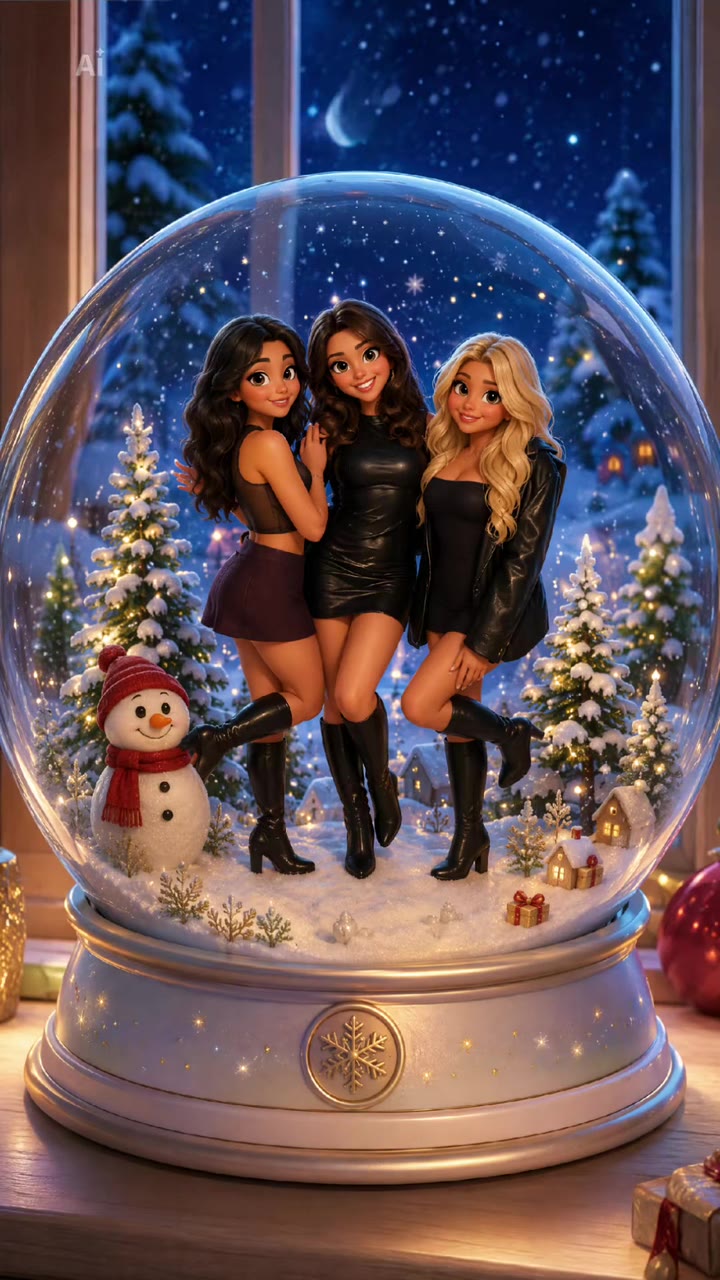
Your photo slides away and you are standing in a Pixar-style snow globe with trees, snow and a snowman. One photo is all it takes.
Updated : Page published.


1Add your photo
What you'll get
Front-facing, well-lit selfies work best. One face per photo.
2Choose quality
By generating you confirm you have permission to use the people in your photos. Terms
No subscription needed · Ready in 4–6 minutes · Failed renders are free
The AI snow globe trend, also called the Pixar snow globe trend, is an 11-second video in which a selfie slides away to reveal a Pixar-style 3D snow globe with the people from the photo inside; videosi makes it from one photo of you.
- Fast facts
- First seen
- Stage
- Just starting
- Started on
- TikTok (unconfirmed)
- Sound
- No single confirmed sound: the template clips share one original sound. The videosi video comes with the reference clip's sound already on it.
- Meaning
- The AI snow globe trend, also called the Pixar snow globe trend, is a 2026 AI video in which a selfie slides away to reveal a Pixar-style 3D cartoon scene with the people from the photo inside a Christmas snow globe.
- Related trends
- AI Christmas Video, Christmas PFP AI
Page updates
- November 18, 2026 — Page published.
The AI Snow Globe Trend prompt and model
AI Snow Globe Trend is made with Seedance 2.0 / 2.5 (you pick the tier) by ByteDance. The prompt behind it has 5 parts, and the timing is what makes or breaks it.
- Model
- Seedance 2.0 / 2.5 (you pick the tier)
- Mode
- Photo + motion reference to video
- Length
- 11 seconds, 9:16, 1:1 or 16:9
- Input
- 1 photo
- Identity lock Your photo is the only source for faces, hair and clothes, in the opening photo and in the cartoon figures.
- Motion reference A short clip supplies the hold, the slide-up and the timing of the reveal.
- Scene One snow globe on a wooden shelf, with pine trees, a snowman, snow and a night window behind it.
- Timeline Four beats over about 11 seconds, from the photo to the slide-up to the finished globe.
- Rules Only the people in your photo appear, with no trace of the original couple, no caption text and no extra logos.
Replace the two young people and the kitten in the selfie photo at the start with the person from your photo, then the Pixar-style cartoon figures inside the snow globe…
Why it goes wrong when you do it yourself
- Without a motion reference the photo does not slide away cleanly and the globe just fades in.
- The people from the reference clip stay in the globe when the prompt does not name them.
- Image models redraw your face between the photo and the cartoon, so the two do not match.
- Each try costs model credits and several minutes, and most people need a few tries to get the timing.
More videos from this trend
Trend inspiration · not a selectable template

How to make your AI Snow Globe Trend video
Upload one photo
A sharp, front-facing photo works best. One person, a couple, three friends or a pet with you all work. What you wear in the photo is what the figures wear.
Pick the format
Choose 9:16 for TikTok, Reels and Shorts, or 1:1 or 16:9, and the quality tier.
Generate
Press Generate. The 11-second MP4 has no watermark and comes with the trend's sound already on it.
Post it
Post it with a Christmas caption and turn on the AI-generated label.
What is the AI Snow Globe Trend trend?
Updated · videosi is an independent tool. It is not affiliated with TikTok, Instagram, YouTube, or with the owners of any trend, song, game or brand named on its pages.
The AI snow globe trend, also called the Pixar snow globe trend, is a short clip with one trick. A person shows a selfie or group photo for a couple of seconds, then the photo slides upward like a window blind and a snow globe appears underneath. Inside it, a Pixar-style 3D cartoon version of the same people stands among snowy pine trees and a snowman, with a night window and warm lights behind the glass. The clip is about 11 seconds and usually carries the caption "Trying the pixar snowglobe trend".
The current wave is TikTok posts dated 13 to 18 November 2026, most of them built with a CapCut Pioneer template you fill with your own photo. Each post has only a few hundred to a couple of thousand views so far, so the trend is just starting. The idea itself is older: a "Me in a Snowglobe" filter was on TikTok in December 2024, and a Hypic "trapped in a Christmas snow globe" video was posted in November 2025.
The AI version works from one photo of you. Seedance, ByteDance's video model, takes your photo and a short reference clip of the reveal, and writes the cartoon figures into the globe. This page is that recipe, already built: you upload the photo, and the slide-away, the globe, the snow and the original sound are done for you.
AI Snow Globe Trend: shot by shot
- 0–2.5 s
The photo
Your selfie fills the frame with the caption on top. It sits still for a moment so the viewer sees the real you.
- 2.5–4 s
Slide-up
The photo starts to slide upward and the polished base of a snow globe appears under it.
- 4–6 s
The reveal
As the photo clears the top of the frame, the glass dome opens up and your cartoon figures stand in the snow between two pine trees.
- 6–11 s
Snow globe loop
The globe holds still in front of a night window with warm lights, a snowman and snow in the air, and the clip ends on it.
Tips for a better result
Keep faces large and clear
The cartoon figures are built from the faces in your photo. Faces that fill a fair share of the frame come out most like you.
Two or three people is the sweet spot
Groups of one to three fit in a globe. Large group photos shrink every face and the likeness drifts.
Dress for winter if you like
The globe is a snowy Christmas scene, so coats, scarves and knits look natural. Your own clothes are kept either way.
Leave sunglasses and hats off
Anything that covers the face makes the cartoon version look less like you.
Good to know before you make a AI Snow Globe Trend video
- The figures are a stylised Pixar-like version of you, not a copy, so expect a cartoon likeness.
- Large group photos make faces tiny and the likeness drifts; one to three people works best.
- The winter scene is fixed (night window, pine trees, snowman) and you cannot change it on this page.
- Likeness is not guaranteed. A failed, timed-out or blocked render returns its credits automatically.
AI Snow Globe Trend: questions
What is the AI snow globe trend and where did it come from?
The AI snow globe trend is an 11-second TikTok clip in which a selfie slides away to reveal a Pixar-style snow globe with you inside it. The current wave is CapCut Pioneer template posts dated 13 to 18 November 2026; similar snow globe filters existed in 2024 and 2025, so the idea is not new. videosi makes it from one photo of you.
How do I make the AI snow globe video from one photo?
Upload one photo to videosi and press Generate. The AI snow globe video is 11 seconds long and comes with the trend's sound on it. Photos with one, two or three people, or a pet, all work. You choose the format (9:16, 1:1 or 16:9) and the quality tier, and you write no prompt.
Is there a website or generator for the AI snow globe trend?
Yes. videosi (videosi.io) is a web tool that makes the AI snow globe video from one photo. The photo-to-globe slide, the Pixar-style figures and the winter scene are built in. A standard 11-second video (Standard model, 720p) costs 10 credits, and Single is $8.90 for 10 credits. The MP4 has no watermark.
Is there a TikTok filter or CapCut template for the snow globe trend?
Yes. The 2026 wave is mostly CapCut Pioneer template posts captioned "Trying the pixar snowglobe trend", made by uploading a photo to a template. videosi is a separate web tool: it makes a similar 11-second video from one photo without CapCut. Results differ in details, since each is an AI render.
What AI model and prompt does the snow globe video use?
videosi uses Seedance (ByteDance). Seedance 2.0 and 2.5 take your photo plus a short reference clip of the snow globe reveal. The prompt only says which people in the clip become the people in your photo. We do not publish the full prompt, and you do not need to write one.
How much does the AI snow globe video cost?
A standard 11-second AI snow globe video (Standard model, 720p) costs 10 credits on videosi, and Single is $8.90 for 10 credits. Higher tiers cost more credits. A failed, timed-out or blocked render returns its credits automatically. There is no free tier.
Why did my snow globe video come out wrong or not look like me?
The likeness of a videosi AI snow globe video depends on your photo. Use a sharp, front-facing photo with the faces fully visible and no sunglasses or hats. Cartoon figures are stylised, so expect a Pixar-like version of you, not a copy. Very small faces in a big group photo often drift.
Can I put my partner, friends or pet in the snow globe?
Yes. If your photo shows two or three people, or a pet, all of them appear in the photo and as figures in the globe. videosi only uses the photo you upload. Use photos of people who agree to appear in it, and label the clip as AI-generated when you post.
What does the Pixar snow globe trend mean?
The Pixar snow globe trend is a 2026 AI clip that turns a selfie into a 3D cartoon scene inside a Christmas snow globe, with snow, pine trees and a snowman around the figures. The Pixar in the name describes the cartoon look only; videosi has no link to Pixar the studio.
What song or sound is used in the snow globe trend?
There is no single confirmed song. The template clips share one original sound, and the videosi video comes with the reference clip's sound already on it. As of 18 November 2026 we have not matched it to a named track, so check the sound before you post it.
Is the AI snow globe trend still trending?
As of 18 November 2026 the AI snow globe trend is emerging: the Pixar template clips are dated 13 to 18 November 2026 and mostly under 2,000 views each. A bigger Christmas snow globe filter wave appeared in November 2025, so interest tends to build into December. videosi keeps this page current.
Can I make it with ChatGPT, Sora, Kling or Veo myself?
You can try, but the slide-away reveal is hard to get right by hand. A text prompt does not keep your face and the photo-to-globe timing together, and each attempt costs credits or time. videosi has the reference clip and prompt built in, so all you do is upload one photo.
Will TikTok remove my AI snow globe video?
TikTok asks you to label AI-generated content, and the snow globe template posts in this trend carry an AI mark. Turn on the AI-generated label when you post a videosi snow globe video and use photos of people who agree to be in it.
Trending this week
All trends this week

Go deeper on AI Snow Globe Trend
Make your AI Snow Globe Trend video
Upload a photo and press Generate. 10 credits, refunded if it fails.
Get the next trend first
One email when new trends land on videosi, about once a week. Unsubscribe in one click.
See videosi first on Google
Add videosi as a preferred source and our trend pages show up first in your Top Stories and AI answers on Google.