Self Hug AI Photo: Your Sketch Self Hugs You From Behind
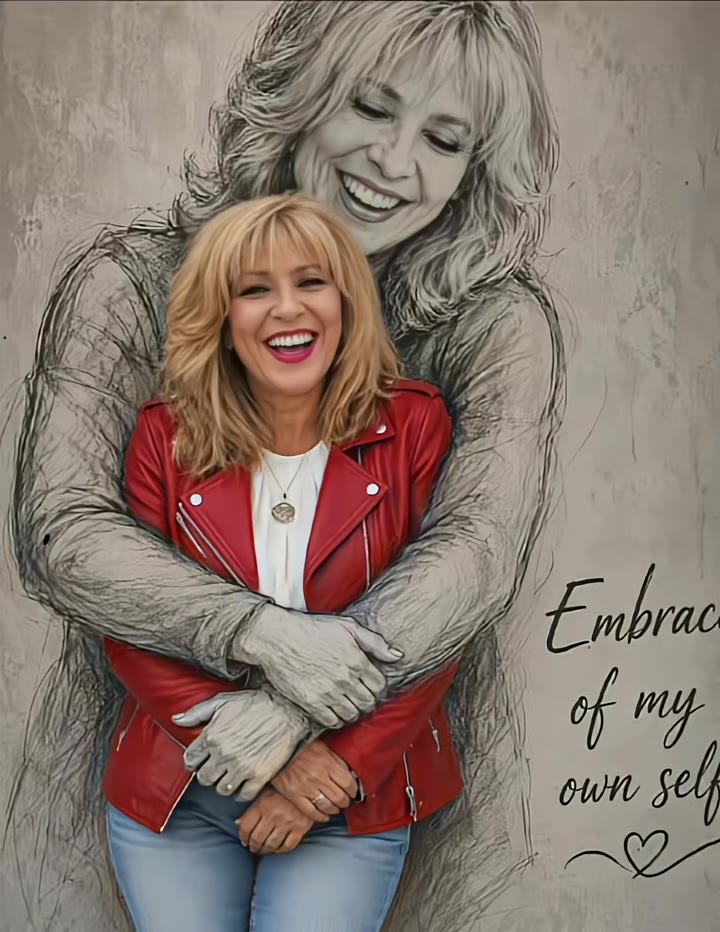
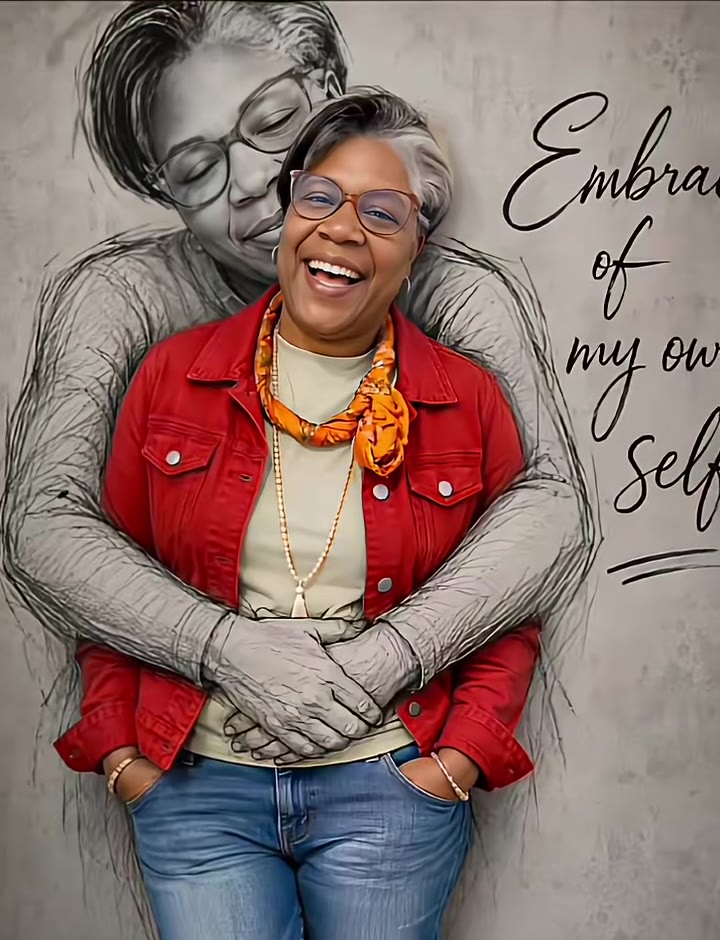
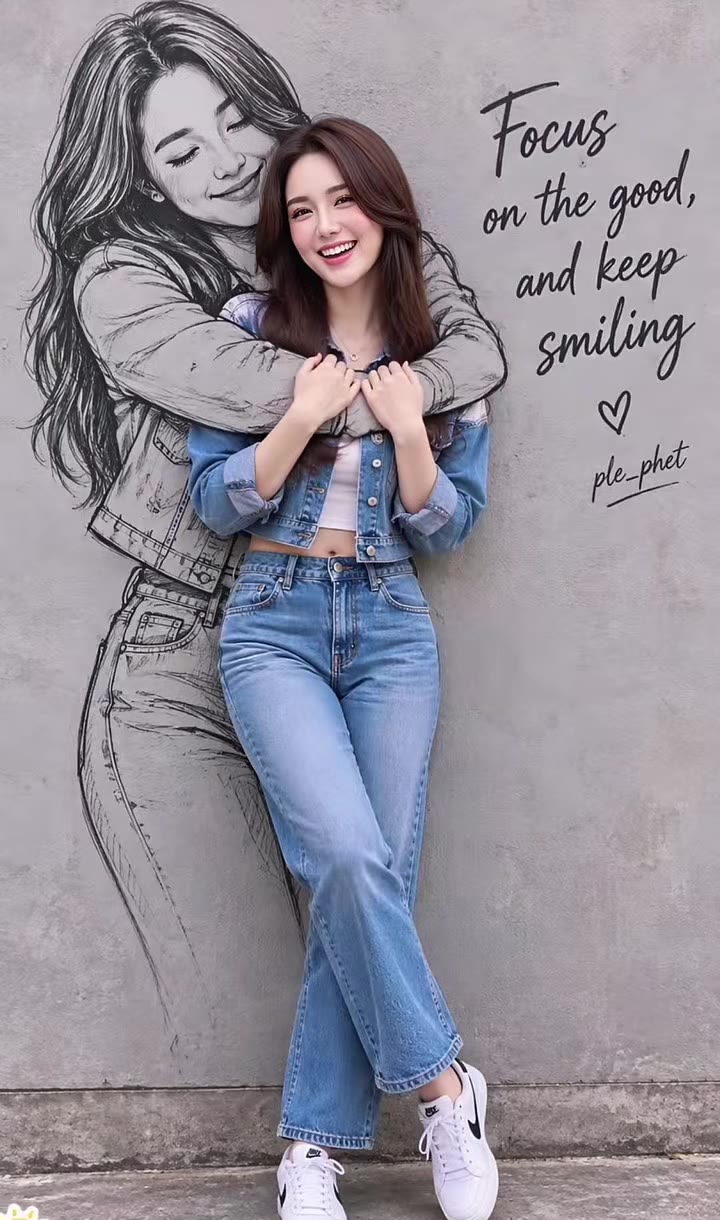
A pencil-sketch version of you wraps its arms around the real you, with a handwritten self-love line on the wall. One photo of you is enough.
Updated : Page published.
1Add your photo
What you'll get
Front-facing, well-lit selfies work best. One face per photo.
2Sketch style
3Handwritten caption
By generating you confirm you have permission to use the people in your photos. Terms
No subscription needed · Ready in about a minute · Failed renders are free
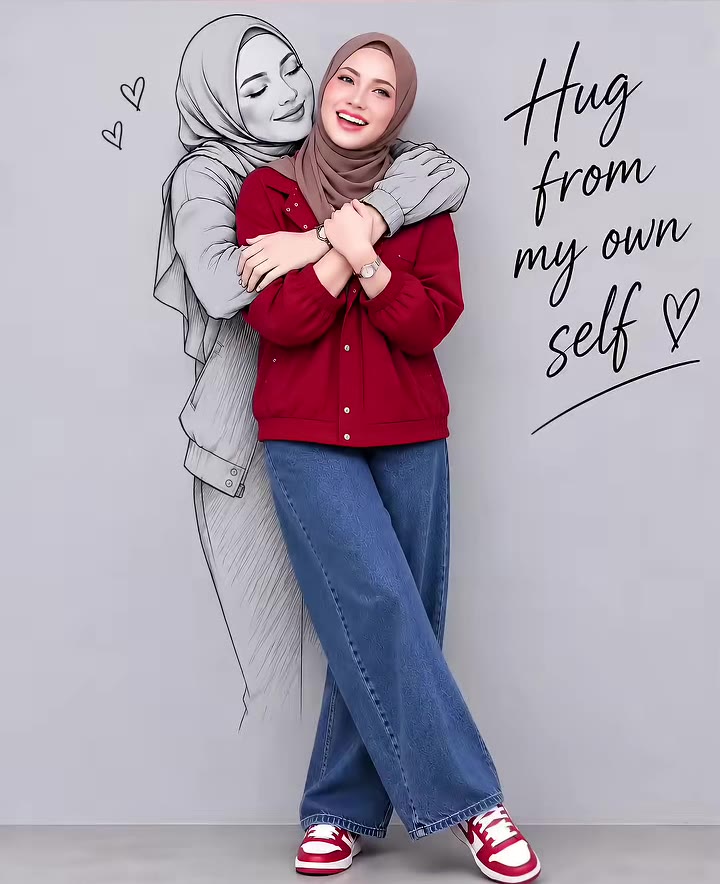
The self hug AI photo, posted on TikTok as Embrace of my own self or Hug from my own self, is a healing portrait trend in which a hand-drawn sketch of you hugs the real you from behind, with a handwritten self-love line on the wall; videosi makes it from one photo of you.
- Fast facts
- First seen
- Stage
- Just starting
- Started on
- TikTok (unconfirmed)
- Sound
- No single sound
- Meaning
- The self hug AI photo, also called Embrace of my own self, is a healing self-portrait trend in which a pencil sketch of you hugs the real you from behind, a visual way to say be kind to yourself.
- Related trends
- Doodle Portrait AI, Doodle Diary AI Photo, Ghost Photoshoot AI
Page updates
- November 14, 2026 — Page published.
The Self Hug AI Photo prompt and model
Self Hug AI Photo is made with GPT Image 2.6 by OpenAI. The prompt behind it has 5 parts, and the timing is what makes or breaks it.
- Model
- GPT Image 2.6
- Mode
- Photo to still image
- Length
- One vertical 2:3 still image
- Input
- 1 photo
- Identity lock Your photo is the only source for the face, skin tone, age, hair and outfit of the real person.
- Sketch self A loose monochrome drawing of the same person that hugs from behind, arms crossed over the chest.
- Real plus drawn Only the hugging figure is a drawing; the person in front stays a colour photo.
- Wall and caption A plain concrete wall, soft daylight and a handwritten self-love line next to you.
- Guard rails One real adult and one sketch only, no other text or watermark.
Using the person in Image 1, create one vertical 2:3 image: the real person standing against a plain wall, hugged from behind by a hand-drawn sketch of themselves.…
Why it goes wrong when you do it yourself
- Without an identity rule the sketch hugger turns into a different person, so you end up hugged by a stranger.
- A plain prompt like draw me hugging myself often turns the whole image into a drawing, or makes two photographed people.
- Without a wall and handwriting rule the model adds stray text, frames and filled-in colour behind the sketch.
- Hands crossing over a chest go wrong easily: extra fingers or fused arms are common without a limit.
More videos from this trend
Trend inspiration · not a selectable template
How to make your Self Hug AI Photo image
Upload one clear photo
A standing or waist-up photo of you in even light works best.
Pick the sketch and the caption
Choose graphite pencil, charcoal or fine ink line, and one of 3 handwritten lines.
Generate
Press Generate; the 2:3 image is usually ready in about a minute.
Post it with an AI label
Download the still, add your platform's AI label and share it with the self hug hashtags.
What is the Self Hug AI Photo trend?
Updated · videosi is an independent tool. It is not affiliated with TikTok, Instagram, YouTube, or with the owners of any trend, song, game or brand named on its pages.
The self hug AI photo is a portrait effect in which an ordinary photo of you standing against a wall turns into a picture where a pencil sketch of yourself hugs you from behind. The drawn figure has your face, rests its cheek on your shoulder or head and crosses its arms over your chest, while a line in handwriting sits on the wall, most often Embrace of my own self or Hug from my own self. TikTok posts call it the self hug trend, hug myself, the hugging-yourself sketch photo effect or a healing AI self-portrait, and the mood is gentle, not funny.
The trend is brand new. The earliest post we found is from 17 October 2026. A clip from 8 November 2026 showed about 409,000 views and a clip with Spanish subtitles from 13 November 2026 about 602,000 when we checked on 14 November 2026; these view counts are unconfirmed. Most posts are CapCut template tutorials that show where to find the template, so no original creator or single sound is confirmed. It is not the Hug My Younger Self trend, which puts a childhood photo of you next to your adult photo.
On TikTok the effect is usually made with a CapCut template. videosi does not use that template: it makes one vertical 2:3 still portrait with GPT Image 2.6, which reads your photo. You pick the sketch style and the handwritten line, and you never write a prompt. Only one real photo of one adult is used, and the second figure is a drawing of that same person, not another person.
Your face, skin tone, hair, glasses or head covering and your own outfit come from the photo; the model draws the sketch figure and the wall. The result is a still image with no sound. If you want it as a video, add it to your editor and put your own music under it.
Self Hug AI Photo: shot by shot
- 0-1 s
Your photo
The clip starts on a normal full-length photo of a person leaning against a wall.
- 1-2 s
Sketch appears
A pencil drawing of the same person draws in behind them and wraps its arms around them.
- 2-3 s
Caption
A handwritten line such as Embrace of my own self appears on the wall next to them.
- 3-5 s
Hold
The finished portrait holds, then the clip cuts to the next person's result.
Tips for a better result
Stand straight and look at the camera
A front-facing photo with your arms relaxed gives the sketch room to hug you.
Show your upper body
Waist-up or full-length photos work better than tight face crops, because the arms wrap around your shoulders.
Plain background helps
A wall or a simple backdrop keeps the drawing from mixing with clutter.
One person per photo
A second person in the picture can get a sketch hug too or blend into your face.
Good to know before you make a Self Hug AI Photo image
- The result is a still image with no sound, not the CapCut template video that TikTok shows.
- Upload a photo of one adult, ideally yourself. videosi does not accept photos of minors and does not merge two real people into a hug.
- The sketch figure is generated, so line style and hand positions differ every time and hands can look off.
- The sketch is meant to look like you, but it is a drawing, so small details such as glasses or freckles may be simpler.
- The earliest post we found is from 17 October 2026, so the trend is still very new and how long it will last is unknown.
Self Hug AI Photo: questions
What is the self hug AI photo trend?
The self hug AI photo trend, also posted as Embrace of my own self or Hug from my own self, is a TikTok portrait in which a pencil sketch of yourself hugs the real you from behind, with that handwritten line on the wall. The earliest post we found is from 17 October 2026, and it was spreading fast in mid November 2026. videosi makes the still portrait from 1 photo of you, with no prompt.
How do I make a self hug AI photo of myself?
Upload 1 clear photo of yourself, ideally standing or waist-up, on the videosi self hug AI photo page, pick a sketch style and a caption, and press Generate. It costs 1 credit and usually finishes in about a minute. The face and outfit come from your photo, and the sketch figure is drawn to match.
Is there a self hug AI generator or app?
Yes, videosi has a self hug AI generator that runs in the browser on a phone or computer, so there is nothing to install. You upload 1 photo, choose 1 of 3 sketch styles and 1 of 3 handwritten lines, and get a 2:3 still for 1 credit. On TikTok the same look is usually made with a CapCut template.
Is the self hug trend a free CapCut template?
On TikTok most self hug posts are tutorials for a CapCut template, and whether that template is free depends on the app and your account. videosi does not use the CapCut template: it makes a 2:3 still image from 1 photo for 1 credit instead of a short video. If you want motion, put the still into your own edit.
Is the sketch really me, or a second person?
The sketch is a drawing of you, not a second person. The model draws it with your face, hair and age, in one colour, and only the person in front is a photograph. videosi uses 1 photo of 1 person and does not merge two real people into a hug.
Can I use a photo of a friend, my partner or my child?
The videosi self hug AI photo takes 1 photo of 1 adult, and the sketch is always a drawing of that same person. It does not accept photos of minors and does not merge two real people into one hug. Use your own photo, or an adult's photo only with their clear permission.
Is this the Hug My Younger Self trend?
No, it is a different trend. Hug My Younger Self puts a child photo of you next to your adult photo, while the self hug sketch trend has a pencil drawing of the same adult hugging from behind. videosi's self hug page covers the sketch version and does not combine photos of two people.
Which AI model makes the self hug picture?
videosi uses GPT Image 2.6 from OpenAI, which reads your photo and draws the sketch hugger around you. The recipe locks your identity, keeps you photographic, draws only the hugging figure and adds a handwritten line on a plain wall. The full prompt is not shown, and you never write one.
How much does a self hug AI image cost on videosi?
One self hug AI image costs 1 credit on videosi, and a failed render returns its credit. There is no free generation, no subscription needed and no prompt to write. A 2:3 portrait is usually ready in about a minute and downloads as a still image.
Why does the sketch not look like me?
On videosi the usual causes are a small or half-hidden face, a beauty-filtered photo, sunglasses or a second person in the frame. Use a clear photo where your face is visible and you look at the camera, then generate again; each run draws a new sketch. A drawing keeps your likeness loosely, so fine details may be simplified.
What does Embrace of my own self mean?
Embrace of my own self is the handwritten line most self hug posts show on the wall, a self-love message about comforting yourself. TikTok creators also use Hug from my own self and the healing self-portrait label. On videosi you can pick Embrace of my own self, Hug from my own self or Me, always here for myself.
What song is used in the self hug AI videos?
There is no single confirmed song in the self hug AI videos; the posts we checked use original sound. The videosi result is a 2:3 still image with no audio, so add any music you like when you post it in TikTok or CapCut.
Is the self hug trend still going?
The self hug trend is new and still growing as of 14 November 2026. The earliest post we found is from 17 October 2026, and clips from 8 and 13 November 2026 showed about 409,000 and 602,000 views when we checked (counts unconfirmed). How long it will last is not known yet; videosi published its self hug page on 14 November 2026.
Trending this week
All trends this week


Make your Self Hug AI Photo image
Upload a photo and press Generate. 1 credits, refunded if it fails.
Get the next trend first
One email when new trends land on videosi, about once a week. Unsubscribe in one click.
See videosi first on Google
Add videosi as a preferred source and our trend pages show up first in your Top Stories and AI answers on Google.