GTA Loading Screen AI Photo: Your Own Loading Screen
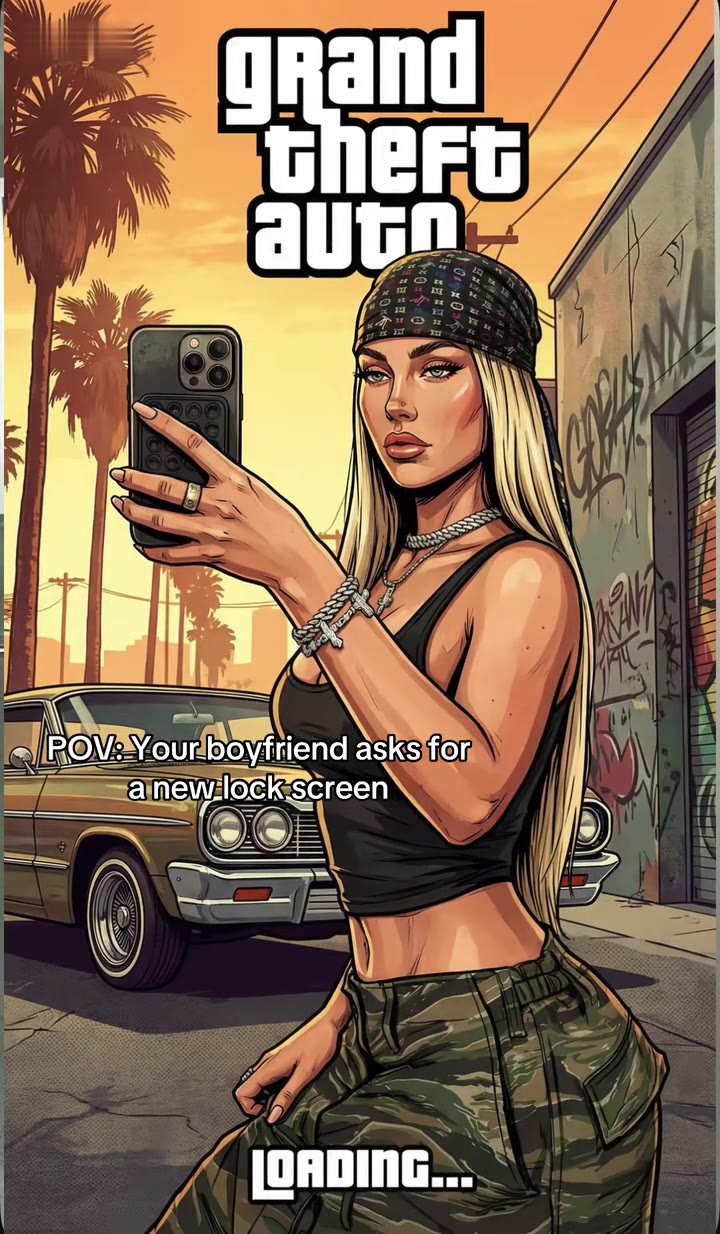
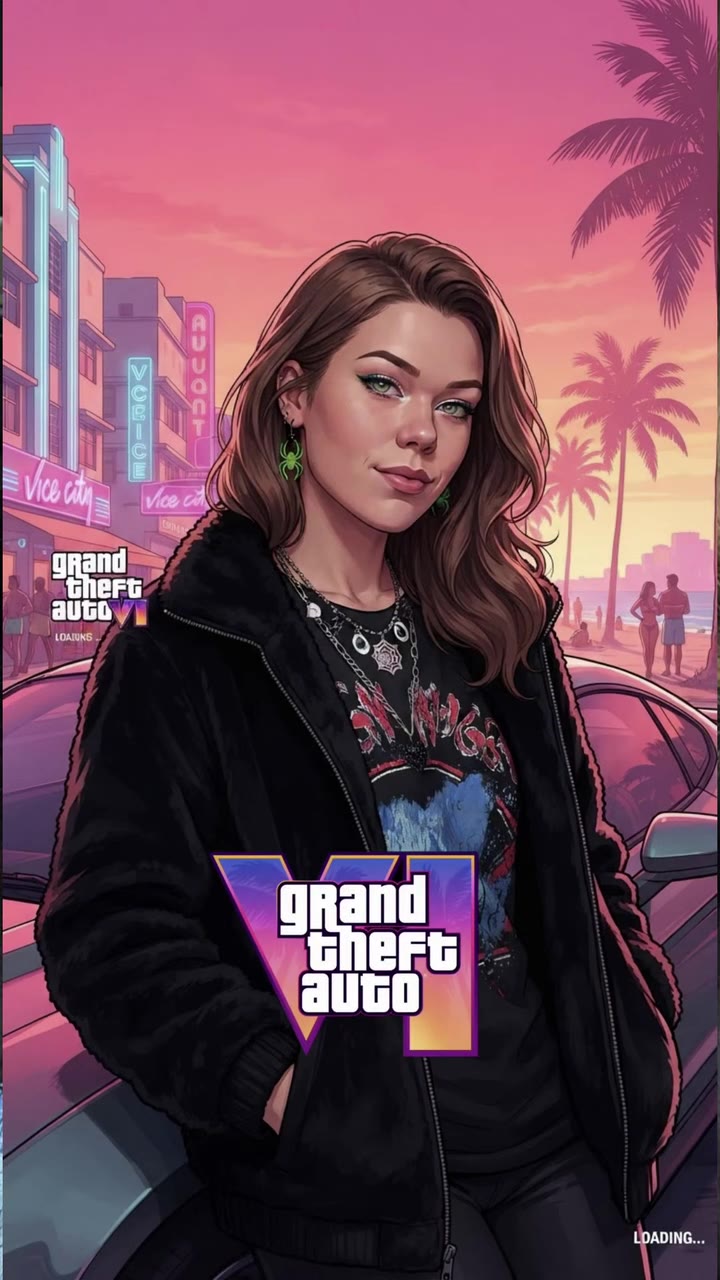
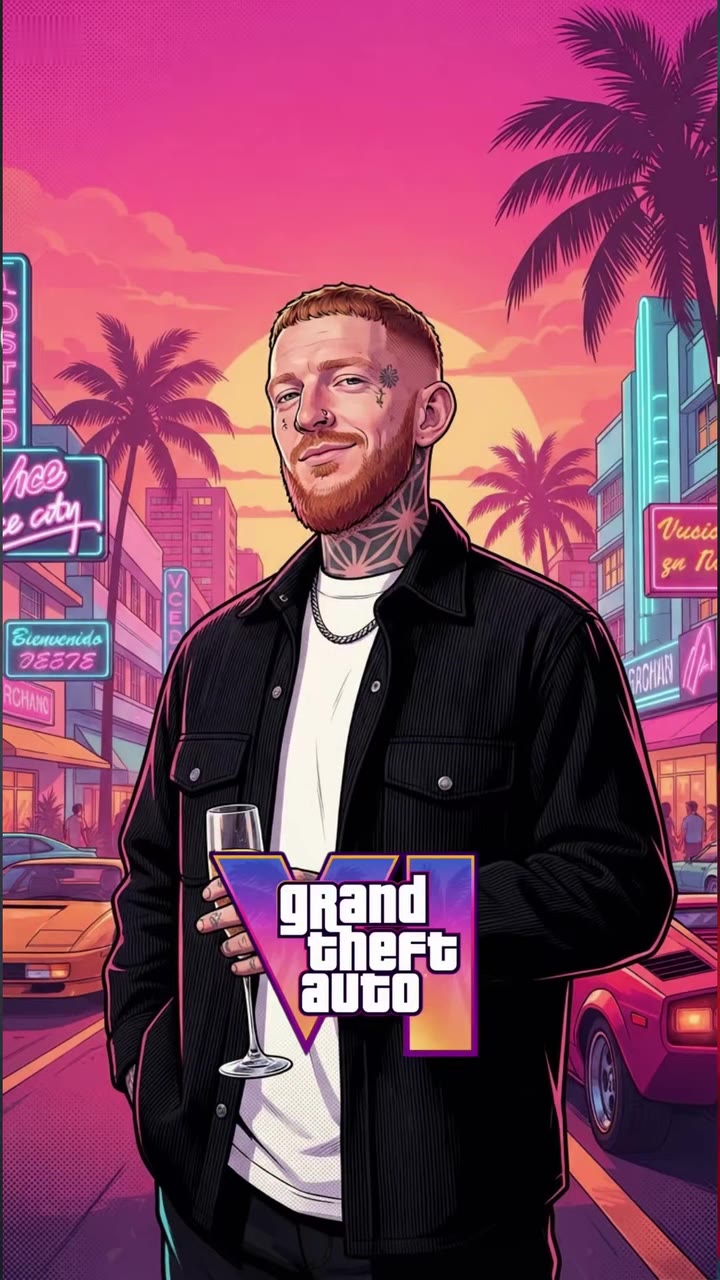
You get a comic-style loading-screen portrait of yourself, standing in front of a sunset city with a parked car behind you. One photo of you is enough, with no prompt to copy.
Updated : Page published.
1Add your photo
What you'll get
Front-facing, well-lit selfies work best. One face per photo.
2Look
By generating you confirm you have permission to use the people in your photos. Terms
No subscription needed · Ready in about a minute · Failed renders are free
A GTA loading screen AI photo turns one picture of you into a bold-outlined, comic-style loading-screen portrait set against a sunset city; videosi makes it from one photo of you.
- Fast facts
- First seen
- Stage
- Just starting
- Started on
- TikTok (unconfirmed)
- Sound
- No single sound: the CapCut template clips share an original sound and other posts use different songs; no song from Grand Theft Auto VI itself is confirmed.
- Meaning
- A GTA loading screen AI photo is an AI-made, comic-style portrait of you in the look of a Grand Theft Auto loading screen, with a sunset city and a parked car behind you.
- Related trends
- AI Movie Poster, AI Anime Filter, Mirror Selfie Prompt, Lookbook AI
Page updates
- November 17, 2026 — Page published.
The GTA Loading Screen AI Photo prompt and model
GTA Loading Screen AI Photo is made with GPT Image 2.6 by OpenAI. The prompt behind it has 5 parts, and the timing is what makes or breaks it.
- Model
- GPT Image 2.6
- Mode
- Photo to image
- Length
- One still image, vertical 2:3
- Input
- 1 photo
- Identity lock Your photo is the only source for the face, age, skin tone, hair and clothes, with no beautifying or slimming.
- Art style Bold ink outlines, flat painterly colour and cel-shaded skin, drawn as a loading-screen illustration rather than a photo.
- Sunset city One of 2 looks fixes the place, the sky, the palm trees and the parked car behind you.
- Pose Three-quarter length, relaxed and looking at the camera, with the face kept clear.
- Rules No game title, logo, loading text, copied characters or watermark, adults only, five fingers per hand.
Using the person in Image 1, create one vertical 2:3 illustration in the style of a video-game loading-screen portrait, with bold ink outlines…
Why it goes wrong when you do it yourself
- Copied prompts that say "GTA 6" bring the game logo and a lookalike character into the image, which you cannot safely post or sell.
- Without an identity rule the model redraws your face as a generic comic character, so it stops looking like you.
- A photo style such as "realistic" fights the illustration look and gives you a muddy half-painted face.
- Asking for a loading bar and a title makes the model misspell the text and cover your legs.
More videos from this trend
Trend inspiration · not a selectable template
How to make your GTA Loading Screen AI Photo image
Upload one photo of yourself
A clear, front-lit photo with your face and most of your body in frame, one adult only. A mirror selfie works well.
Pick the look
Neon sunset city with palm trees and a sports car, or sun-baked Los Angeles with a graffiti wall and a lowrider.
Generate and download
Press Generate and one vertical 2:3 image comes back, usually in about a minute, ready for a post or a lock screen.
Post it with a caption
Share it as a still with a caption such as "Your GTA 6 loading screen", or add your own music when you post it as a Reel or a TikTok slideshow.
What is the GTA Loading Screen AI Photo trend?
Updated · videosi is an independent tool. It is not affiliated with TikTok, Instagram, YouTube, or with the owners of any trend, song, game or brand named on its pages.
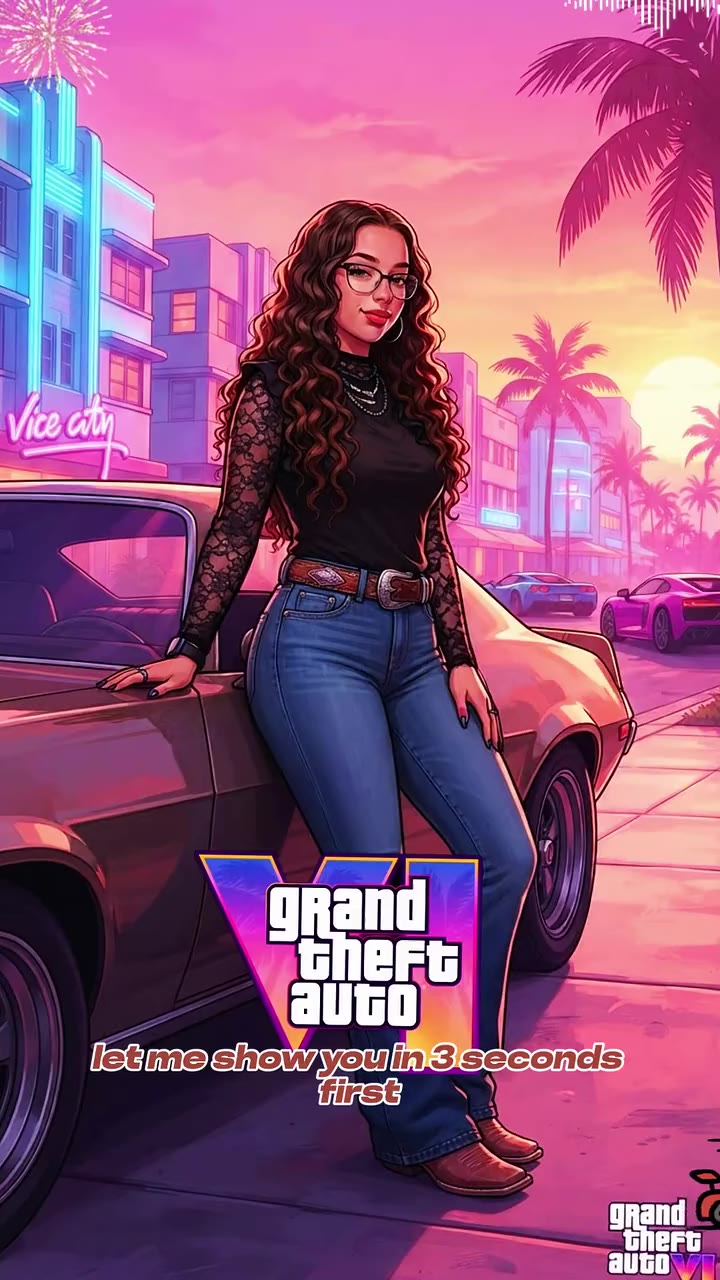
The GTA loading screen AI trend turns an ordinary photo of you into the kind of illustrated portrait that Grand Theft Auto games show while they load: bold ink outlines, flat painterly colour, a stylised but recognisable face and a hot-coloured city sunset behind. The usual post is a short clip where a plain photo wipes into the finished portrait, often with a caption such as "Your GTA 6 loading screen" or "What would I look like as a GTA character?".
The earliest big post we watched is a CapCut template clip dated 21 January 2026 in the older Los Angeles sunset look; it showed about 4.9 million views when we checked on 17 November 2026. The wave that carries the name now is the neon, Vice City-flavoured version: the posts we found date from 22 September 2026, and most of the ones we saw were posted on 10 to 16 November 2026, shortly before Grand Theft Auto VI, which has been announced for November 2026 (release date unconfirmed). People also paste long prompts into ChatGPT to get the same look. No original creator is identified.
There is no single trend sound: the template clips share an original sound, and other posts use different songs of their own choosing, so the clips on this page are shown muted.
videosi skips the template and the copied prompt. Upload one photo, pick the sunset look (neon city or sun-baked LA) and download one vertical 2:3 still image. Your face, hair and clothes come from your photo; the city, the light and the parked car come from the look. The clips here are results made with other tools, shown for reference. They were not made by videosi, and videosi does not add any game logo, title or character to your image.
GTA Loading Screen AI Photo: shot by shot
- Step 1
Your photo
Your face, hair, skin tone and build are taken from your photo and held as the same person, with the clothes you are wearing.
- Step 2
Comic-style paint
The photo is redrawn as a bold-outlined, painterly illustration with flat colour and cel-shaded skin, like loading-screen art.
- Step 3
Sunset city
Neon hotels and palm trees at pink dusk, or a graffiti wall and palm trees at golden hour, sit behind you.
- Step 4
Parked car
A retro car stands behind you and you pose in front of it, three-quarter length, looking at the camera.
- Step 5
No logos
There is no game title, no loading bar and no text: the image is yours to caption and post.
Tips for a better result
Show your whole face
A sharp, front-on photo without sunglasses gives the model the most to keep your face the same.
Waist-up or full length
The portrait is three-quarter length, so a photo that shows your torso keeps your clothes right; a face-only photo leaves the outfit to the model.
Use one person
The portrait has one star. In a group photo only the most prominent person is used, so crop first.
Plain background helps
A wall or a quiet room makes it easy for the model to cut you out and place you in the city.
Good to know before you make a GTA Loading Screen AI Photo image
- The result is a still image with no sound, not a video, and there is no game logo, title or loading bar on it.
- It is a comic-style illustration inspired by the loading-screen look, not official game art, and it uses no real game characters.
- The face is redrawn in a stylised way, so small details such as jewellery, tattoos and glasses can change or disappear.
- It is an AI image, so label it where the platform asks. A failed or blocked generation returns its credits automatically.
GTA Loading Screen AI Photo: questions
What is the GTA loading screen AI trend?
The GTA loading screen AI trend turns a photo of you into a comic-style portrait that looks like a Grand Theft Auto loading screen, usually shown as a wipe from photo to portrait. A CapCut template clip from January 2026 passed 4.9 million views, and a neon GTA 6 version grew in November 2026. videosi makes one from 1 photo.
What does "GTA loading screen" mean in this trend?
"GTA loading screen" here means the illustrated key-art portrait shown while a Grand Theft Auto game loads: a character in bold outlines in front of a sunset city. People post themselves in that style with captions like "Your GTA 6 loading screen". As of November 2026 videosi makes one from 1 photo in 2 looks.
How do I make a GTA loading screen of myself with AI?
Upload 1 clear photo on the videosi GTA loading screen AI page, pick neon sunset city or sun-baked Los Angeles, and press Generate. It costs 1 credit, needs no written prompt and usually finishes in about a minute. Your face, hair and clothes come from the photo.
Is there a GTA loading screen AI generator or website?
Yes. videosi (videosi.io) is a web generator that takes 1 photo and returns 1 vertical 2:3 comic-style portrait in the GTA loading-screen look. It runs in a phone or desktop browser with no app to install, and you do not have to write or copy a prompt.
Is there a TikTok filter or CapCut template for the GTA loading screen?
Yes, CapCut has templates for it, and the clips of the trend on TikTok mostly come from them; templates change often and some need a TikTok link to open. videosi is a separate web tool, not affiliated with CapCut, TikTok or Rockstar Games, that returns 1 portrait from your photo without a template.
What is the best GTA loading screen prompt for ChatGPT?
No single prompt is best, but the ones that work name the art style, the sunset city and the pose, and tell the model to keep your face unchanged. Results vary by tool and photo. videosi keeps its 1 prompt private and applies it for you, so you only pick from 2 looks.
What AI model makes the GTA loading screen photo?
The videosi GTA loading screen AI page runs on GPT Image 2.6, an image model made by OpenAI, with your photo as the source for the face. It produces 1 vertical 2:3 still at about 1K. The full prompt stays private; its structure and common mistakes are in the how it is made section.
How much does a GTA loading screen AI photo cost?
One GTA loading screen AI photo costs 1 credit on videosi. Credit packs start at $8.90 for 10 credits and do not expire, and plans start at $29.90 a month. There is no free generation on this page. Purchases are final, and a failed generation returns its credits automatically.
Why does my GTA loading screen not look like me?
The usual cause is the source photo: on videosi, 1 sharp, front-lit picture with your whole face visible gives the best match. Avoid sunglasses, heavy filters and group shots. The style redraws your face as an illustration, so small differences can appear in either of the 2 looks.
Will it have the Grand Theft Auto logo or a real character?
No. The videosi image has no game title, logo or loading text and uses no game characters; it is an original comic-style portrait of you in the loading-screen look. Clips of the trend on social media often show the logo because the template adds it, but videosi does not. The image is not official game art.
Can I use someone else's photo, or a pet or a child?
Only an adult who agreed: videosi is for photos of grown-ups, with 1 person per image. Do not upload a photo of a child, and do not use it to mislead anyone about a real person. Pets are not part of this page, because the look is built around a human character.
What song is used in the GTA loading screen trend?
No single song is confirmed for the GTA loading screen trend as of November 2026: the CapCut template clips share an original sound and other posts use different songs; no song from Grand Theft Auto VI itself is confirmed. The videosi result is 1 still image with no sound, so you choose your own music if you post it.
Is the GTA loading screen AI trend still trending?
As of November 2026 it is growing: the neon GTA 6 version appeared from 22 September, most of the posts we found are dated 10 to 16 November, and Grand Theft Auto VI has been announced for November 2026 (release date unconfirmed). An earlier Los Angeles-style clip passed 4.9 million views in 2026. videosi keeps 2 looks available from 1 photo.
Is the result a video or an image?
An image. The videosi GTA loading screen AI page produces 1 still 2:3 portrait per generation, not a video, and it has no sound. The clips on this page are results made with other tools, some with a wipe from the photo, and are shown for reference.
Trending this week
All trends this week




Make your GTA Loading Screen AI Photo image
Upload a photo and press Generate. 1 credits, refunded if it fails.
Get the next trend first
One email when new trends land on videosi, about once a week. Unsubscribe in one click.
See videosi first on Google
Add videosi as a preferred source and our trend pages show up first in your Top Stories and AI answers on Google.