Clayface AI: The Clayface Face-Melt Video, Starring You
You look into the camera, drag a hand down your face, and everything under it turns into smooth, featureless wet clay. One photo of you is all it takes.
Updated : Page published.
1Add your photo
What you'll get
Front-facing, well-lit selfies work best. One face per photo.
2Choose quality
By generating you confirm you have permission to use the people in your photos. Terms
No subscription needed · Ready in about 3 minutes · Failed renders are free
The Clayface AI trend is a 5-second portrait video in which a person drags a hand down over their face and the face underneath turns into smooth, featureless, glossy clay, copied from the photo booth that promoted the 2026 Clayface movie; videosi makes it from one photo of you.
- Fast facts
- First seen
- Stage
- Spreading
- Started on
- TikTok (unconfirmed)
- Sound
- Do You Realize?? (from the "Clayface" Trailer) — L'Orchestra Cinematique
- Meaning
- "Clayface AI" refers to a short AI video, first made by a photo booth promoting the 2026 Clayface film, in which a person drags a hand down their face and the face underneath turns into smooth, featureless clay.
Page updates
- November 3, 2026 — Page published.
The Clayface AI prompt and model
Clayface AI is made with Seedance 2.0 / 2.5 (you pick the tier) by ByteDance. The prompt behind it has 5 parts, and the timing is what makes or breaks it.
- Model
- Seedance 2.0 / 2.5 (you pick the tier)
- Mode
- Photo + motion reference to video
- Length
- 5 seconds, 9:16, 1:1 or 16:9
- Input
- 1 photo
- Person swap The person in a short portrait reference clip is replaced by the person in your photo, while the dark backdrop, framing and still camera are kept.
- Identity lock Your face, hair, skin tone, hands and top come only from your photo and stay recognisable for the first 1.5 seconds, before the clay takes over.
- The hand drag One hand rests on the forehead, then slides down over the eyes and nose at the same speed as the original booth clip.
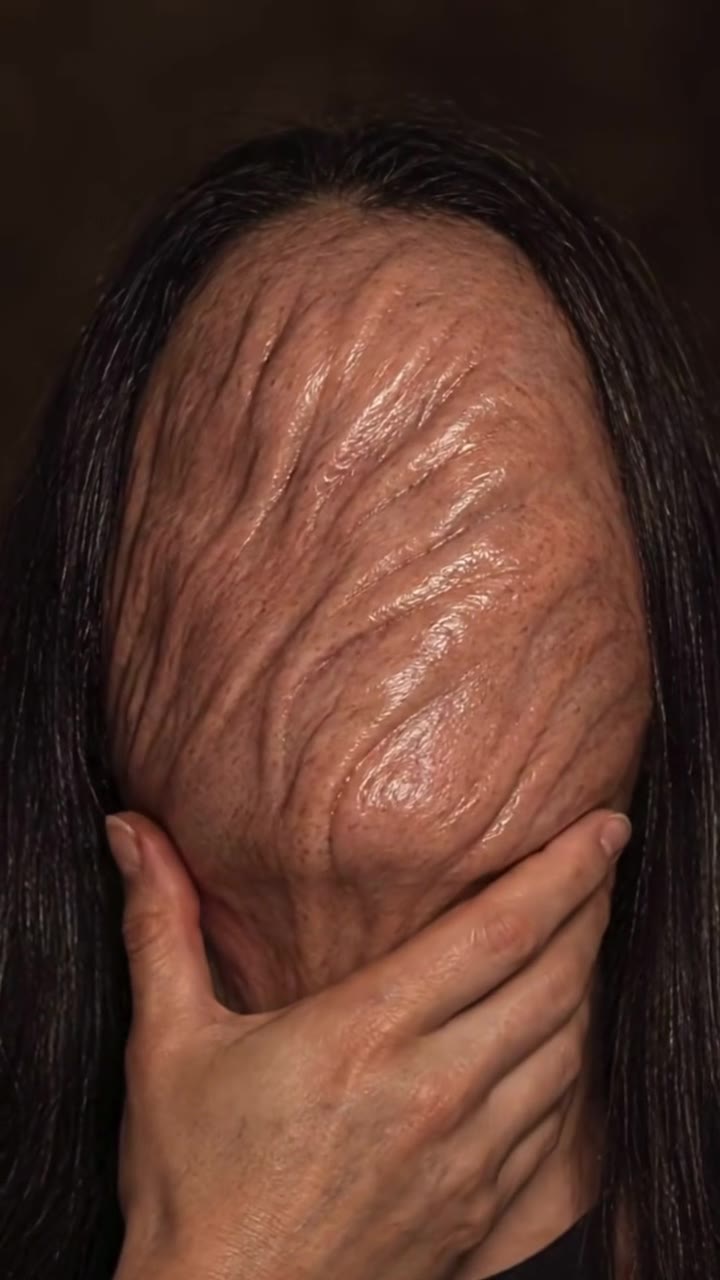
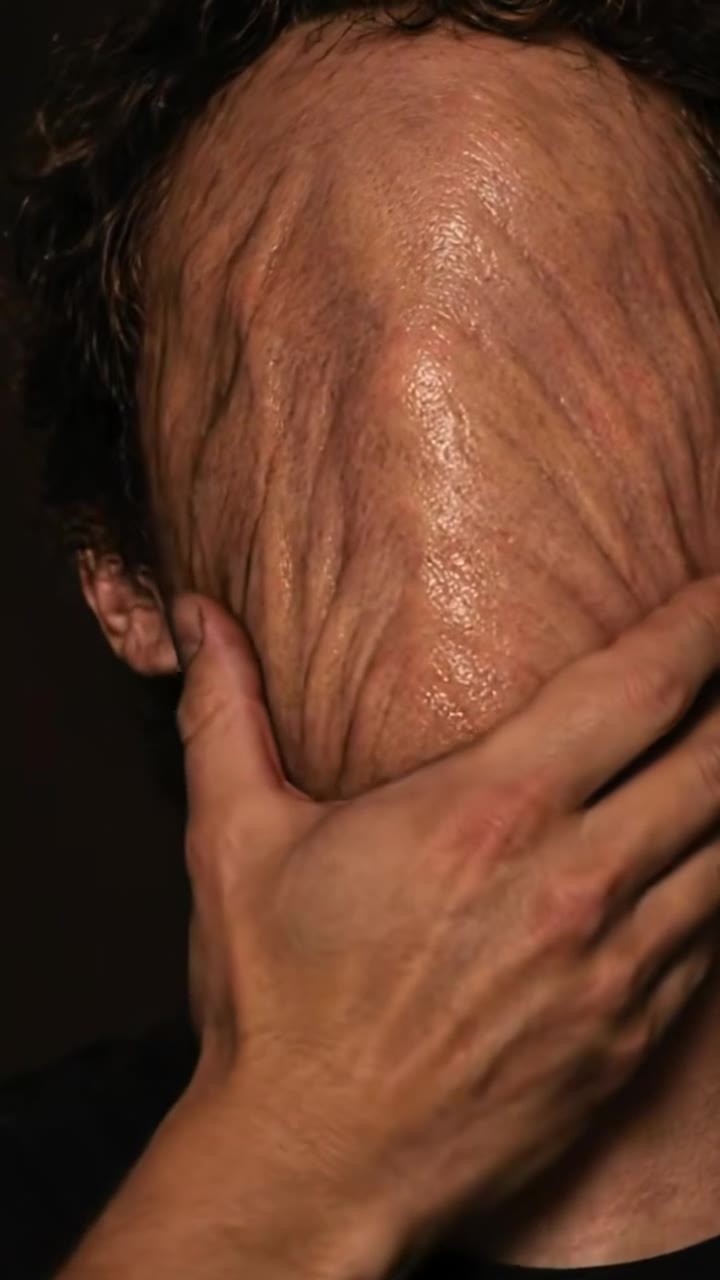
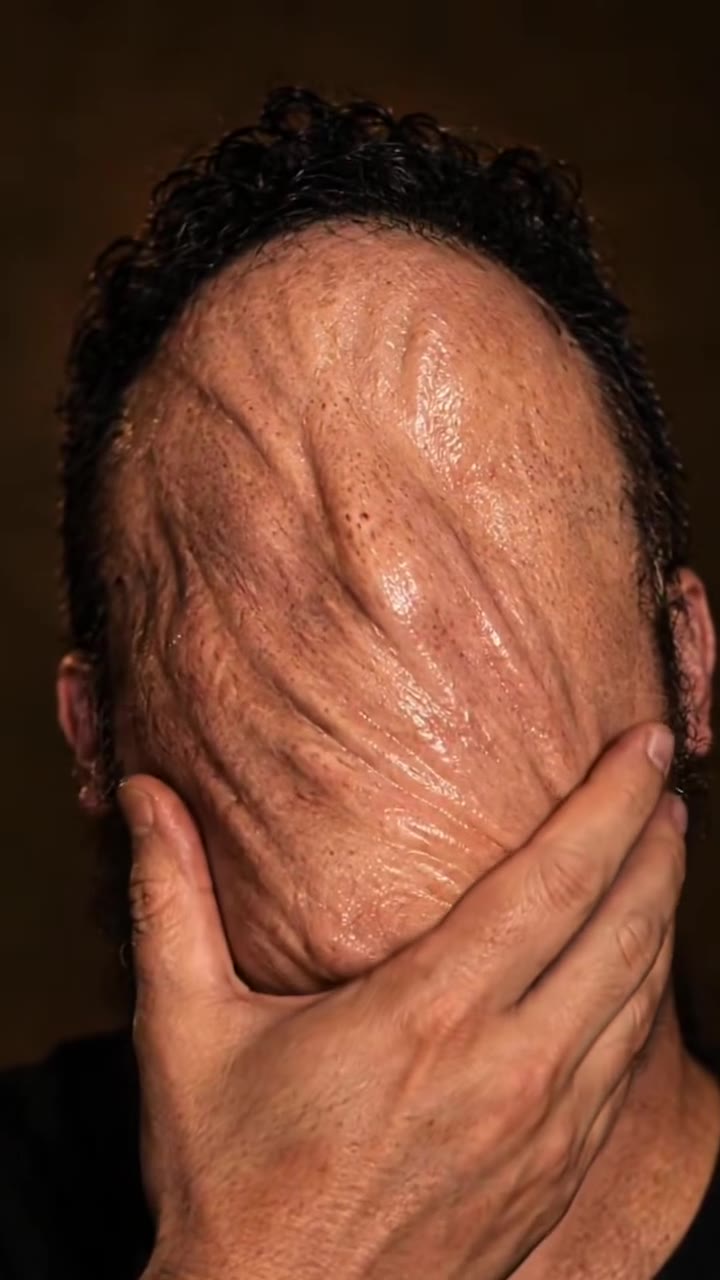
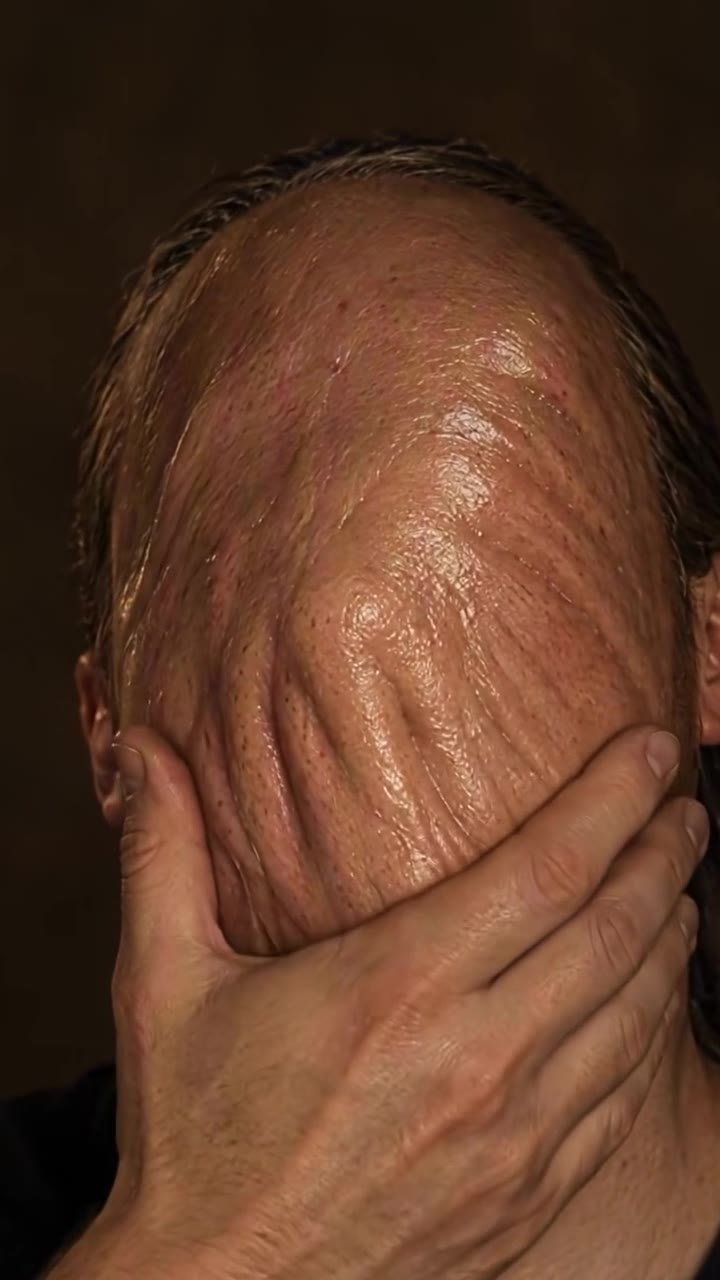
- The clay Only the skin the hand has passed over turns into smooth, glossy, featureless clay that stretches into soft ridges under the fingers.
- Rules One adult, five fingers, no blood or wounds, no poster frame, logo or text, and no cuts in 5 seconds.
Replace the person in Video 1 with the person from Image 1. Keep everything else from Video 1 as it is: the plain dark studio backdrop, the portrait framing…
Why it goes wrong when you do it yourself
- Without a reference clip the model melts the whole head at once, or the hand, hair and shirt too, and the slow drag that makes the clip work is gone.
- Ask for a monster and most models draw a brown mud creature or a copy of the movie character instead of your own face turning to clay.
- Left alone, models add blood, cracks or torn skin, which reads as gore and gets the clip limited on TikTok.
- Each try costs credits and a few minutes, and most people need several before the face is still theirs in the first second and gone by the last.
Clayface AI examples
How to make your Clayface AI video
Upload one photo of yourself
Face to the camera, head and shoulders in frame, even light. A plain dark top looks closest to the booth clips.
Pick the format
9:16 for TikTok, Reels and Shorts, 1:1 for a square post, or 16:9 for a wide shot. There is nothing else to choose: the hand, the clay and the timing are fixed.
Generate and download
Press Generate and the 5-second Clayface clip renders in a few minutes as an MP4 with no watermark. You can leave the page; the result waits in My creations.
Post it with the sound on
The clip already carries the trend's original sound. Post it and turn on the platform's AI-generated label.
What is the Clayface AI trend?
Updated · videosi is an independent tool. It is not affiliated with TikTok, Instagram, YouTube, or with the owners of any trend, song, game or brand named on its pages.
The Clayface AI trend is a short portrait video in which a person looks into the camera, lays a hand on their forehead and drags it slowly down. Everywhere the hand passes, the face turns into smooth, glossy, skin-coloured clay with no eyes, nose or mouth, folding into soft ridges under the fingers. The whole thing lasts about five seconds.
It comes from the marketing for Clayface, the DC Studios body-horror film released in cinemas on 23 October 2026. From early October 2026 an interactive AI photo booth for the film toured horror and fan events in the US: visitors stood against a dark backdrop, covered their face, and got back a short clip of their own face melting into clay with the film's logo in the corner. The earliest booth clips we found on TikTok are from 6 October 2026; one posted on 10 October with the trailer song passed 120,000 views. After the film opened, people started asking where to get the Clayface AI filter without going to an event.
As of early November 2026 the trend is spreading: the booth is gone from most events, but the format is easy to recognise and the film is still in cinemas.
This page rebuilds the effect from one photo. The hand, the clay and the timing are built in, and the clip comes with the trend's original sound. It does not use the film's character design, logo or poster, only the face-to-clay melt.
Clayface AI: shot by shot
- 0–1.5 s
Look into the lens
Head-and-shoulders portrait on a dark brown backdrop, your hand resting on your forehead, eyes on the camera.
- 1.5–3 s
The drag
The hand slides down over the eyes and the nose; the skin above it starts to smooth out.
- 3–4 s
Clay takes over
Forehead, eyes and nose are gone, replaced by glossy skin-toned clay that stretches under the fingers.
- 4–5 s
No face left
The hand rests on the chin; above it is a blank, ridged clay face. Hair, neck and clothes are still yours.
Tips for a better result
Face the camera straight on
The first second is the only time your features are on show. A sharp, front-facing photo makes sure the face that melts is clearly yours.
Keep the frame to head and shoulders
The clip is a tight portrait. A full-body or group photo leaves the model to invent your face at a much smaller size.
Wear a plain, dark top
The booth clips are a dark top on a dark backdrop, which makes the skin-toned clay stand out. Busy prints pull attention away from the face.
Leave sunglasses and hats off
The hand slides over the eyes and forehead. Sunglasses or a cap get in the way of the drag and the clay.
Good to know before you make a Clayface AI video
- The video has one person and lasts 5 seconds. A photo with more than one face can confuse it.
- The clay is a smooth, featureless, skin-coloured face, as in the booth clips. It is not the film's monster, logo or poster, and the page is not affiliated with DC or Warner Bros.
- By the last second your face is gone by design, so likeness rests on the first 1.5 seconds and on your hair, skin tone and clothes.
- The video comes with the trend's original sound, and likeness is not guaranteed. A failed, timed-out or blocked render returns its credits automatically.
Clayface AI: questions
What is the Clayface AI trend and where did it come from?
The Clayface AI trend is a 5-second portrait video in which a person drags a hand down their face and the face turns into smooth, featureless clay. It started with an AI photo booth promoting the Clayface film (in cinemas 23 October 2026) at US horror events; the earliest booth clips on TikTok are from 6 October 2026. videosi makes the same clip from 1 photo.
How do I turn my face into Clayface with AI?
On videosi, upload 1 photo of yourself, pick 9:16, 1:1 or 16:9 and press Generate. The Clayface AI video is a 5-second MP4 with the trend's original sound: you look into the camera, drag a hand down, and your face turns to clay. You write no prompt, and the result waits in My creations if you leave the page.
Is there a Clayface AI filter or website I can use without the booth?
Yes. videosi (videosi.io) is a web tool that makes the Clayface AI face-melt video from 1 photo, no event or booth needed. The hand drag, the clay and the timing are built in, so you only choose the photo and the format. A Standard 720p video is 10 credits, and the MP4 has no watermark.
Is there a Clayface TikTok filter or CapCut template?
As of November 2026 we have not found an official Clayface filter in TikTok or a CapCut template that reproduces the booth effect; the original clips came from a physical AI photo booth at events in October 2026. Apps change often, so check inside them. videosi is independent and not affiliated with TikTok, CapCut, DC or Warner Bros.; its Clayface AI page makes the clip from 1 photo.
Which AI model or prompt makes the Clayface face melt?
The Clayface AI video on videosi is made with ByteDance's Seedance video model (Seedance 2.0 Mini by default; Fast, Pro and Ultra are one click away), from a five-part prompt plus a 5-second reference clip of the hand drag. Doing it yourself usually takes several tries, because models melt the whole head or draw a mud monster. On videosi the prompt and reference are built in.
How much does the Clayface AI video cost, and is it free?
The Clayface AI video on videosi is not free: there is no free generation and no free trial. A Standard 720p video is 10 credits, and better models and higher resolutions cost more. Credit packs start at $6.99 for 10 credits and never expire; plans start at $29.90 a month. Purchases are final, and a failed render returns its credits automatically.
Why doesn't the start of my Clayface video look like me?
In the videosi Clayface AI video your face is only on screen for about 1.5 seconds before the hand drags over it, so the photo matters. The usual causes of drift are a side-on face, sunglasses, a hat, a dark or blurry photo, or a group shot. Use a sharp, front-facing head-and-shoulders photo in even light. Likeness is not guaranteed; a failed render returns its credits.
Can I use a photo of a friend, my partner or a celebrity?
Only an adult who has agreed to it. videosi does not accept photos of celebrities, public figures or minors for the Clayface AI video, and users must be 18 or older. The page is built for exactly 1 person, so make one clip per person. Photos and results are deleted within 30 days.
What does "Clayface AI" mean?
"Clayface AI" refers to a short AI video, first made by a photo booth promoting the 2026 Clayface film, in which a person drags a hand down their face and the face turns into smooth, featureless clay. Clayface is a DC shape-shifting villain made of clay; the trend borrows only the melt. videosi makes it in 5 seconds from 1 photo.
What song is used in Clayface AI videos?
There is no single confirmed sound for the Clayface AI trend as of November 2026. The most-viewed booth clip we found, from 10 October 2026, uses a horror cover of "Do You Realize??" credited on TikTok to L'Orchestra Cinematique and labelled as the Clayface trailer version; other clips use horror ambience. The videosi video comes with that original sound already on it.
Is the Clayface AI trend still trending, or is it over?
As of 3 November 2026 the Clayface AI trend is spreading, not over: the booth clips first appeared on 6 October 2026, the film opened on 23 October, and searches for a Clayface filter kept rising after the release. Movie trends usually fade a few weeks after the film leaves cinemas, so videosi will mark the stage as it changes.
Can I turn into the full Clayface monster from the movie?
Not on this page. The videosi Clayface AI video recreates the booth effect, where only your face turns into smooth clay under your hand; it does not draw the film's monster, costume or logo, which belong to DC and Warner Bros. For a full-body monster change, see the werewolf or zombie transformations on videosi, each made from 1 photo.
Is the Clayface video gory or safe to post?
The videosi Clayface AI video is built to be postable: one person, no blood, no wounds and no torn skin, only a smooth clay face in 5 seconds. Turn on TikTok's AI-generated label when you post, as the platform asks for realistic AI video. Platform rules change, so check the current community guidelines.
Can ChatGPT, Sora, Veo or Kling make the Clayface effect?
You can try, but the hard parts are the same everywhere: keeping the face recognisable for the first second, melting only the skin under the hand, and not drawing a mud monster or gore. Most people need several paid tries. videosi builds the 5-second reference clip, the timing and the rules into the page, so you only upload 1 photo.
Trending this week
All trends this week





Make your Clayface AI video
Upload a photo and press Generate. 10 credits, refunded if it fails.
Get the next trend first
One email when new trends land on videosi, about once a week. Unsubscribe in one click.
See videosi first on Google
Add videosi as a preferred source and our trend pages show up first in your Top Stories and AI answers on Google.