Christmas Box Photo AI Photo Generator: You Leaning Out of a Tinsel Box
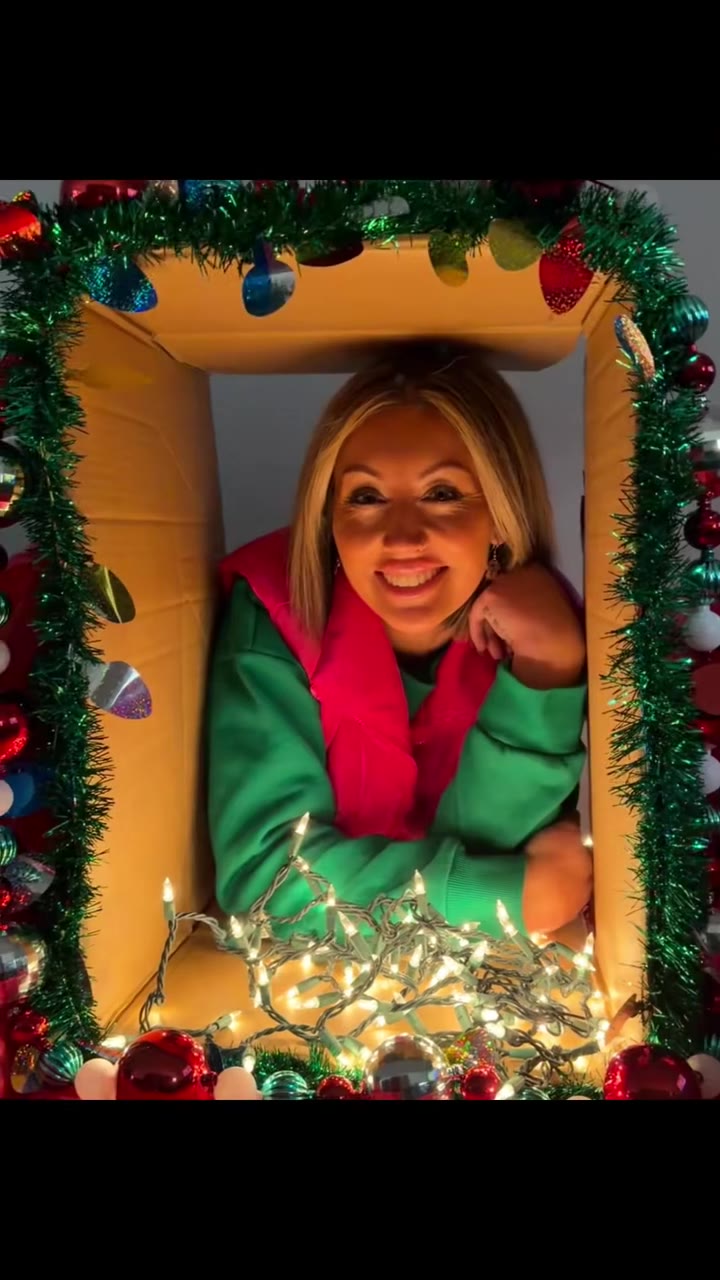
You leaning out of a cardboard box framed with tinsel, fairy lights or pine garland, the Christmas card photo that has come back every holiday season since 2024. One photo of you is enough, no box or tinsel needed.
Updated : Page published.

1Add up to 2 photos, one person each
What you'll get
Trend remakes · inspiration only
Front-facing, well-lit selfies work best. One face per photo; they don't need to be taken together.
2Box style
By generating you confirm you have permission to use the people in your photos. Terms
No subscription needed · Ready in about a minute · Failed renders are free
The Christmas box photo trend is a holiday portrait of a person leaning out of a cardboard box turned on its side and framed with tinsel, lights or garland, usually collected into a grid Christmas card; videosi makes it from one photo of you.
1 photo (up to 2) in, an image out, no watermark. $8.90 to start, a one-time payment with no subscription. Ready in about a minute.
- Fast facts
- First seen
- Stage
- Spreading
- Started on
- TikTok (unconfirmed)
- Sound
- No single sound: posts use different Christmas songs or their own original sounds.
- Meaning
- The Christmas box photo trend is a holiday portrait in which a person or pet leans out of a cardboard box turned on its side and framed with tinsel, lights or garland, with the single shots usually combined into a grid Christmas card.
- Related trends
- AI Christmas Video, Christmas Pajamas Dance AI, Snowman Bestie AI Photo
Page updates
- November 25, 2026 — Page published.
What prompt and AI model make the Christmas Box Photo?
Christmas Box Photo is made with GPT Image 2.6 by OpenAI. The prompt behind it has 5 parts, and the timing is what makes or breaks it.
- Model
- GPT Image 2.6
- Mode
- Photo to image
- Length
- One still image, vertical 2:3
- Input
- 1–2 photos
- Identity lock Your photo is the only source for the face, hair, skin tone and build, with no beautifying, slimming or de-aging.
- The box A real cardboard box on its side, open end to the camera, filling most of the frame like a small window.
- Box style Green tinsel with red bows, fairy lights with ornaments, or pine garland with big baubles around the front edge.
- Pose and camera Chest-up, elbows inside the box, a playful holiday pose, the phone straight in front at eye level.
- Rules Adults and pets only, one single box photo, no text, no collage and no grid.
Using Image 1, create one photorealistic vertical 2:3 photo in the viral Christmas box photo style: a real cardboard box lies on its side on a table.…
Why it goes wrong when you do it yourself
- Writing "Christmas gift box" makes most image models draw a giant wrapped present with a bow, not the open cardboard box framed with tinsel that the trend uses.
- If the camera position is not stated, models shoot the box from above or from the side, and the window effect is lost.
- Asking for the whole family card at once gives a grid of strangers; each box portrait needs its own photo.
- Without an identity lock, the model smooths faces and swaps the top for a generic Christmas sweater, so the person no longer looks like the photo.
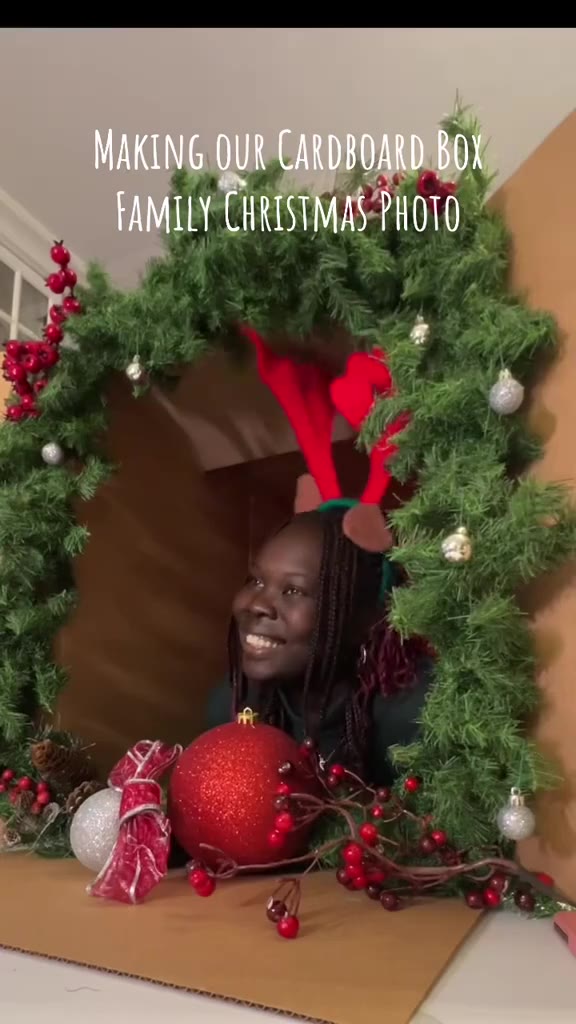
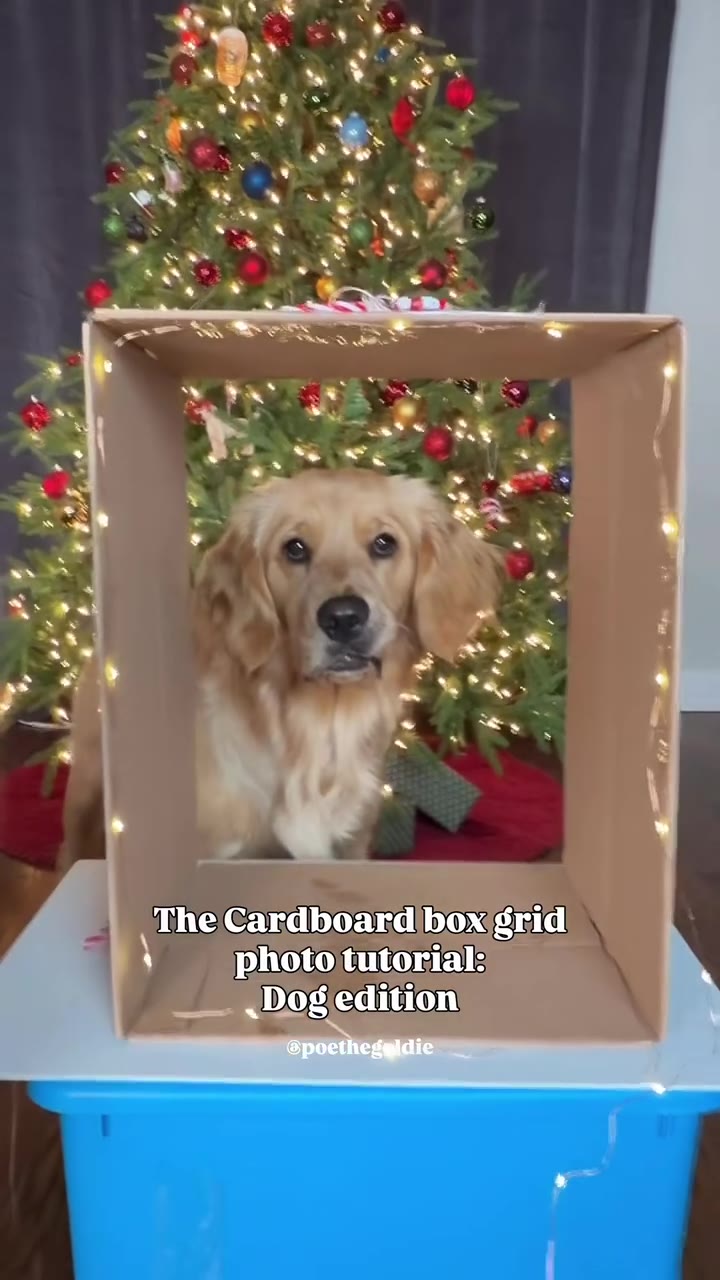
More videos from this trend
These clips were made and posted by other creators, not by videosi. Credits link to the original posts.

How do you make the Christmas Box Photo?
Upload one photo
A clear photo of you, or of your pet, with the face in good light. One adult per photo.
Add a second photo (optional)
A partner, friend or pet to squeeze into the same box with you.
Pick the box style
Green tinsel and red bows, fairy lights and ornaments, or pine garland and big baubles.
Generate and make the card
One vertical 2:3 image comes back; make one for each family member and lay them out as a grid card.
What are the ways to make the Christmas Box Photo?
| Way | Cost | What you need | What you get |
|---|---|---|---|
| videosi (this page) | $8.90 to start, one-time, no subscription | 1 photo (up to 2) | An image, no watermark, ready in about a minute. |
| Shoot it yourself with a real cardboard box | Free if you already have a box, tinsel and lights | A box on its side on a table, decorations, a phone on a stand and each person posed in turn | The original look; the grid card is then laid out by hand, often in Canva |
| Paste a Christmas gift box prompt into ChatGPT or Gemini | Free chatbot plans, within their daily image limits | A prompt copied from a TikTok caption and one photo, often several tries | The prompts we saw put people in a giant wrapped gift box, not the tinsel-framed cardboard box |
| A Christmas gift box AI template in a photo-editing app | Not stated in the posts we watched | The app and one selfie | One fixed scene of you in a red gift box; you cannot pick the box style or add a second person |
Compared on November 25, 2026.
What is the Christmas Box Photo trend?
Updated · videosi is an independent tool. It is not affiliated with TikTok, Instagram, YouTube, or with the owners of any trend, song, game or brand named on its pages.
The Christmas box photo trend, also called the Christmas box photoshoot, the Christmas photo box, the "in the box" trend or the cardboard box Christmas photo, is a holiday portrait. A cardboard box is turned on its side on a table, its open front is framed with tinsel, fairy lights or pine garland, and each person leans out of the box and poses for a phone camera in front of it. The single shots are then laid out side by side as a grid Christmas card, so every family member, coworker or pet gets their own little window.
The earliest dated post we opened is a "family box trend card" from 20 November 2024. On 4 December 2024 a morning TV show posted its hosts doing the "in the box" trend for their Christmas card, which passed about 2.5 million views, and a couple's version on 16 December 2024 reached about 595,000. It came back in 2025: an office version with fairy lights from 3 December 2025 has about 1.7 million views. In November 2026 it is back for a third season, with a cardboard-and-Canva family card from 7 November 2026 at about 1.8 million views and new pet and family versions posted since.
The real version needs a box, decorations, a stand and everyone in the same room. videosi makes the single box portrait from one photo: pick green tinsel with red bows, fairy lights with ornaments, or pine garland with big baubles, add an optional second photo for a partner, friend or pet in the same box, and you get one vertical 2:3 image. The clips on this page show the trend as people posted it; they are not videosi results.
As of 25 November 2026 the trend is spreading again for its third Christmas, mostly as family, office and pet Christmas cards.
What happens in the Christmas Box Photo, shot by shot?
- Step 1
Your photo
Your face, hair, skin tone and top come from one clear photo; a pet photo works too.
- Step 2
The box
A plain cardboard box lies on its side on a table, open end to the camera, like a little window.
- Step 3
The frame
The front edge is decorated: green tinsel and red bows, fairy lights and ornaments, or pine garland and big baubles.
- Step 4
The pose
You lean inside, elbows on the box floor, chin on hands, a peace sign or a wave, looking at the camera.
- Step 5
Finish
One vertical 2:3 photo, ready to post or to drop into a grid Christmas card with the rest of the family.
How do you get the best Christmas Box Photo?
Show your top
A chest-up photo lets the box portrait keep your sweater or shirt; a tight face crop makes the model guess.
Wear something festive
A red or green top, Santa hat or reindeer ears in your photo reads best inside the tinsel frame.
One person per photo
Use a photo where you are alone, or the most prominent person; add a second person with the second photo.
Same style for the whole card
Pick the same box style for every family member so the grid card looks like one shoot.
What should you know before making the Christmas Box Photo?
- The box, the decorations and the room around it are new; your face, hair and top come from your photo.
- The result is one still image with no sound, vertical 2:3, not a video and not the finished grid card: you make one image per person and lay them out yourself.
- Photos of children are not allowed, even though many families do the real trend with kids; adults and pets only.
- Likeness is not guaranteed.
What can you change in the Christmas Box Photo?
| Idea | Prompt | |
|---|---|---|
| Christmas Box Photo AI, green tinsel and red bows | You inside a cardboard box framed with green tinsel and two big red bows. | |
| Christmas Box Photo AI, fairy lights | You inside a tinsel and ornament box with glowing fairy lights at your elbows. | |
| Christmas Box Photo AI, pine garland | You inside a box framed with pine garland, berries and oversized red baubles. |
How much does the Christmas Box Photo cost?
- This image costs $8.90 to start, a one-time payment with no subscription: the Single pack (10 credits) covers it, and each image is 1 credit.
- There is no free generation on this page. Every account gets one free 5-second Muse video (watermarked, view only) and one free watermarked image in the AI tools. Credit packs start at $8.90 for 10 credits and never expire; plans start at $29.90 a month.
- Purchases are final. A failed, timed-out or blocked render returns its credits automatically.
Christmas Box Photo: more questions
What is the Christmas box photo trend?
The Christmas box photo trend, which videosi makes from 1 photo, is a holiday portrait where each person leans out of a cardboard box turned on its side and framed with tinsel, lights or garland, and the shots become a grid Christmas card. The earliest dated post is from 20 November 2024; a TV show's version on 4 December 2024 passed about 2.5 million views, and it is back in November 2026.
What does the "in the box" or "Christmas photo box" trend mean?
"In the box" and "Christmas photo box" are other names for the Christmas box photo trend, which videosi makes as 1 still image per photo in 3 box styles. Each person poses inside a decorated cardboard box like a little window, and the pictures are combined into one Christmas card.
How do I make a Christmas box photo with AI?
Upload 1 clear photo on the videosi Christmas box photo page, add an optional second photo for someone sharing the box, pick green tinsel, fairy lights or pine garland, and press Generate. You get 1 vertical 2:3 image, with no box, decorations or prompt needed.
What are good Christmas box photoshoot ideas?
On videosi the Christmas box photoshoot comes in 3 ready box styles: green tinsel with red bows, fairy lights with ornaments, or pine garland with big baubles. Popular poses from the trend are chin on hands, a peace sign or a wave, with elbows on the box floor. Couples share one box, offices and families give each person their own box in a grid card, and pets get a box too.
Is there a Christmas box photo generator or app?
Yes: videosi (videosi.io) is a web Christmas box photo generator that turns 1 photo into a box portrait in 3 box styles, with an optional second photo for someone sharing the box. It runs in a phone or desktop browser with no app to install. Make one image per person and lay them out as your grid card.
How do I do the Christmas box trend at home without AI?
To do the Christmas box trend at home you need 1 cardboard box per shot, turned on its side on a table, with tinsel, garland or fairy lights taped around the open front. Put a phone on a stand straight in front of it at eye level, and have each person lean in and pose. Then lay the shots out as a grid in a card app. videosi skips the box and the setup with 1 photo per person.
Is there a TikTok filter or CapCut template for the Christmas box photo?
As of November 2026 we found no official TikTok filter or CapCut template that makes the tinsel-framed Christmas box photo; videosi makes it from 1 photo instead. In the posts we watched, card apps such as Canva were used only to lay out the final grid. Some photo-editing apps offer a Christmas gift box AI template, which puts you in a wrapped present, a different look. videosi is not affiliated with TikTok or CapCut.
What AI model makes the Christmas box photo?
The videosi Christmas box photo page runs on GPT Image 2.6, an image model made by OpenAI, with your photo as the only source for your face. It returns 1 vertical 2:3 still at about 1K. The full prompt stays private; its structure and common mistakes are in the how it is made section.
Why does my Christmas box photo not look like me?
On videosi the likeness comes from your photo, so use 1 sharp, front-facing photo in good light without sunglasses, heavy filters or other people close to you. A chest-up photo also keeps your top. If one result misses, generate again with a clearer photo.
Can I put two people or my dog in the same Christmas box?
Yes: the videosi Christmas box photo takes 1 required photo and 1 optional second photo, so a partner, friend or pet can squeeze into the same box with you. Pets also work on their own as photo 1, like the dog versions of the trend. Children's photos are not allowed.
Can I make the whole family Christmas card grid?
videosi makes 1 box portrait per generation, not the finished grid. For a family card, make one image per adult or pet in the same box style, then place them side by side in any card or collage app, the way the original posts did.
What song is used in the Christmas box photo trend?
No single song is tied to the Christmas box photo trend as of November 2026, and the videosi result is 1 still image with no sound. Posts use different Christmas songs or their own original sounds, so add your own music when you post it.
Is the Christmas box photo trend still trending?
Yes: as of 25 November 2026 the Christmas box photo trend is spreading for its third Christmas, and videosi makes it from 1 photo. It began in November 2024, returned in December 2025 with an office version at about 1.7 million views, and a family card posted on 7 November 2026 passed about 1.8 million views.
Trending this week
All trends this week






Make your Christmas Box Photo
Upload two photos and press Generate. 1 credits, refunded if it fails.
Get the next trend first
One email when new trends land on videosi, about once a week. Unsubscribe in one click.
See videosi first on Google
Add videosi as a preferred source and our trend pages show up first in your Top Stories and AI answers on Google.