I'm a Celebrity AI Filter: The Jungle Walk-In, Starring You
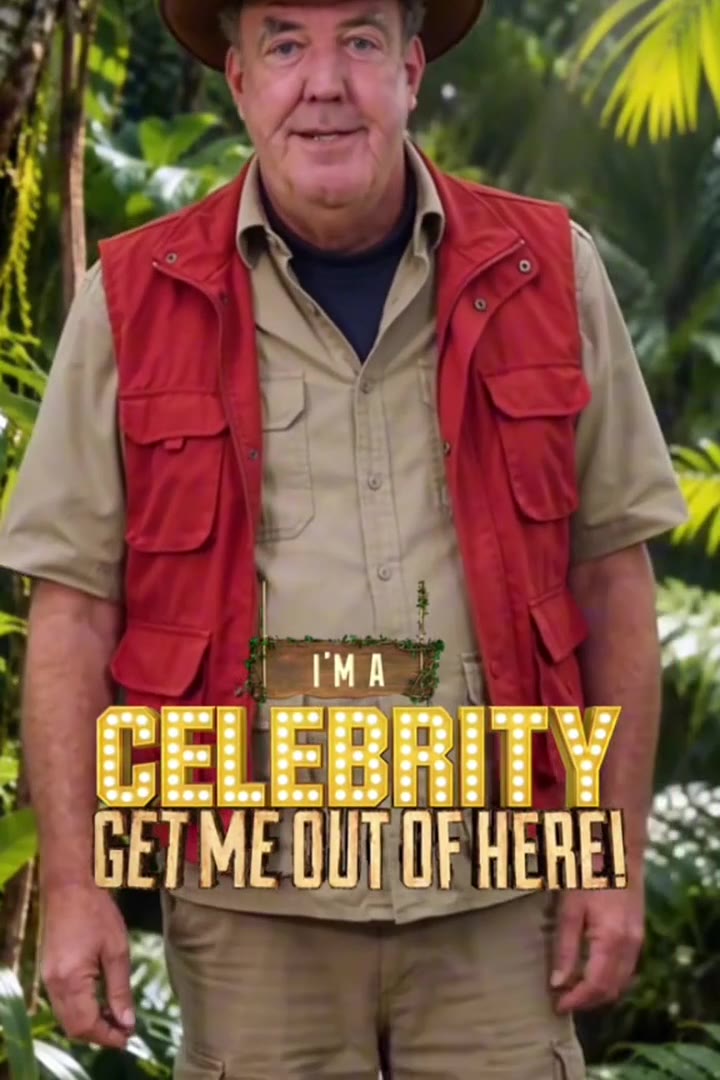
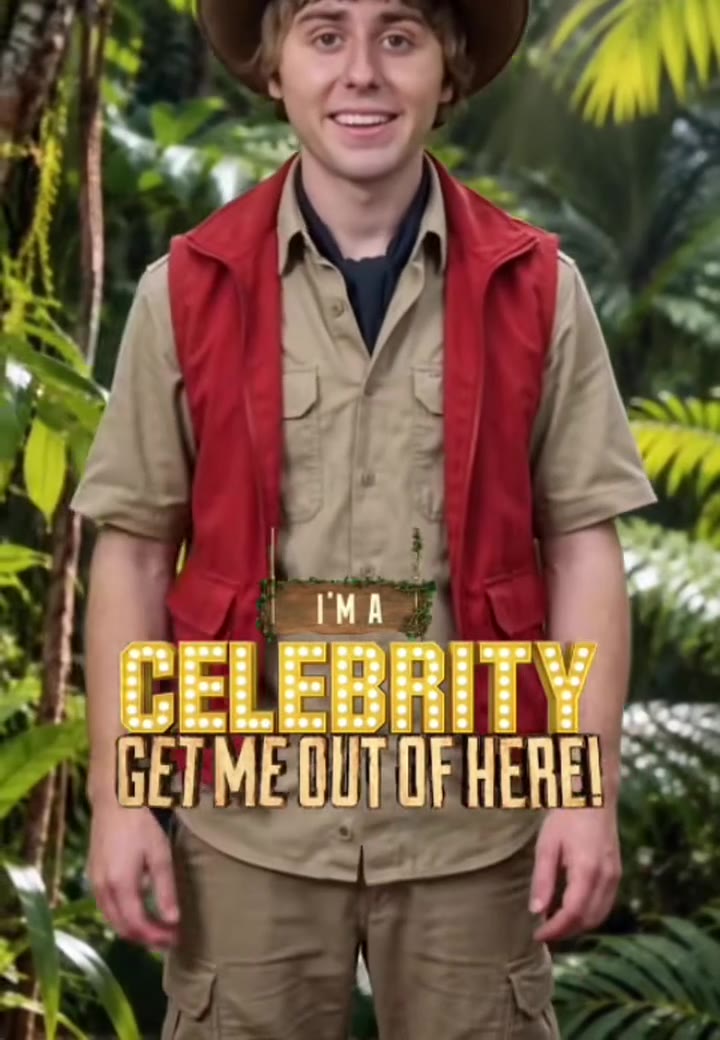
You step out of the rainforest in a red vest and a bush hat, wave at the camera and walk off, just like the cast photos in the I'm a Celebrity filter. One photo of you is all it takes.
Updated : Page published.
1Add your photo
What you'll get
Front-facing, well-lit selfies work best. One face per photo.
2Choose quality
By generating you confirm you have permission to use the people in your photos. Terms
No subscription needed · Ready in 4–6 minutes · Failed renders are free
The I'm a Celebrity AI filter (also typed "im a celeb filter") is a 9-second clip in which a person walks into a rainforest in a red vest and bush hat, smiles and waves like a campmate on the TV show, then walks off; videosi makes it from one photo of you.
- Fast facts
- First seen
- Stage
- Just starting
- Started on
- TikTok (unconfirmed)
- Sound
- The template carries its own built-in sound, identical across posts; title and artist not identified.
- Meaning
- The I'm a Celebrity AI filter is a CapCut filter that places your selfie into the jungle cast portrait of the TV show I'm a Celebrity... Get Me Out of Here!, in a red vest and bush hat.
- Related trends
- Celebrity Red Carpet AI, AI Celebrity Signature Trend, Popstar AI
Page updates
- November 20, 2026 — Page published.
The I'm a Celebrity AI Filter prompt and model
I'm a Celebrity AI Filter is made with Seedance 2.0 / 2.5 (you pick the tier) by ByteDance. The prompt behind it has 5 parts, and the timing is what makes or breaks it.
- Model
- Seedance 2.0 / 2.5 (you pick the tier)
- Mode
- Photo + motion reference to video
- Length
- 9 seconds, 9:16 or 16:9
- Input
- 1 photo
- Identity Your photo supplies the face, hair, skin tone and age.
- Motion reference A short clip of the trend gives the walk-in, the pose, the wave and the walk-off.
- Jungle and costume The rainforest, the red vest, khaki shirt and bush hat come from the reference, so the look stays the same.
- Edit instruction The prompt only says who is replaced by whom, and everything else in the reference stays.
- Sound The trend's own sound is laid under the finished video.
Replace the young woman with long red hair, a brown bush hat, a red vest, a khaki shirt and a navy top in Video 1 with the person from Image 1.…
Why it goes wrong when you do it yourself
- Asking a video model to invent the jungle, the costume and the walk-in timing from text gives a different outfit and a different pace on every try.
- If the prompt does not name who is replaced, the model keeps the reference woman and only borrows your accessories.
- Hands and the hat brim are where invented detail shows first during the wave, so unguided attempts often distort them.
- Each try costs model credits and several minutes, and getting the same walk-in beat takes several attempts.
More videos from this trend
Trend inspiration · not a selectable template
How to make your I'm a Celebrity AI Filter video
Upload one photo of yourself
A clear, front-facing photo with your face and shoulders in even light. Hair, face and age come from the photo.
Pick the format
Choose 9:16 for TikTok, Reels and Shorts, or 16:9 for a wide clip. There is no other choice to make.
Generate
Press Generate and wait a few minutes. The 9-second jungle walk-in is built from your photo, with the trend sound already on it.
Download and post
Download the MP4 with no watermark and post it with a caption like "Me if I was in I'm a celeb".
What is the I'm a Celebrity AI Filter trend?
Updated · videosi is an independent tool. It is not affiliated with TikTok, Instagram, YouTube, or with the owners of any trend, song, game or brand named on its pages.
The I'm a Celebrity AI filter, also typed "im a celeb filter" or "I am a celebrity AI", is a CapCut AI filter that turns one selfie into the cast portrait of a jungle reality show. The person in the photo steps out of dense rainforest in a red vest, khaki shirt and brown bush hat, smiles, waves or tips the hat, and walks off again, with the show's gold logo across the bottom of the frame. The clip is 8 to 10 seconds long and the template carries its own built-in sound.
It is a yearly wave that follows the UK reality show I'm a Celebrity... Get Me Out of Here! The earliest filter posts we found are from 20 and 21 November 2024; the most-viewed 2025 posts are dated 16 November 2025; and the 2026 wave started in mid-November, with the first posts we saw dated 12 November 2026. Creators caption it with lines like "Me if I was in I'm a celeb" or "My mum really fell for it", and CapCut templates shared under tags such as #imaceleb and #capcutpioneer make it in one tap.
Videosi makes the same walk-in from one photo of you. The motion, the jungle and the timing come from a reference clip of the trend, your photo supplies the face, hair and age, and the trend's own sound is laid under the finished video. There is nothing to type and nothing to choose except the video format. The show's name and logo are only the reason the trend exists; videosi is not connected to the show or its makers.
The trend has only just come round again for 2026, so expect more variants soon: dancing with a footballer in the jungle, couples walking in together, pets in the bush hat. This page covers the single-person walk-in, which is the version most people mean when they search for the I'm a Celebrity filter.
I'm a Celebrity AI Filter: shot by shot
- 0–1 s
Empty jungle
A still rainforest with sunlight through the leaves and the gold show logo at the bottom. Nobody is in frame yet.
- 1–2.5 s
Walk-in
You step in from the left edge in a red vest, khaki shirt and brown bush hat, walking toward the camera.
- 2.5–4.5 s
Pose
You stop in the middle of the frame, facing the lens with a small smile, like a cast portrait.
- 4.5–6 s
Wave
A friendly wave, or a tip of the hat in some versions, while the logo stays put.
- 6–7.5 s
Hold
A last smile held to the camera.
- 7.5–9 s
Walk-off
You turn and walk out of frame to the right, leaving the empty jungle again.
Tips for a better result
Face the camera
The clip ends on a smile to the lens, so a straight-on photo with both eyes visible gives the best likeness.
Use a plain, bright photo
Soft daylight or an evenly lit selfie works best. Heavy filters and dark rooms make the face drift.
Skip hats and sunglasses
The bush hat is added for you. A photo that already has a hat or dark glasses confuses the likeness.
One person per photo
Use a photo with only you in it. Group shots can make the model pick the wrong face.
Good to know before you make a I'm a Celebrity AI Filter video
- The jungle, the costume and the gold logo come from the reference clip. The logo belongs to the TV show; videosi has no connection to it and you should not present the video as an official one.
- The video comes with the trend's built-in sound already on it. You can swap it in the app where you post it.
- Hands and the hat brim are where small mistakes show first during the wave.
- Likeness is not guaranteed; a failed, timed-out or blocked render returns its credits automatically.
I'm a Celebrity AI Filter: questions
What is the I'm a Celebrity AI filter?
The I'm a Celebrity AI filter, often typed "im a celeb filter", is a CapCut AI filter, about 9 seconds long, that puts your selfie in a jungle in a red vest and bush hat like a campmate on the TV show I'm a Celebrity. It returns each November with the show: posts we found date from November 2024, November 2025 and 12 November 2026. videosi makes the walk-in from one photo.
How do I make the I'm a Celebrity filter video from one photo?
Upload one front-facing photo on videosi, pick 9:16 or 16:9 and press Generate. In about a few minutes you get a 9-second jungle walk-in with a wave and the trend sound, no prompt and no watermark. A standard video (Standard model, 720p) is 10 credits, and a failed render returns its credits.
Is there a website or generator for the I'm a Celebrity AI filter?
Yes. videosi (videosi.io) is a web tool that makes the I'm a Celebrity AI filter walk-in from 1 photo. The motion, the jungle and the costume are built in, so you only pick the format. It makes a 9-second MP4 with no watermark, and a standard video (Standard model, 720p) costs 10 credits.
Is there a TikTok filter or CapCut template for I'm a Celebrity?
Yes. The trend spread through CapCut AI templates under names like I'm a celeb and imaceleb, shared with #capcutpioneer, and creators post the results on TikTok. videosi is a separate web tool: it needs no CapCut template, takes one photo and makes a 9-second video, with 10 credits for a standard 720p render.
What AI model and prompt make the I'm a Celebrity filter video?
videosi uses ByteDance's Seedance 2.0 / 2.5 in photo-plus-motion-reference mode, with a reference clip of the trend as the base. The built-in prompt only says whose face replaces whose, so the jungle, outfit and 9-second timing stay fixed. The full prompt is not published, and you choose the tier at 5 to 93 credits depending on quality.
How much does the I'm a Celebrity AI filter video cost, and is it free?
The I'm a Celebrity AI filter video on videosi is not free: there is no free generation and no free trial. A standard 9-second video (Standard model, 720p) is 10 credits; better models and higher resolutions cost more. Credit packs start at $8.90 for 10 credits and never expire; plans start at $29.90 a month. A failed render returns its credits.
Why doesn't the face in my I'm a celebrity video look like me?
The usual causes are a side-on or blurry photo, sunglasses, a hat or a heavy filter. The videosi I'm a Celebrity video ends on a smile to the lens, so use a sharp, front-facing photo in even light. Likeness is not guaranteed. A failed, timed-out or blocked render returns its credits, and you can try again with a better photo.
Can I use a friend's, partner's or pet's photo?
Use a photo of yourself or of someone who has agreed to it. The videosi I'm a Celebrity AI walk-in replaces the person in the reference with the person in your photo, 1 face per video. Pets and groups are not what the template is built for, and you should label AI videos as AI when you post them.
What does "I am a celebrity" mean in this trend?
"I am a celebrity" here is short for I'm a Celebrity... Get Me Out of Here!, the long-running UK reality show where famous people live in a jungle camp. The AI filter shows you as a campmate in the show's red vest and bush hat, and creators caption it "Me if I was in I'm a celeb". videosi turns that idea into a video of you.
What song or sound is used in the I'm a celebrity filter?
The template carries its own built-in sound, the same in every post, so there is no single named song and the title is unconfirmed. videosi lays that trend sound under the finished 9-second video, and you can swap it in the app where you post it.
Is the I'm a Celebrity AI filter still trending?
As of 20 November 2026 it is just starting its yearly wave: the first 2026 posts we found date from 12 November. The same filter went viral in November 2024 and November 2025, so it tends to peak while the TV show is on air. videosi has this page live now.
Is it the real I'm a Celebrity show or official?
No. The video is an AI-made imitation of a social-media filter, not footage from the TV show, and videosi has no connection to the show or its makers. The gold logo in the frame comes from the trend's reference clip, so do not present the video as official and mark it as AI when you post it.
Trending this week
All trends this week





Make your I'm a Celebrity AI Filter video
Upload a photo and press Generate. 10 credits, refunded if it fails.
Get the next trend first
One email when new trends land on videosi, about once a week. Unsubscribe in one click.
See videosi first on Google
Add videosi as a preferred source and our trend pages show up first in your Top Stories and AI answers on Google.