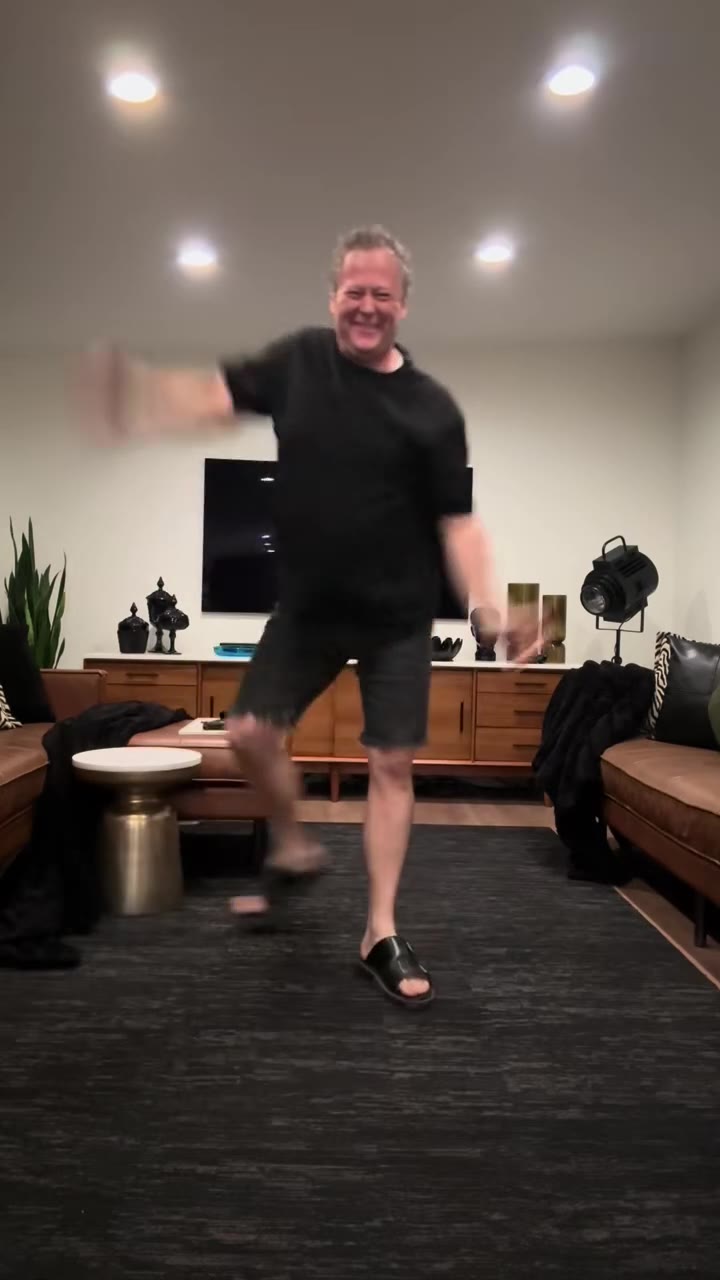
The dancing baby AI trend is a 2026 TikTok dance in which an AI-made baby, puppy or kitten in a cute outfit sways, spins and kicks to the song "Last Call for Love". On videosi you make your own version of the dancing baby AI dance from one photo of your pet or yourself, with no prompt.
This guide goes deeper than the FAQ on the trend page. It covers how the trend differs from the 1996 3D baby, how the clips are made, why a dachshund and a kitten took off, the dance beat by beat, and what to do about photos, labels and sound.
Key takeaways
- The 2026 dancing baby is an AI video trend, not the 1996 3D animation; Know Your Meme dates the earliest combined upload to 14 December 2025.
- Creators mostly use animation tools such as Viggle AI or Kling AI, and the dance is recognisable by its order: low lean, stare, sway, spin, arms wide and kick.
- The dachshund clip (8 January 2026, about 10.6 million views) and the kitten clip (13 January, about 3.0 million) carried the trend to pets.
- videosi is built for pets and adults. It does not generate AI babies, and photos of very young children are untested.
- The 9 second scene costs 10 credits and the 15 second kitten scene costs 13; credit packs start at $8.90 for 10 credits.
In this guide
- How is this different from the 1996 dancing baby?
- Where did the AI baby dance start?
- How are the AI baby videos made?
- Why did the dachshund and the kitten go viral?
- What makes the dance recognisable beat by beat?
- Which song is it, and why might TikTok mute it?
- How do I pick the right photo?
- Can I use a baby's photo?
- Do I have to label the video as AI?
- How does it relate to the other sway dance pages?
How is this different from the 1996 dancing baby?
They share a name and little else. The original dancing baby was a 3D model, a toddler in a diaper, animated with a looping cha-cha dance and passed around by email and animated GIFs in the late 1990s. Its history is on Wikipedia: a baby model from a doll scan, dance moves added in Character Studio for 3D Studio Max, and a file that spread through forums and fan sites.
The 2026 version is a short video that looks real enough to pass at a glance. It is made by animating a still image, it comes with a song, and it moves to a different, wobbling sway. If you search for the dancing baby AI clip you see on TikTok today, you will not find the 3D cha-cha.
Where did the AI baby dance start?
Know Your Meme files it as the AI Baby Dance Trend, also called the Sway Dance or the Last Call for Love dance. It dates the earliest upload that combines the dance with the song to 14 December 2025, a baby in sunglasses and a gold chain, and the song's first upload to 24 December 2025. By early January 2026 other creators were posting babies in different outfits, a dance tutorial appeared on YouTube, and people filmed real families doing the moves for comparison. Later the dance spread to celebrities and animals.
That entry is still under research, and we could not confirm who started it beyond what it states. We also found no confirmed Snapchat lens for the dance.
How are the AI baby videos made?
Know Your Meme says creators most often use AI tools such as Viggle AI or Kling AI to make a subject perform the sway, and some posts point to CapCut templates. The common recipe is the same everywhere: one still image of the subject plus a dance video as the motion reference. The tool moves the still the way the reference moves.
That is also why a plain text prompt does not work well. It gives a random subject doing a random dance, and the clip stops looking like the trend. On videosi the original scene clip is the reference and your photo takes the dancer's place, using ByteDance's Seedance 2.0 or 2.5. The room, the fixed camera and the dance timing stay, and we do not publish the full prompt.
Why did the dachshund and the kitten go viral?
Babies were the first wave, and pets were the second. The most-viewed pet clip we found is a dachshund in a green T-shirt, posted on 8 January 2026 with about 10.6 million views. A kitten in pink pyjamas followed on 13 January with about 3.0 million. We cannot prove why a given clip took off, but the pattern is easy to see: a small animal standing on two legs in a human outfit is funny without needing a joke, and the sway is simple enough for anyone to recognise in a second.
Anyone with a dog or cat can make one of their own. Those two clips are the scenes on the page: the dachshund on a wooden floor (9 seconds) and the kitten in a marble living room (15 seconds).
What makes the dance recognisable beat by beat?
The order matters more than any single move. In the 9 second scene it runs like this:
- 0 to 1.5 s: a low side lean, both arms out, head turned away, then a snap to face the camera.
- 1.5 to 3.5 s: stand upright, arms by the chest, stare into the lens and tilt the head.
- 3.5 to 5.5 s: the wobbling hip and shoulder sway, arms swinging across the body.
- 5.5 to 7 s: a quick spin to the side and back, one arm sweeping over the head.
- 7 to 9 s: facing the camera, both arms thrown wide and one leg kicked up.
If a clip has the sway but skips the lean at the start or the kick at the end, viewers read it as a different dance. This is why the page copies the original clip's timing instead of asking a model to improvise.
Which song is it, and why might TikTok mute it?
The song is "Last Call for Love" by Abarza Recabal Erick Yordan, a track that Know Your Meme says was created with AI. It is the sound shown on the most-viewed clips we found. Some CapCut baby templates use other sounds.
Whether TikTok plays a given sound depends on its licensing and on your region, and a sound that works in one account can be unavailable or muted in another. We have not verified a mute rule for this track. The practical fix is to keep your own copy: every videosi video comes as an MP4 with the scene's original sound already mixed in, so it plays the same wherever you upload it. If a platform strips the audio, re-upload without its sound picker or post to another platform.
How do I pick the right photo?
Four things matter. Use a sharp photo with the whole face in view, because a dark or blurry one makes the model invent the face. Daylight from a window keeps the coat colour, markings and eyes. Take it at eye level, upright for a person, at your pet's height for an animal. And crop to one subject, since two animals in a photo can merge into one strange figure.
Match the coat to the scene as well. Dark or short coats read well on the dachshund scene, while light or fluffy ones suit the brighter kitten scene. Expect some drift in very fluffy coats and rare patterns, mostly in the spin when the head turns away for about 2 seconds. Whatever your subject wears in the photo, it wears in the video. A failed render gives its credits back.
Can I use a baby's photo?
Honestly, we do not recommend it. The page at /dancing-baby-ai is built for pets and adults, and its examples show a dog, kittens and a grown man. It does not generate AI babies, we have not tested photos of very young children, and we do not offer a baby-only version.
If you still upload a photo of a friend or family member, use one you have the right to use. A friend's dog or a neighbour's cat works exactly like your own pet.
Do I have to label the video as AI?
You should, and on most platforms you are expected to. The video is synthetic, and nothing in it is a record of something that happened. When you share it on TikTok, Reels or Shorts, turn on the AI-generated label if the app offers one, or say so in the caption. Do not present a clip of a real person as if it were filmed. videosi is independent of TikTok, Snapchat and CapCut and has no tie to the creators of the original clips.
How does it relate to the other sway dance pages?
The same dance family has more than one page. AI sway dance is a 5-second photo animation made famous by a TikTok effect of the same name, and Toc Toc AI baby dance is a 12-second clip of a toddler hopping on one foot and knocking on an invisible door to Patrick Sébastien's "Toc toc". The dancing baby AI page is the one for the Last Call for Love scenes with the dachshund and the kitten. Pick the page by the clip you want your photo to copy.
Try it
Open the dancing baby AI page, pick the dachshund or kitten scene, upload one photo, choose 9:16, 1:1 or 16:9 and press Generate. The 9 second scene costs 10 credits, the 15 second kitten scene costs 13, and credit packs start at $8.90 for 10 credits.