Tim Burton AI: The Puppet Filter Video, Starring You
Your hair whips across the lens and you land as a big-eyed, stitched stop-motion puppet in a gothic world. One photo of you is enough.
Updated : Page published.
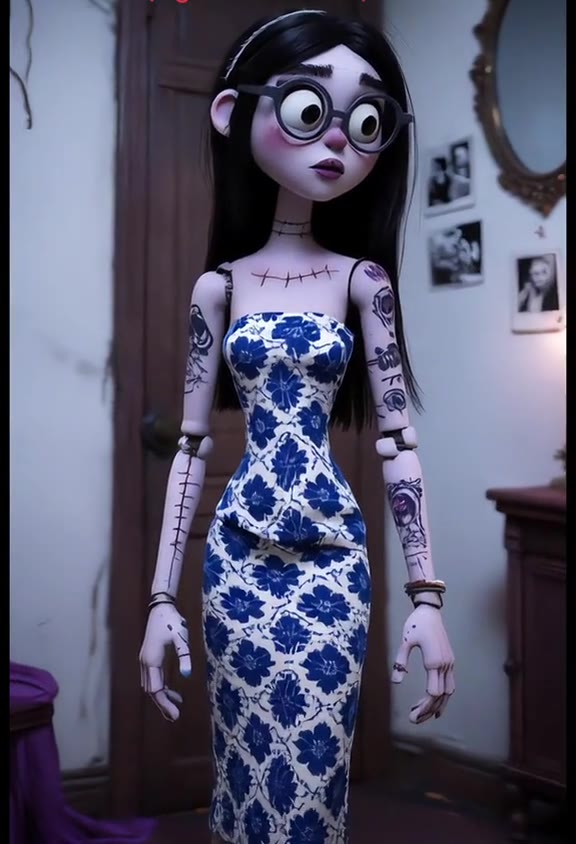
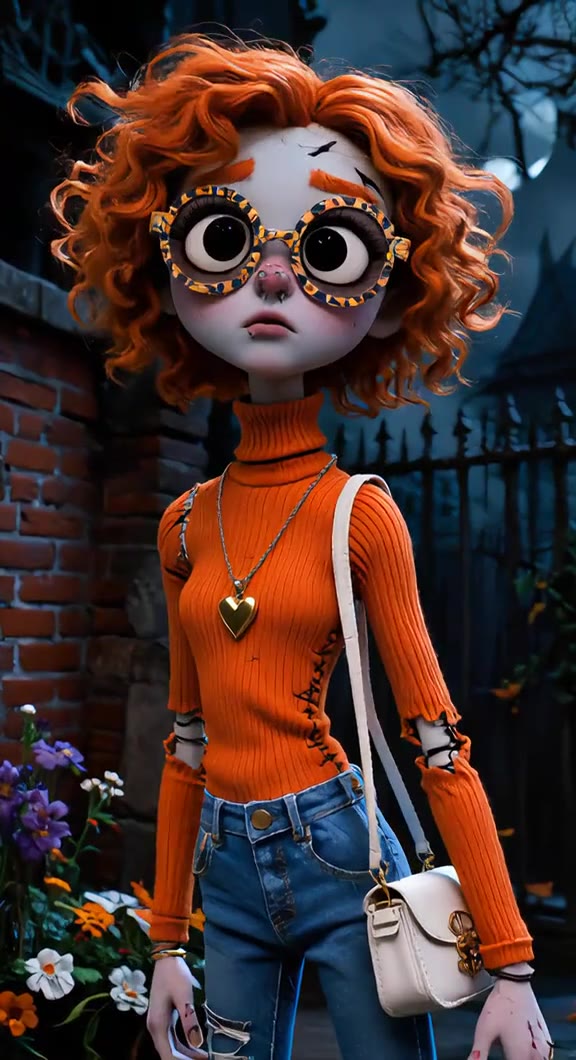
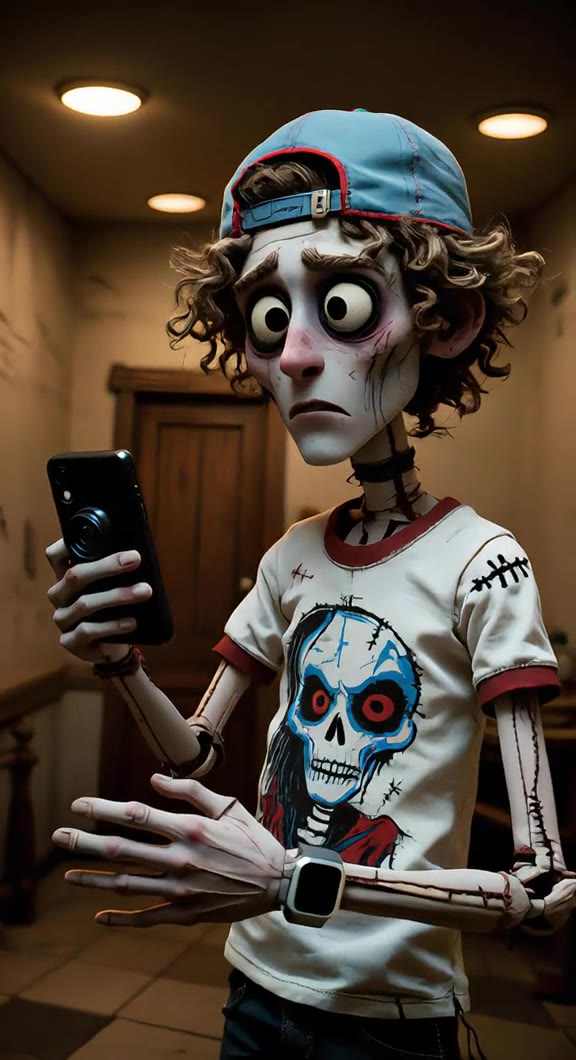
1Add your photo
What you'll get
Front-facing, well-lit selfies work best. One face per photo.
2Where you end up
3Choose quality
By generating you confirm you have permission to use the people in your photos. Terms
No subscription needed · Ready in about 3 minutes · Failed renders are free
Tim Burton Girls AI is a 5-second transformation video in which a real selfie dissolves in a whip of hair and the person lands as a big-eyed, stitched stop-motion puppet in a gothic setting; videosi makes it from one photo of you.
- Fast facts
- First seen
- Stage
- Just starting
- Started on
- TikTok (unconfirmed)
- Sound
- DARKSIDE — Neoni
- Meaning
- "Tim Burton girls" refers to a Burton-inspired AI look in which a woman appears as a pale, big-eyed gothic figure or stitched puppet, made popular on TikTok as a filter video and a picture template.
Page updates
- November 1, 2026 — Page published.
The Tim Burton AI prompt and model
Tim Burton AI is made with Seedance 2.0 / 2.5 (you pick the tier) by ByteDance. The prompt behind it has 5 parts, and the timing is what makes or breaks it.
- Model
- Seedance 2.0 / 2.5 (you pick the tier)
- Mode
- Photo + motion reference to video
- Length
- 5 seconds, 9:16, 1:1 or 16:9
- Input
- 1 photo
- Replace the subject The woman in the reference clip is swapped for the person in your photo, with nothing of her left.
- Identity Face, hair colour, outfit, skin tone and any tattoos come from your photo and carry over into the puppet.
- Motion reference A viral 5-second clip supplies the selfie opening, the hair whip across the lens and the pull back to full height.
- Scene You land either on a moonlit gothic street or in your own room turned dim and storybook crooked.
- Rules An original puppet, not an existing film character; no gore; no text, logos or watermark; the sound is added afterwards.
Replace the woman with curly orange hair, large round glasses, an orange ribbed turtleneck, jeans and a white shoulder bag in Video 1 with the person…
Why it goes wrong when you do it yourself
- Without a motion reference the hair whip disappears and you get a slow morph instead of a sudden reveal.
- Video models keep the person in the reference clip unless the prompt names what must go, so you can end up with someone else's hair and glasses.
- Asking for a Burton look by name often pulls in famous film characters, costumes and veils instead of a puppet of you.
- Each try costs model credits and several minutes, and the likeness tends to vanish behind the big puppet eyes after the first attempts.
Tim Burton AI examples
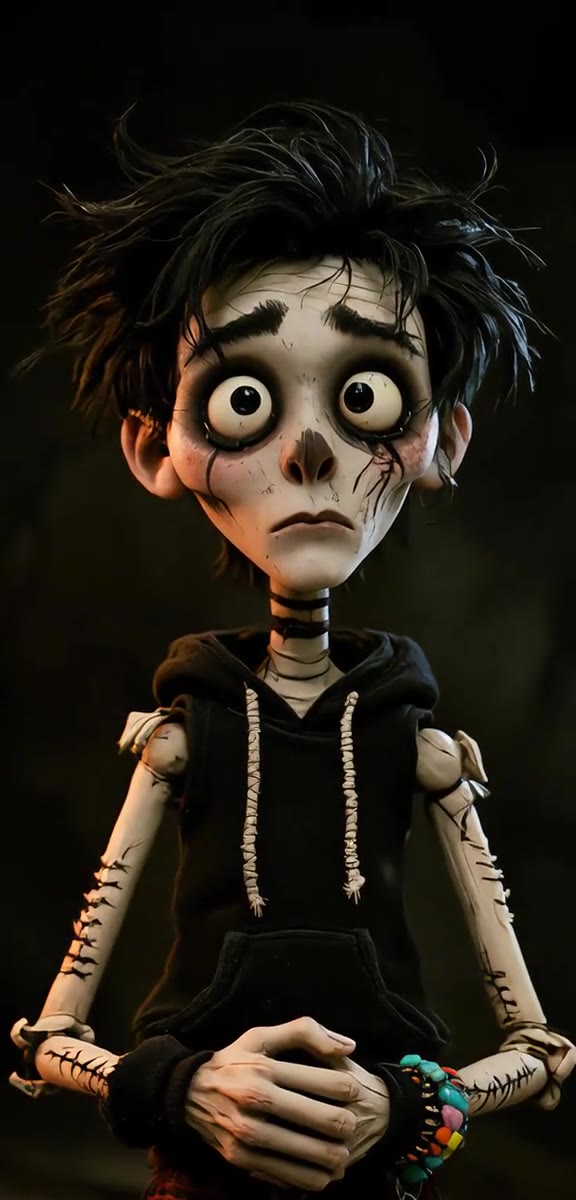
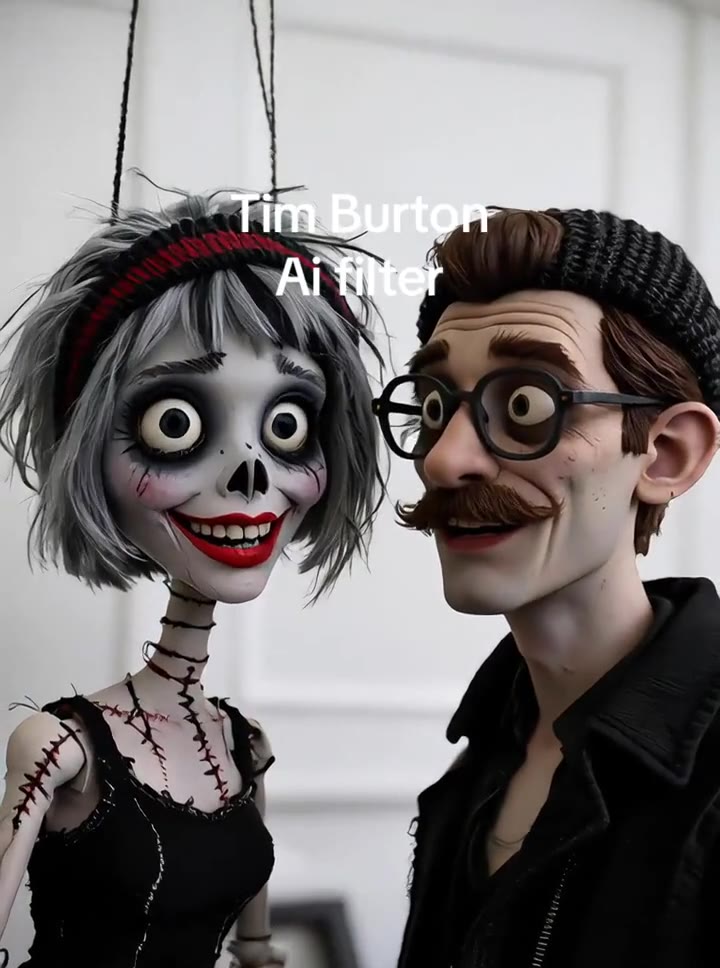
How to make your Tim Burton AI video
Add one photo
A full or half body shot works best, because the puppet shows your hair and whole outfit. Two people in one photo also works: both become puppets.
Pick where you end up
Choose the gothic moonlit street, or your own room turned dim and storybook crooked.
Generate and download
Choose the model, resolution and format, then press Generate. You get a 5-second MP4 with no watermark and the trend's original sound already on it.
Post it
The clip is ready for TikTok, Reels or Shorts. Turn on the platform's AI-generated label when you post.
What is the Tim Burton AI trend?
Updated · videosi is an independent tool. It is not affiliated with TikTok, Instagram, YouTube, or with the owners of any trend, song, game or brand named on its pages.
Tim Burton Girls AI is the name people use for a Burton-inspired AI look: a real person becomes a pale, big-eyed, stitched stop-motion puppet in a gothic world. On TikTok it appears in two forms. The video form, usually called the Tim Burton AI filter, is a 5-second clip in which a normal selfie vanishes behind a whip of hair and the person lands as a puppet in the same clothes. The still form, tagged Tim Burton girls, is a template picture of a woman surrounded by gothic figures. This page makes the video.
The earliest post we could date is from 4 September 2025, and that clip has passed 10 million views. A second clip from 29 September 2025 has passed 7 million. The format came back in late August 2026, ahead of Halloween, and the phrase Tim Burton girls showed up in tutorial and template posts around 13 and 14 October 2026. Nobody has confirmed who started it. As of November 2026 the Tim Burton girls wording has only just started spreading.
The sound most often attached to the video form is DARKSIDE by Neoni, whose line about crossing your heart and welcoming people to your dark side fits the reveal. Other creators use other sounds. Nobody films this: an AI video model works from your photo, a short motion clip and a written prompt, all built into this page.
The videosi version keeps your own hair colour, outfit and tattoos on the puppet, which is why these clips are funny and recognisable. It makes an original puppet of you and does not put you next to film characters. It is inspired by a style, and it is not made, approved or endorsed by Tim Burton or any studio.
Tim Burton AI: shot by shot
- 0–1 s
Real selfie
A casual, close selfie of the real person, who smiles and leans in.
- 1–2 s
Hair whip
The hair swells and swings across the lens, hiding the face as the world turns dark blue.
- 2–3.5 s
The body rearranges
Behind the moving hair the camera pulls back and a thin, jointed figure starts to stand.
- 3.5–4.2 s
Puppet stands
The figure is now full height in the gothic street, in the same outfit, shaking the hair back.
- 4.2–5 s
The stare
The puppet faces the lens with huge round eyes, pale skin and small stitches, and holds still.
Tips for a better result
Show your outfit
The joke is your own clothes on a puppet. A half or full body photo gives the model the whole outfit to copy.
Let your hair be seen
Your hair drives the whip and the final look. Avoid hats that hide it, unless the hat is part of the look you want.
Use clear, even light
A sharp, bright photo keeps your features readable through the big-eyed puppet design.
Keep the frame simple
One person, or two people side by side, with nobody in the background. For the room option, a tidy background turns gothic more clearly.
Good to know before you make a Tim Burton AI video
- The result is a stylised puppet, so expect to recognise your hair, outfit and overall look more than your exact face.
- This is a Burton-inspired style. It is not affiliated with Tim Burton or any studio, and it does not produce film characters such as the Corpse Bride.
- The picture-style Tim Burton girls template, with figures crowding around a seated person, is a different format. This page makes the video transformation.
- The prompt has not been test-rendered for this page. The clips shown are real posts from the trend, not videosi output. A failed, timed-out or blocked render returns its credits automatically.
- Use only photos of adults who agreed to it. Photos of children and of celebrities are not accepted.
Tim Burton AI: questions
What is the Tim Burton Girls AI trend?
Tim Burton Girls AI is a TikTok look that turns a real person into a pale, big-eyed gothic figure. The video form lasts 5 seconds: a selfie disappears behind a whip of hair and a stitched puppet stands in its place. The earliest clip we could date is from September 2025. videosi makes the video from 1 photo.
How do I make a Tim Burton Girls AI video?
To make a Tim Burton Girls AI video on videosi, upload 1 photo that shows your hair and outfit, choose the moonlit street or your own room, pick the model and format, and press Generate. The 5-second video renders in a few minutes, and you write no prompt. It already has the trend's sound.
What does Tim Burton girls mean?
"Tim Burton girls" means women shown in a Burton-inspired look: pale skin, huge dark eyes, stitches and gothic clothes. As an AI trend in 2026, it labels both a filter video and a picture template on TikTok. The name describes a style, and videosi applies it as an original puppet made from 1 photo of you.
Is there a website or generator for the Tim Burton AI video?
Yes. videosi (videosi.io) is a web tool that makes the Tim Burton Girls AI video from 1 photo. The motion, the setting and the prompt are built in, so you choose only the photo, the scene and the format. It produces a 5-second MP4 with no watermark, with the original sound already on it.
Is there a Tim Burton filter on TikTok or a CapCut template?
Probably several: in September and October 2026 many TikTok posts promoted CapCut templates for the Tim Burton look, and apps change often, so check inside them. videosi is independent and not affiliated with TikTok or CapCut. Its Tim Burton Girls AI page is a web tool: add 1 photo, download a 5-second MP4, then post it.
What song is used in the Tim Burton AI filter videos?
The Tim Burton AI filter clips most often use DARKSIDE by Neoni, named on several of the top posts we checked, with others using different sounds. The line about welcoming you to my dark side lands on the reveal. The 5-second videosi version comes with that sound already on it, so you can post it as it is.
What AI model or prompt makes the Tim Burton Girls video?
The Tim Burton Girls AI video on videosi is made with ByteDance's Seedance model (Seedance 2.0 Mini by default; Fast, Pro and Ultra are one click away), from a written prompt and a 5-second motion reference clip. People can also ask ChatGPT for a still, but that does not give you the hair-whip reveal. On videosi the prompt and reference are built in.
How much does Tim Burton Girls AI cost, and is it free?
Tim Burton Girls AI on videosi is not free: there is no free generation and no free trial. A 5-second video on the Standard model at 720p is 10 credits; better models and higher resolutions cost more. Credit packs start at $6.99 for 10 credits and never expire; plans start at $29.90 a month. A failed render returns its credits automatically.
Why doesn't my Tim Burton puppet look like me?
The puppet's huge eyes and thin limbs change your proportions on purpose, so in a 5-second videosi clip you will recognise your hair, outfit and overall look more than your exact face. Use a sharp, evenly lit half or full body photo with no sunglasses. Likeness is not guaranteed. A failed, timed-out or blocked render returns its credits automatically.
Can I make it with my boyfriend, a friend or someone else's photo?
Yes, if both of you agree. The videosi Tim Burton Girls AI page takes 1 photo, and when two adults stand side by side in that photo, both can become puppets. It is not only for women: men made some of the top clips. Use only photos of adults who agreed to it, with no children or celebrities.
Can I become the Corpse Bride, Sally or Wednesday?
No. The videosi Tim Burton Girls AI video makes an original puppet from 1 photo of you, wearing your own clothes, and does not reproduce film or TV characters. Those characters belong to their studios, and the look here is only Burton-inspired. It is not affiliated with Tim Burton, and you can still pick the gothic street setting.
Is the Tim Burton AI trend still trending?
As of November 2026 the Tim Burton Girls wording is emerging on TikTok, with posts from mid-October 2026. The underlying Tim Burton AI filter is older: it peaked in autumn 2025, with clips above 7 million views, and came back in late August 2026 before Halloween. videosi keeps the 5-second video available after the season.
Can I make the Tim Burton AI video with ChatGPT, Sora, Veo or Kling?
You can try, but it is hard. ChatGPT gives you a still, and a general video model needs a motion reference for the hair whip plus firm instructions so it keeps your clothes and avoids famous characters. Most people need several paid tries. videosi builds all of this into one page, so you only upload 1 photo.
Trending this week
All trends this week


Make your Tim Burton AI video
Upload a photo and press Generate. 10 credits, refunded if it fails.
Get the next trend first
One email when new trends land on videosi, about once a week. Unsubscribe in one click.
See videosi first on Google
Add videosi as a preferred source and our trend pages show up first in your Top Stories and AI answers on Google.