Stage Singing AI Effect: You, Singing Live on Stage
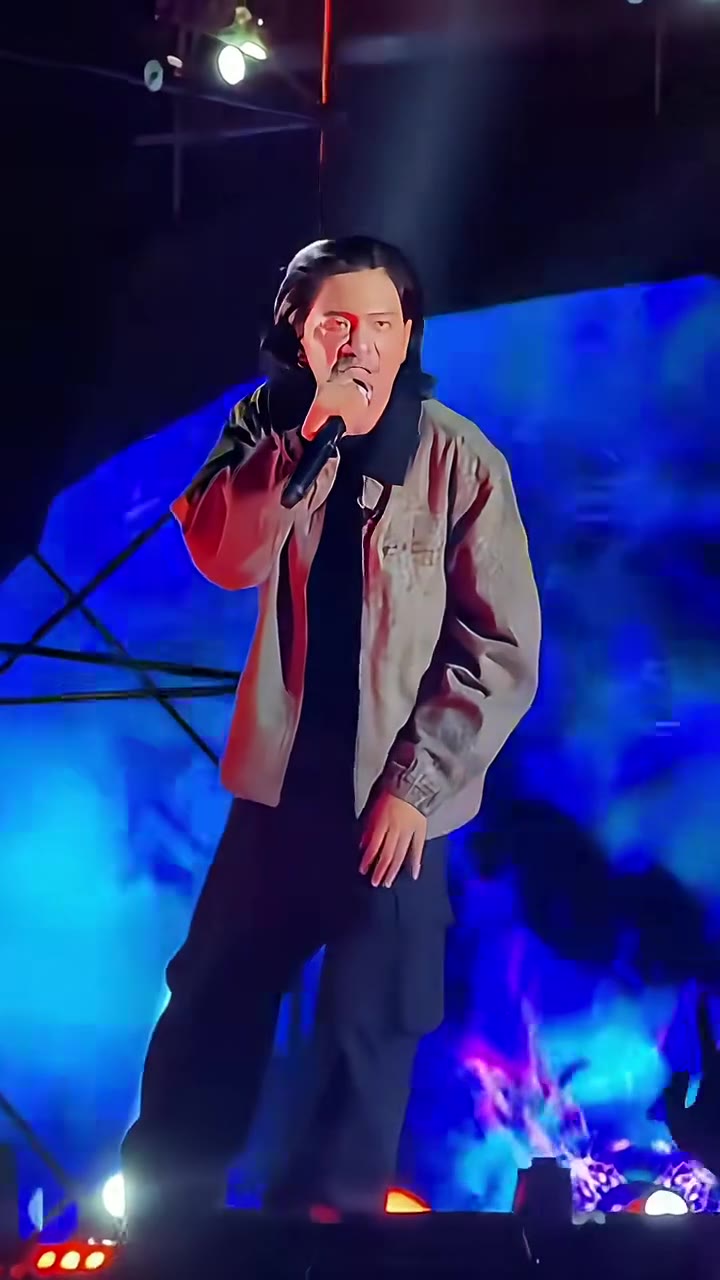
You hold a microphone under blue LED screens and white spotlights, singing live as if the crowd were right there. One photo of you is enough.
Updated : Page published.
1Add your photo
What you'll get
Front-facing, well-lit selfies work best. One face per photo.
2Choose quality
By generating you confirm you have permission to use the people in your photos. Terms
No subscription needed · Ready in about 3 minutes · Failed renders are free
The stage singing AI effect is a short clip of you singing into a microphone on a lit concert stage, and videosi makes it from one photo of you.
- Fast facts
- First seen
- Stage
- Just starting
- Started on
- TikTok (unconfirmed)
- Sound
- The clips use a track posted as original sound; the title and artist are not verified. The videosi video comes with that sound already on it.
- Meaning
- The stage singing AI effect is a TikTok and CapCut trend in which one photo of a person is placed on a real-looking concert stage, singing into a microphone under blue LED screens and spotlights.
- Related trends
- Tiny Desk AI
Page updates
- October 29, 2026 — Page published.
The Stage Singing AI Effect prompt and model
Stage Singing AI Effect is made with Seedance 2.0 / 2.5 (you pick the tier) by ByteDance. The prompt behind it has 5 parts, and the timing is what makes or breaks it.
- Model
- Seedance 2.0 / 2.5 (you pick the tier)
- Mode
- Photo + motion reference to video
- Length
- 5 seconds, 9:16, 1:1 or 16:9
- Input
- 1 photo
- Identity lock Your photo is the only source for the singer's face, hair, build and clothes, kept identical in every frame.
- Motion reference A short concert clip supplies the stage, the lights, the handheld camera and the singer's gestures; the original singer is replaced.
- Scene A lit concert stage with a blue LED backdrop, white spotlight beams and haze, seen from the crowd.
- Timeline Three beats over about five seconds: mic up, singing along, and the step back.
- Rules One adult performer, a natural handheld feel, no text, logos, subtitles or slow motion.
Replace the long-haired singer in Video 1 with the person from Image 1. Keep everything else from Video 1 as it is: the live concert stage with the glowing blue LED backdrop…
Why it goes wrong when you do it yourself
- Without a replace instruction the model keeps the singer from the reference concert clip and only borrows details from your photo.
- Ask for a person singing on stage in plain text and you get a studio-lit music video, not the crowd-view handheld concert look.
- The microphone and the singing hand drift over the face unless the position is written into every beat.
- Each try costs model credits and several minutes, and the stage lights often wash out the face.
Stage Singing AI Effect examples
How to make your Stage Singing AI Effect video
Upload one photo of yourself
A sharp, well-lit photo of one adult with the face and upper body in view. The face, hair and clothes in the photo are what you wear on stage.
Press Generate
There is nothing to pick for the scene: the blue LED stage, the lights and the camera are built in. Choose 9:16 for TikTok, Reels and Shorts, or 1:1 or 16:9.
Wait a few minutes
Rendering takes several minutes. If you close the page, the result is saved in My creations.
Post it
The 5-second MP4 has no watermark and comes with the trend's original sound on it. Post it and label the clip as AI-generated.
What is the Stage Singing AI Effect trend?
Updated · videosi is an independent tool. It is not affiliated with TikTok, Instagram, YouTube, or with the owners of any trend, song, game or brand named on its pages.
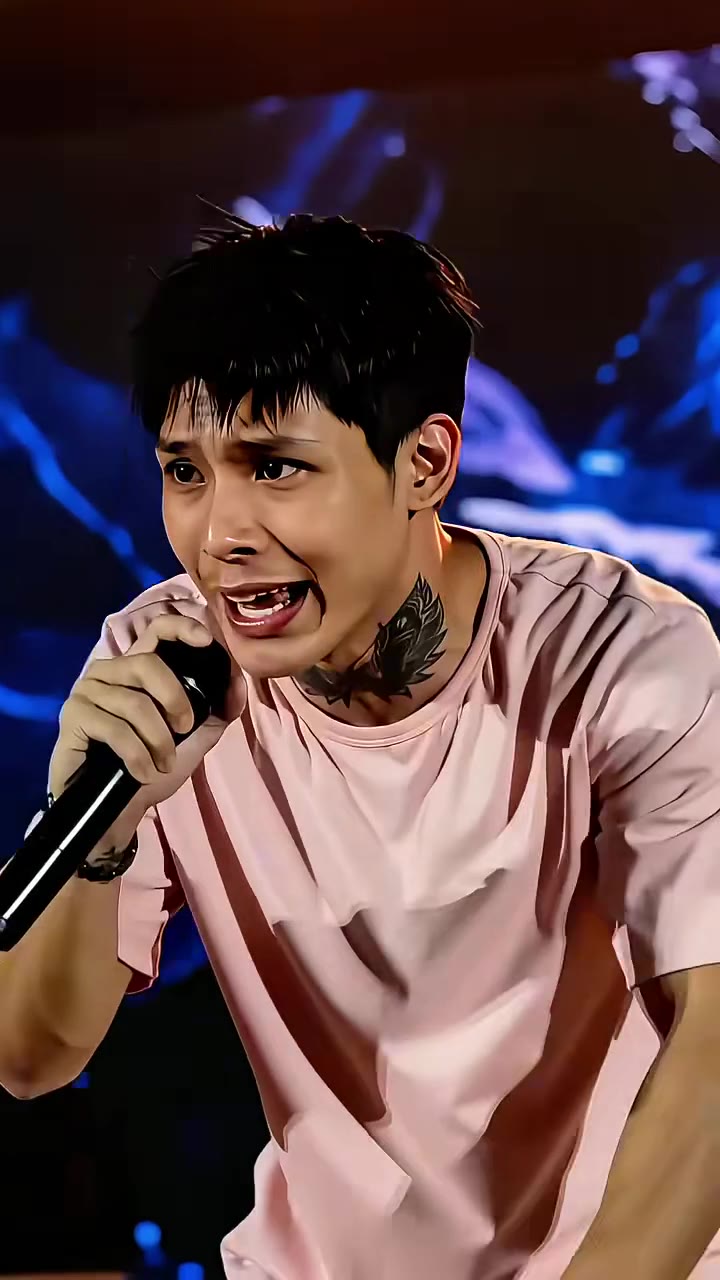
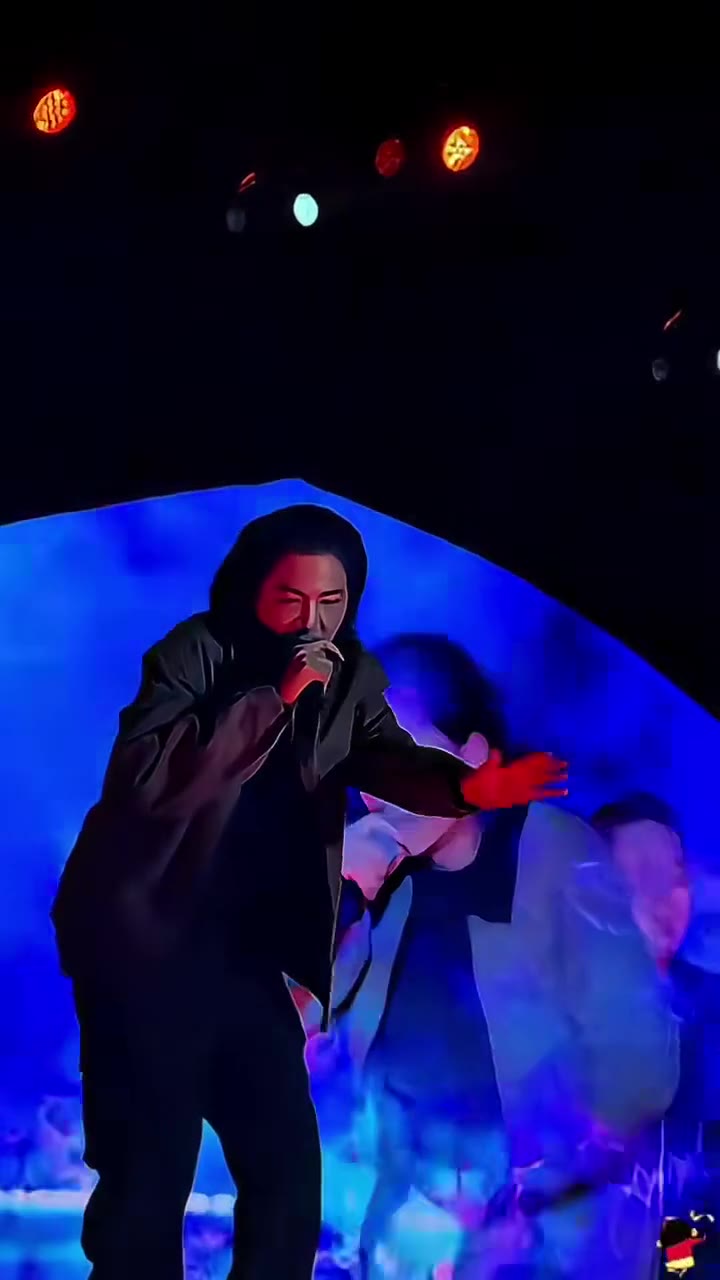
The stage singing AI effect is a short TikTok and CapCut AI trend in which an ordinary photo is turned into a clip of that person singing live on a concert stage. The footage looks like it was shot from the crowd: a singer with a handheld microphone under glowing blue LED screens, white spotlight beams and stage haze, the camera drifting in a little and the singer swaying, pointing and stepping back. The AI swaps the performer for the person in your photo.
It is a very new trend. The earliest tutorial videos we could find on TikTok are dated 2026-10-23, and the burst radar marked it as budding on 2026-10-26. Almost all of them are CapCut template tutorials captioned Viral stage singing AI effect, many in Burmese, plus one CapCut template that had been used about 4,000 times by 2026-10-29; no single original creator or original post is confirmed, and no creator is named here. The concert footage in these clips comes from live shows, and the sound under them is a track whose title we have not verified.
The clip on this page follows the first scene of those tutorial videos: one singer, full length, on a blue LED stage. The later scenes in the same videos (a second singer and a close-up) are separate shots, so we did not make them part of one clip.
This page does the whole thing for you. Upload one photo of yourself, press Generate, and videosi makes the 5-second stage clip with your face on the singer and the trend's original sound already on it. Nothing is installed and no CapCut template is needed.
Stage Singing AI Effect: shot by shot
- 0–1.5 s
Mic up
Full-length on the stage under blue LED and white beams: you hold the mic at your mouth, already mid-song, the camera a little below stage level.
- 1.5–3 s
Singing along
The handheld camera drifts in slowly while you sing, shift your weight and let your free hand hang or flick with the beat.
- 3–4.3 s
Step back
You sway back and step off the mark with one hand out as the lights sweep, the camera still on you in full length.
Tips for a better result
Face front, eyes to camera
A straight-on face is copied best. Profiles and photos looking down lose the likeness once the stage lights hit.
Upper body in view
Include the shoulders and chest. The singer is shown full length, so the model must invent clothes if the photo is a tight face crop.
Even light, no colour cast
Daylight or a plain room light keeps skin tone. A photo already tinted blue or red fights the stage lights.
Only you in the frame
Crop to the one person who should sing. Two people in the photo can merge into one performer.
Good to know before you make a Stage Singing AI Effect video
- Likeness is not guaranteed: strong stage light, beards and glasses drift the most.
- The singer's mouth moves like singing, but it is not synced to the words of the sound; the audio is the trend's original sound laid over the clip.
- The clip is a single 5-second scene. The multi-singer, multi-scene cuts in the tutorial videos are not reproduced.
- A failed, timed-out or blocked render returns its credits automatically.
Stage Singing AI Effect: questions
What is the stage singing AI effect trend?
The stage singing AI effect is a short TikTok and CapCut clip in which one photo of a person is turned into a video of them singing on a concert stage. On videosi it lasts 5 seconds. The earliest tutorials we found on TikTok are dated 2026-10-23, and no original creator is confirmed.
How do I make the stage singing AI effect from one photo?
Upload one photo of yourself to videosi, choose 9:16, 1:1 or 16:9 and press Generate. The stage singing clip is 5 seconds long and you write no prompt. Rendering takes several minutes, and the result is saved in My creations if you close the page.
Is there a website or generator for the stage singing AI effect?
Yes. videosi (videosi.io) is a web tool that makes the stage singing AI effect from one photo of you. The stage, the lights, the camera and the prompt are built in. A standard 5-second video (Standard model, 720p) is 5 credits, and the MP4 has no watermark.
Is there a stage singing CapCut template or TikTok filter?
Most of the trend was made with a CapCut AI template that creators shared in tutorial videos, and one such template had about 4,000 uses on 2026-10-29. Templates change often, so check inside CapCut. videosi is independent and not affiliated with TikTok or CapCut; it is a web tool that needs no template.
What AI model and prompt make the stage singing effect, and can I do it myself?
The videosi stage singing video is made with ByteDance's Seedance model (Seedance 2.0 Mini by default; Fast, Pro and Seedance 2.5 Ultra are one click away) from a five-part prompt plus a concert reference clip. Doing it yourself often takes several tries, because the model keeps the original singer or turns the scene into a studio shot.
How much does the stage singing AI effect cost, and is it free?
The stage singing AI effect on videosi is not free: there is no free generation and no free trial. A standard 5-second video (Standard model, 720p) is 5 credits; better models and higher resolutions cost more. Credit packs start at $6.99 for 10 credits and never expire, and a failed render returns its credits.
Why doesn't the singer in my stage video look like me?
The usual cause is the photo: a side profile, a tight face crop, strong colour tint or two people in frame. For the videosi stage singing clip use one sharp, even-lit photo with your face front and your upper body in view. Likeness is not guaranteed, and bright stage lights wash out faces the most.
Can I use someone else's photo, or a friend or family member?
Only if you have the right to use the photo. The videosi stage singing clip takes one photo of one adult and puts that person on stage, so use a photo of yourself or of someone who agreed to it. Do not post a clip of a real person singing words they never sang as if it were real; label it as AI-generated.
What does the stage singing AI effect mean?
"Stage singing AI effect" is the caption most tutorial videos use for a CapCut template that puts your photo on a concert singer. It describes what you see: you, a microphone, a lit stage. The videosi version is a 5-second clip, first seen in tutorials dated 2026-10-23.
What song is used in the stage singing AI trend?
The tutorials post the clips with a track under the label original sound, and we have not verified its title or artist, so no song name is given here. The videosi stage singing video is a 5-second MP4 that comes with that sound already on it. You can swap it on TikTok or Instagram.
Is the stage singing AI effect still trending?
It is just starting. As of October 2026 the stage singing AI effect is early: the first tutorials on TikTok are dated 2026-10-23, the trend radar marked it as budding on 2026-10-26, and the tutorial videos had passed 100,000 views each by 2026-10-29. videosi's version is early, not late.
Does the singer actually sing my words?
No. In the videosi stage singing clip your mouth moves like singing, but it is not lip-synced to any lyrics. The trend's original sound plays over the 5-second video. If you want specific lyrics synced, a lip-sync app is the better tool.
Can I post the stage singing video on TikTok?
Yes, if the photo is yours to use. The videosi stage singing video is a 5-second MP4 with no watermark, in 9:16 for TikTok, Reels and Shorts, and it comes with the trend sound. Label it as AI-generated, as TikTok asks for realistic AI content.
Trending this week
All trends this week

More effects like this
All viral effects
Go deeper on Stage Singing AI Effect
Make your Stage Singing AI Effect video
Upload a photo and press Generate. 10 credits, refunded if it fails.
Get the next trend first
One email when new trends land on videosi, about once a week. Unsubscribe in one click.
See videosi first on Google
Add videosi as a preferred source and our trend pages show up first in your Top Stories and AI answers on Google.