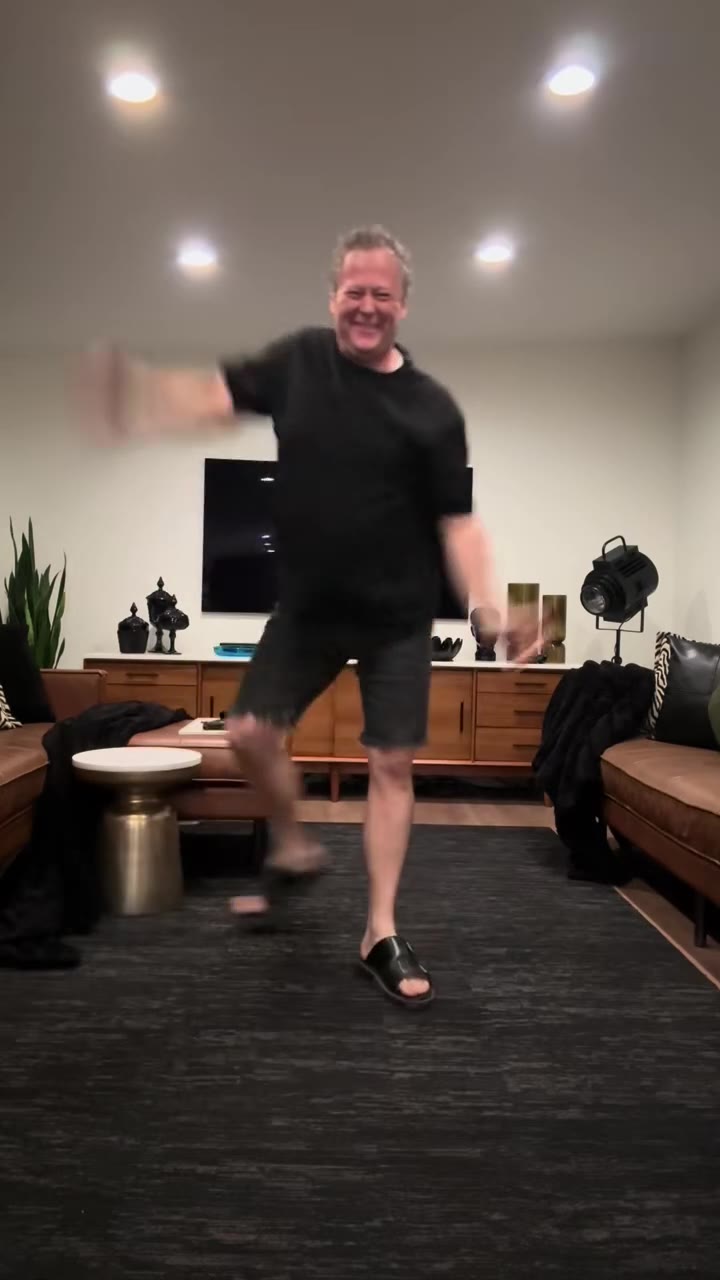
Huss huss huss AI is a 15-second selfie lip-sync video, made from one photo, in which you mouth the "in this town everybody goes out partying except me" sound and add the viral hand gestures. It needs no filming and no prompt, and the clip comes with the trend sound already mixed in. This guide answers the questions people ask once they have opened the huss huss huss AI generator, from how to time the lip-sync to what to do when a hand crosses the face.
Key takeaways
- The trend is a selfie lip-sync with five gestures: folded arms, an X, party hands, cupped hands and a shrug.
- The Roblox-style animation came first; the live-person selfie version followed from 17 November 2026.
- The sound is mixed in after rendering, and the mouth only follows it loosely.
- Hands crossing the face are the weak spot, so a sharp front-facing photo matters most.
- A 15-second video is 13 credits (Standard, 720p); packs start at $8.90 for 10 credits.
In this guide
- How do you lip-sync the huss huss huss sound?
- How do you remember the huss huss huss hand gestures?
- Why is the original huss huss huss video an animation?
- What if your hand covers your face in the video?
- Which photo works best for a huss huss huss video?
- Why is the trend sound mixed in after the video is made?
- How do you add your own twist, like the phonk and funk remixes?
- How should you label a huss huss huss AI video?
- How do you pick between 9:16 and 16:9?
- What does the huss huss huss AI video cost, and is it worth a try?
How do you lip-sync the huss huss huss sound?
Treat it as a performance, not a recital. The voice track is short and clean, so the trick is to mouth each line a half beat early and let your face carry the attitude. The opening line about everybody in town going out partying is delivered flat and unimpressed. Keep your lips relaxed there, then get sharper on the panting "huss" pulses that follow, where the mouth snaps open and shut on the beat.
Most people who film it themselves record a straight-on selfie at arm's length and play the sound from a second device so they can watch their timing. Do three or four takes and keep the one where the "huss" hits land with the head tilts. The clip you get from the huss huss huss AI page follows the same idea, but the mouth only tracks the sound loosely, so it reads as a performance to the track rather than a frame-perfect dub.
How do you remember the huss huss huss hand gestures?
Think of the clip as five small scenes, each with one gesture. In the first two seconds your arms are folded across the chest. From about two to five seconds the forearms cross into a big X on "except me", with the head tilting on each beat. Next come the party hands, both hands flicking and waving beside the face for roughly three seconds while the mouth keeps time with the pulses.
Around the eight second mark the hands curl into claws in front of the face and then cup the mouth, as if shouting down the street. The finish is open hands up in a shrug, a hand to the ear and neck, and a flat look into the lens. If you rehearse, say the scene names out loud (fold, X, party, cup, shrug) and your hands will follow. You do not need to memorize this to use the AI version, because the gestures are built in.
Why is the original huss huss huss video an animation?
The first version people mean is a Roblox-style animation in which a blocky townsperson dribbles a basketball and says everyone goes out partying except him. A cartoon character is a good fit for a sound like this. The voice track does the joke, the character only has to stand there and look left out, and anyone can reuse the audio without needing a face on camera.
That also explains the second wave. Once the sound was everywhere, people wanted to put themselves in the joke, and a selfie with hand gestures is the easiest way to do it. The live-person version is what videosi's huss huss huss AI makes. The Roblox animation itself is not reproduced there, only the selfie performance that came after it.
What if your hand covers your face in the video?
This is the hardest moment of the whole trend. Crossed forearms, an X in front of the chest and cupped hands all pass close to the mouth, and video models tend to smear fingers or soften the lips when that happens. People who try to build the clip by hand with a general video model often need four or five attempts for exactly this reason.
You can reduce the risk before you generate. Use a sharp, front-facing photo with even light so the face is easy to keep stable, and show your upper body if you can, so the model has less to invent. Skip sunglasses and caps, because anything that already hides the mouth makes a hand pass look worse. If a render still comes out soft around the hands, a failed, timed-out or blocked render returns its credits, and a fresh photo is the first thing to change before you try again.
Which photo works best for a huss huss huss video?
The scene is a close selfie, so a close, honest portrait wins. Face the camera, keep your head and shoulders in frame and avoid a tight crop that cuts off the chin or ears. Your hair and clothes in the photo are what you wear in the video, so pick a photo where you would be happy to appear exactly like that.
The room comes from the reference performance, which means a busy background in your photo is ignored. A plain wall behind you is still the safer choice, because it keeps attention on the face. Use only a photo of yourself, or of an adult who has agreed to it. Celebrities, public figures and minors are not accepted, and pet photos are not supported for this trend, since the performer is replaced with a person.
Why is the trend sound mixed in after the video is made?
Because the video model draws pictures, and the voice track already exists. The model draws the picture only, then the original trend audio is laid under it once the picture is finished. That keeps the sound identical to the one people are using in their own selfie lip-syncs, and it avoids a model inventing a different voice.
The practical result is that you can post the file as it is. Download the 15-second MP4 and upload it with the sound already on the clip. If you re-edit it in another app, keep the original audio track in place so the "huss" pulses still line up with the head tilts and gestures. Be aware that the mouth is only a loose match to the words, so avoid zooming in and cutting to a close-up that exposes it.
How do you add your own twist, like the phonk and funk remixes?
New versions of the huss sound appear daily, mostly phonk and funk remixes laid over the same selfie gestures. The gestures stay the same and only the beat underneath changes, so the cheapest twist is to swap the audio in your editing app after you download the clip. Because the trend is still young, a remix that lands on the same head tilts will look intentional.
You can also change the context rather than the music. Duet it with a friend's reaction, caption the "except me" moment with your own joke, or cut it against a clip of the party you are not at. Keep the cut short. The base clip runs 15 seconds, which is already shorter than the longest hand-filmed versions of about 22 seconds, so there is room to add a beat or a caption.
How should you label a huss huss huss AI video?
Label it as AI-made wherever the app asks, and say so in the caption if you want to be safe. It takes two seconds and removes any doubt about whether it is you on camera. The trend is a joke about being left out, so a tag such as "AI version" does not spoil it.
Also remember that sound rights belong to each platform. The trend audio has no credited artist and no single official song, and the videosi clip simply carries the same sound people are already using. If a platform mutes or limits a clip for audio reasons, that is the platform's call, and it is worth checking the in-app rules before you rely on the reach. videosi's page is independent and not affiliated with TikTok or CapCut.
How do you pick between 9:16 and 16:9?
Use 9:16 for TikTok, Reels and Shorts, because the trend lives in vertical feeds and a selfie fills that frame naturally. Choose 16:9 only if you plan to drop the clip into a wider edit, such as a reaction video, a slideshow or a YouTube compilation of the trend. The choice sets the frame only, and the performance is the same either way.
Do not choose it by guesswork. If you are unsure, make the vertical version, since it is the format of almost every huss lip-sync that spread in the first place. You can run a second render in the other format later if you need both, and each render is billed on its own.
What does the huss huss huss AI video cost, and is it worth a try?
A 15-second video on the Standard model at 720p is 13 credits. Credit packs start at $8.90 for 10 credits, so you buy a pack first and then spend credits on renders. Better models and higher resolutions cost more, and a failed render returns its credits.
Whether it is worth it depends on how fast you want to join. As of late November 2026 the sound has only been spreading for about ten days and is still growing, but trends like this often fade within weeks. If you want your own version while the sound is hot, upload one photo on the huss huss huss AI page, choose a format and wait a few minutes. If you want to film it yourself, the five scene list above is all the choreography you need.
Ready to try it? Upload one photo on the huss huss huss AI page and get your own version in a few minutes.