AI Parkour: The Barrier-Vault Video, Starring You
You vault, dive and roll over a row of concrete barriers while luxury cars and private jets blur past. One photo of you is all it takes.
Updated : Page published.
1Add your photo
What you'll get
Front-facing, well-lit selfies work best. One face per photo.
2Choose quality
By generating you confirm you have permission to use the people in your photos. Terms
No subscription needed · Ready in about 3 minutes · Failed renders are free
The AI parkour trend is a 14-second clip in which a person vaults, dives and rolls over concrete barriers on a private-jet apron in one side-on tracking shot, and videosi makes it from one photo of you.
- Fast facts
- First seen
- Stage
- Spreading
- Started on
- TikTok (unconfirmed)
- Sound
- Many clips are tagged with the sound known as "holy thuggin", but the track is not confirmed; the videosi video comes with the audio of the reference clip.
- Meaning
- The AI parkour trend is a short clip in which a photo of a person is turned into a barrier-vaulting parkour run in one side-on tracking shot.
- Related trends
- Car Jump AI Video
Page updates
- November 1, 2026 — Page published.
The AI Parkour prompt and model
AI Parkour is made with Seedance 2.0 / 2.5 (you pick the tier) by ByteDance. The prompt behind it has 5 parts, and the timing is what makes or breaks it.
- Model
- Seedance 2.0 / 2.5 (you pick the tier)
- Mode
- Photo + motion reference to video
- Length
- 14 seconds, 9:16, 1:1 or 16:9
- Input
- 1 photo
- Replace the runner The character in the reference clip is swapped for the person in your photo, real and photorealistic, and nothing of the original remains.
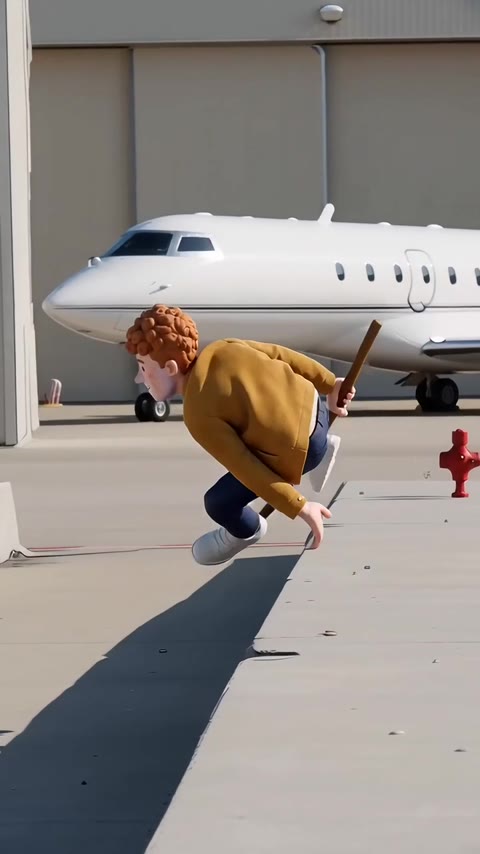
- Keep the take The barriers, the black cars, the white jets, the side-on tracking camera and the pace come from the reference clip.
- Identity lock Your photo is the only source for face, hair, build, skin tone and clothes, held in every frame including hands and arms.
- Key beats First vault, low dive, jet vaults, slide past the hydrant and the crouched finish, in that order.
- Rules One adult, five fingers, no text, logos or readable plates, no slow motion and no photo shown as its own shot.
Replace the curly ginger-haired animated character in Video 1 with the person from Image 1, as a real photorealistic person. Keep everything else from Video 1 as it is…
Why it goes wrong when you do it yourself
- Without an explicit replace instruction the model keeps the runner from the reference and only borrows your clothes.
- A face-only selfie gives the model no body to vault with, so legs and shoes are invented and drift between frames.
- Asked for parkour with no reference, models make slow, floaty jumps that do not clear the barrier in a single take.
- Left alone, the model adds text, logos or readable plates on the cars and jets, which is why the rules block forbids them.
AI Parkour examples
How to make your AI Parkour video
Upload one photo of you
A sharp, well-lit photo with your whole body in view, standing, so the model can see your legs and shoes. The clothes you wear in the photo are the clothes you vault in.
Pick a format
Choose 9:16 for TikTok, Reels and Shorts, 1:1 or 16:9. There is nothing else to set: the apron, the jets and the camera are built in.
Generate
Press generate and wait a few minutes. Your 14-second MP4 comes back with no watermark and the trend sound already on it.
Post it
Post the video as it is. Label it as AI-generated where the platform asks, because the vaults are not real footage of you.
What is the AI Parkour trend?
Updated · videosi is an independent tool. It is not affiliated with TikTok, Instagram, YouTube, or with the owners of any trend, song, game or brand named on its pages.
The AI parkour trend is a short clip in which an ordinary photo of a person is turned into a parkour run: they vault, dive and roll over a row of concrete barriers on an empty street or airfield apron, always in a side-on tracking shot. The joke is usually a caption such as "Trying parkour, I'll always get there first", and the person in the clip is whoever the maker put in. Creators also search for it as the "holy thuggin" parkour trend, after a sound that is used on many of the clips.
The earliest clips and CapCut tutorials we could find are dated 11 October 2026 on TikTok, so the wave is only a few weeks old and no original creator is confirmed. Most posts are CapCut-template tutorials: viewers copy the video link, open the template and drop in their own photo, which is why dozens of near-identical clips with small view counts appeared at once rather than one clearly viral original. The look is a single continuous take with a hard cut to a laser-slash transition in many of the tutorial intros.
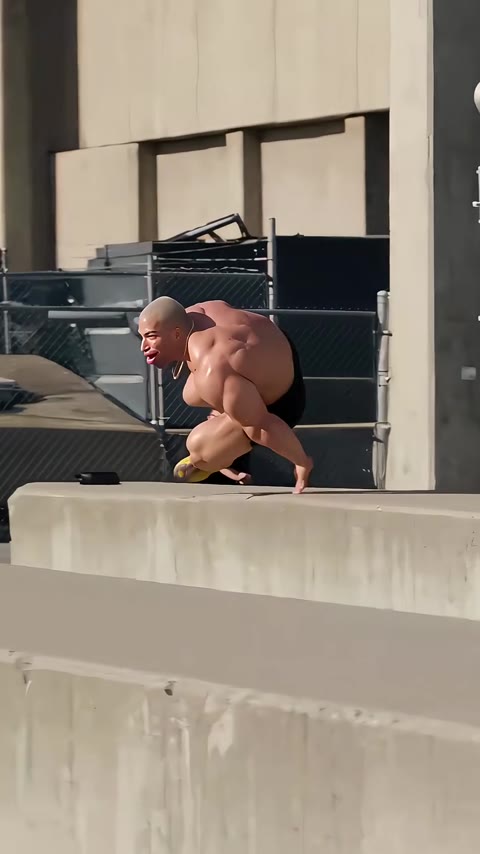
The version on this page follows a 14-second clip set on a private-jet apron: black luxury cars and white jets parked behind the barriers, a camera that tracks the runner from the side, and one vault after another until a final crouched landing. The videosi AI version replaces the runner with the person in your photo, keeps the barriers, the jets, the camera and the timing, and delivers the video with the trend sound already on it. One photo is enough; a full-body shot works best.
AI Parkour: shot by shot
- 0–2 s
First vault
The runner hits the first concrete barrier in front of a row of black luxury cars, one hand down, legs swinging over.
- 2–4 s
Low dive
A flat dive over the next barrier, arms out, with the parked cars passing behind in the side-on tracking shot.
- 4–7 s
Jet vaults
Two quick vaults with a white private jet coming into frame behind, the runner landing on one foot each time.
- 7–10 s
Slide and roll
A low dive and slide past the red hydrant, a crouch to absorb the landing, then straight back up into a sprint.
- 10–14 s
Last barrier
One more vault over a long barrier with a jet tail behind, then a crouched landing as the clip ends.
Tips for a better result
Whole body, standing
Parkour needs legs. A full-length photo gives the model your shoes and trousers; a head-and-shoulders crop makes it invent them.
Plain, fitted clothes
Clothes you actually wear and that fit the body outline help the likeness hold through the dives; long coats and big scarves blur.
One person, facing the camera
Keep other people out of the shot. The video has exactly one runner, so a second person in the photo is ignored.
Even daylight
Daylight with no hard shadow across the face keeps the skin tone and features stable when the camera tracks across the sun.
Good to know before you make a AI Parkour video
- Likeness is not guaranteed, and it is hardest in the fastest frames, the dives and the slide, where faces can soften.
- The set is fixed: a private-jet apron with concrete barriers. You cannot swap the location on this page.
- The vaults are AI-generated motion, not real footage of you, and the video will not show a real person's athletic ability; label it as AI where required.
- The video comes with the trend sound already on it. A failed, timed-out or blocked render returns its credits.
AI Parkour: questions
What is the AI parkour trend?
The AI parkour trend is a short clip, 14 seconds on videosi, in which a person vaults, dives and rolls over concrete barriers in one side-on tracking shot. The earliest CapCut-template clips we found are dated 11 October 2026 on TikTok, and no original creator is confirmed.
How do I make the AI parkour video from one photo?
Upload one full-body photo to videosi, pick a format and generate; you get a 14-second parkour video back, with the trend sound on it. There is no prompt to write and nothing else to set. On a standard 720p render it takes 12 credits, and the MP4 has no watermark.
Is there a website or generator for the AI parkour trend?
Yes. videosi (videosi.io) is a web tool that makes the AI parkour trend video from one photo of you. The barriers, the black cars, the private jets, the tracking camera and the prompt are built in, so you only choose the photo and the format. A standard 14-second video costs 12 credits at 720p.
Is there an AI parkour filter on TikTok or a CapCut template?
Most of the clips we found, from 11 October 2026 onwards, were made with a CapCut template and tutorials show you how to find it, but templates change or disappear often, so check inside CapCut. videosi is independent and not affiliated with TikTok or CapCut. Here you upload a photo and download a 14-second MP4 that already has the sound on it.
What AI model and prompt make the AI parkour video?
The videosi AI parkour video is made with ByteDance's Seedance model (Seedance 2.0 Mini by default; Fast, Pro and Seedance 2.5 Ultra are one click away) from a five-part prompt and a reference clip. Doing it yourself often takes four or five tries, because the model keeps the runner from the reference or makes floaty jumps.
How much does the AI parkour video cost?
A 14-second AI parkour video on videosi costs 12 credits on the standard 720p tier; faster and higher-resolution tiers cost more credits, and you see the exact number before you press generate. Credits come in one-off packs and monthly or yearly plans, they do not expire, and there is no watermark on the download.
Why did my AI parkour video not look like me?
The usual cause is a photo that shows only your face: with no body, the model invents the legs and shoes, and the likeness drifts in the fast dives. Use a sharp, standing, full-body photo in daylight, and expect softer faces in the 2 or 3 fastest frames. A failed render returns its credits.
Can I use a photo of a friend or my family in the parkour video?
Yes, as long as the person is an adult and has agreed to it. videosi makes the AI parkour video from one photo of one adult, so a friend, a partner or a colleague works if they stand in full view. Do not use photos of people who have not agreed, or of children.
What does "holy thuggin" mean in the parkour trend?
It is a sound name attached to the AI parkour trend, not the name of one creator: "Holy thuggin" is the sound tag on many CapCut-template clips from October 2026. No original post is confirmed.
What song or sound is used in the AI parkour trend?
Many clips from October 2026 are tagged "holy thuggin", but the track is not confirmed and several clips use other sounds. The videosi video comes with the audio of its reference clip already on it, so it plays with sound as soon as you download it, without searching for the track.
Is the AI parkour trend still trending?
As of 1 November 2026 the AI parkour trend is still spreading: CapCut-template clips and tutorials have been appearing since 11 October 2026, though most have small view counts. No single viral original has been confirmed, so it is worth posting soon, before near-identical clips fill the feeds.
Can I put a pet or a cartoon character in the AI parkour video?
Not on this page. The videosi AI parkour video is made for one photo of a real adult person; a pet or a drawing is not what it is tuned for and often comes out with the wrong body. Use the AI dance page for a person, or a pet page for a pet.
Will the AI parkour video get taken down if I post it?
Not because of the trend itself, but platforms ask you to label realistic AI videos, and TikTok and Instagram both have an AI label you can switch on. The vaults are AI-generated motion, not real footage of you, so label the post as AI-generated.
Trending this week
All trends this week
More effects like this
All viral effects

Read more
Make your AI Parkour video
Upload a photo and press Generate. 12 credits, refunded if it fails.
Get the next trend first
One email when new trends land on videosi, about once a week. Unsubscribe in one click.
See videosi first on Google
Add videosi as a preferred source and our trend pages show up first in your Top Stories and AI answers on Google.