Studio Neutral Zone AI: The Green Booth Video, Starring You
Two rivals share one neon-green recording booth: you rap the verse at the mic while the other one stands behind you, nodding and reacting. Two photos, or one photo of you both, is all it takes, and the track comes with the video.
Updated : Page published.
1Add two photos, one person each
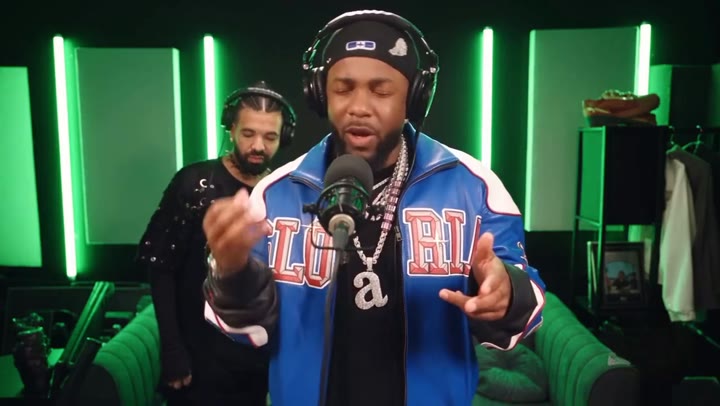
Photo 1 · You, the rapper at the mic
What you'll get
Front-facing, well-lit selfies work best. One face per photo; they don't need to be taken together.
2Choose quality
By generating you confirm you have permission to use the people in your photos. Terms
No subscription needed · Ready in about 3 minutes · Failed renders are free
Studio Neutral Zone AI is a 15-second clip in which two rivals end up in the same green recording booth, one rapping the verse at the mic while the other stands behind, nodding and reacting; videosi makes it from one photo of you and one of your rival.
- Fast facts
- First seen
- Stage
- Just starting
- Started on
- TikTok (unconfirmed)
- Sound
- The posts use the clip's own audio (a rap vocal over a track), listed as original sound; no single song is confirmed.
- Meaning
- "The studio is a neutral zone" is the joke caption on an AI-made clip in which two rap rivals share one green recording booth, one rapping while the other stands behind him and reacts.
Page updates
- November 1, 2026 — Page published.
The Studio Neutral Zone AI prompt and model
Studio Neutral Zone AI is made with Seedance 2.0 / 2.5 (you pick the tier) by ByteDance. The prompt behind it has 5 parts, and the timing is what makes or breaks it.
- Model
- Seedance 2.0 / 2.5 (you pick the tier)
- Mode
- Photo + motion reference to video
- Length
- 15 seconds, 9:16, 1:1 or 16:9
- Input
- 2 photos
- Identity lock Photo 1 is the only source for the rapper at the mic and Photo 2 for the person behind, each kept the same in every frame and never blended.
- Motion reference A short clip of the booth session supplies the shot order, the cut timing and the rap gestures; the model swaps both people and keeps the rest.
- Scene The neon-green booth with its vertical light strips, the green couch and the microphone, fixed for every video.
- Timeline Four beats over 15 seconds: close-up, wide of the booth, the rival reacting, back to close-up.
- Rules Exactly two people, headphones on both, five fingers per hand, no text, logos or subtitles, and no image shown as its own shot.
Replace the bearded rapper in the blue-and-white varsity jacket, black beanie and over-ear headphones who raps into the microphone in the foreground of Video 1…
Why it goes wrong when you do it yourself
- Without an identity lock the model keeps the original beanie, jacket and beard and only borrows your clothes.
- With two people the model often gives both the same face, or puts Photo 2 in the front; each person has to be named by position.
- Tight close-ups copy the face shape of the person in the reference, so a face can come out slimmer than your photo.
- Every try costs credits and several minutes, and a text prompt alone rarely reproduces the booth, the cuts and the headphones.
How to make your Studio Neutral Zone AI video
Add two photos, or one together
Photo 1 is you, the rapper at the mic; photo 2 is your rival, friend or partner standing behind you. Or upload one photo of you both, left for the one behind and right for the rapper.
Check both faces
Use a sharp, front-facing photo of one adult in each box. Faces and clothes come from the photos; the green booth is fixed.
Pick a format and generate
Choose 9:16 for TikTok, Reels and Shorts, 1:1 or 16:9, then press Generate. The 15-second MP4 has no watermark and comes with the track's sound lined up.
Post it with an AI label
Check the sound plays on the platform you post to, and label the clip as AI-generated.
What is the Studio Neutral Zone AI trend?
Updated · videosi is an independent tool. It is not affiliated with TikTok, Instagram, YouTube, or with the owners of any trend, song, game or brand named on its pages.
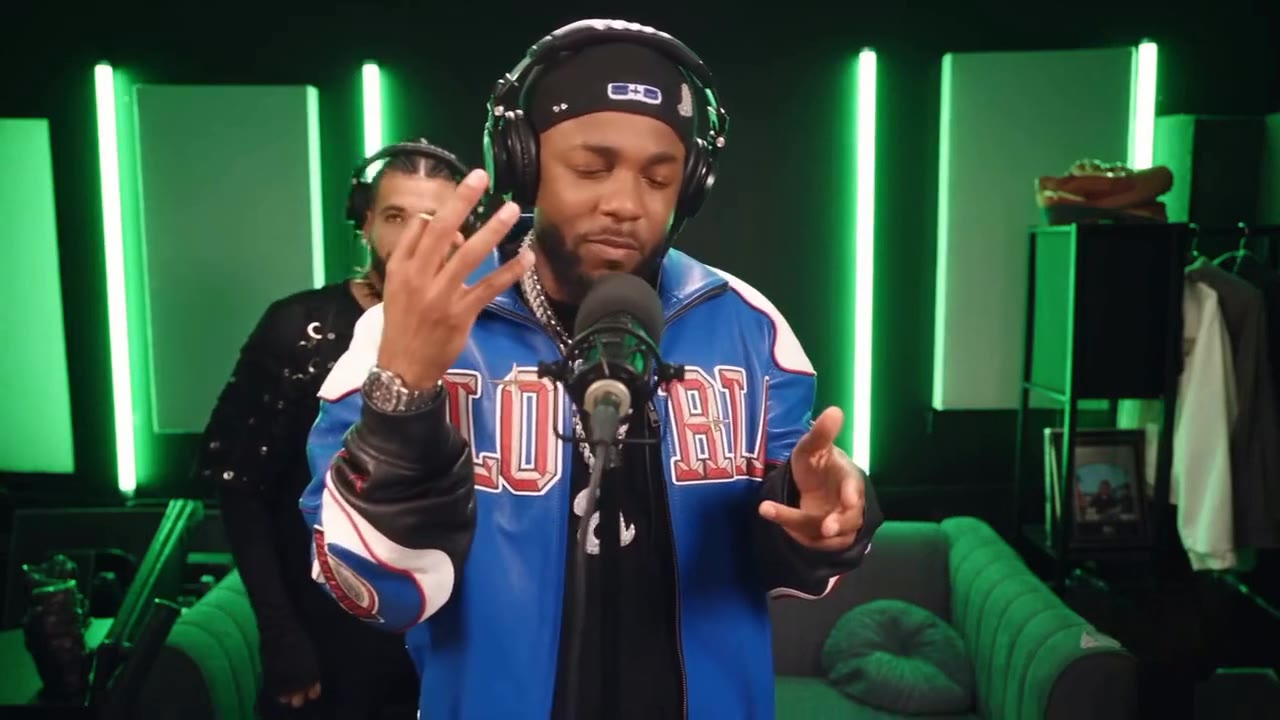
Studio Neutral Zone AI is a short AI-made clip built on a joke caption, "the studio is a neutral zone": two rap rivals who would never share a stage end up in the same neon-green recording booth, and the beef stays outside. One of them stands at the microphone in headphones, a beanie and a blue-and-white varsity jacket and delivers a verse; the other stands behind him in a black top and headphones, scratching his head, nodding and smiling at the lines. The AI version on this page puts you at the mic and a rival, friend or partner behind you.
The clip we followed is 20 seconds and was made with an AI video restyle tool, according to the captions on the TikTok posts. The earliest TikTok post we found with the line is dated 31 October 2026, and the posts around it are tagged with Drake; we could not confirm who made the first one or which rappers the likenesses are meant to be, so treat both as unconfirmed. It has only just started to spread and the numbers are small.
The videosi clip is 15 seconds. It opens on a tight close-up of the rapper at the mic with the second person behind, cuts to a wide shot of the green booth with its vertical neon strips and green couch, and goes back to close-ups. Photo 1 is the rapper in front, Photo 2 is the person behind. Both keep their own face and clothes; the booth, the camera moves and the timing are fixed.
The video comes with the sound of the clip it follows, lined up with the shots. That audio is the original clip's rap vocal and track, so posting it on TikTok or Instagram carries the usual music rights risk; if a platform mutes it, swap in a licensed sound. Your mouth is not lip-synced to the words.
Studio Neutral Zone AI: shot by shot
- 0–6 s
Close-up at the mic
Tight close-up on the rapper in headphones and a beanie, eyes closing on the lines, while the second person behind appears at the edge of frame with a hand to the back of the head.
- 6–10 s
Wide of the booth
The camera pulls back to a wide shot of the green-lit booth: the rapper centred at the mic with open hands, the other person behind on the left.
- 10–14 s
Rival reacts
Still wide, the rapper keeps trading lines with small head tilts and gestures while the person behind nods, smiles and shrugs.
- 14–15 s
Back to close-up
The cut returns to the tight close-up on the rapper, mid-line, with the second person leaning in behind.
Tips for a better result
Face and shoulders for both
The clip opens on a close-up and then goes wide, so each photo should show the face and shoulders sharply and evenly lit.
Headphones help, hats do not
Both people wear studio headphones in the clip. A hat or sunglasses in the photo hides the face the model has to keep.
One person per photo
Crop each box to one adult. A second face in a photo can blend into the other person.
Relaxed faces
A calm or slightly serious look suits the rap delivery. Big laughs and tilted selfies drift more in the close-ups.
Good to know before you make a Studio Neutral Zone AI video
- The clip has exactly two people. A photo with more faces can confuse it, and nobody else is added to the booth.
- Likeness is not guaranteed, especially in the tight close-ups where the face is large and the model can pull it toward the original rapper.
- Your mouth does not rap the verse; the clip is a performance with the track's sound on top, not a lip-sync.
- The video carries the audio of the clip it follows and the rights belong to its owners, so a platform may mute or flag it. The booth is fixed; you cannot upload your own room. A failed, timed-out or blocked render returns its credits.
Studio Neutral Zone AI: questions
What is the Studio Neutral Zone trend?
The Studio Neutral Zone trend is a short AI-made clip captioned "the studio is a neutral zone", in which two rap rivals share one green recording booth: one raps the verse, the other stands behind and reacts. The earliest TikTok post we found is dated 31 October 2026. videosi makes the AI version, 15 seconds, from one photo of you and one of your rival.
How do I make a Studio Neutral Zone AI video?
Upload two photos to videosi (you at the mic, your rival or friend behind you), or one photo of you both, choose 9:16, 1:1 or 16:9 and press Generate. The 15-second video needs no prompt and takes several minutes to render. It is saved in My creations if you close the page.
Is there a Studio Neutral Zone AI generator or website?
Yes. videosi (videosi.io) makes the Studio Neutral Zone AI video from two photos. The green booth, the cuts and the prompt are built in, so you only pick the photos and the format. A 15-second Standard 720p video is 13 credits, and the MP4 has no watermark.
Is there a TikTok filter or CapCut template for the Studio Neutral Zone video?
We found no official TikTok filter or CapCut template for it as of 1 November 2026; the original clips were made with an AI video restyle tool, according to their captions. videosi is independent of TikTok and CapCut. The videosi page is a web tool: upload two photos and download a 15-second MP4 with the sound on it.
What AI model and prompt make the Studio Neutral Zone video?
The videosi video is made with ByteDance's Seedance model (Seedance 2.0 Mini by default; Fast, Pro and Seedance 2.5 Ultra are one click away) from a five-part prompt and a motion reference clip. Doing it yourself often takes four or five tries because the model gives both people the same face or keeps the original rapper.
How much does the Studio Neutral Zone AI video cost?
It is not free: a 15-second Standard 720p video is 13 credits on videosi, and your first video on an account never costs more than 10. Credit packs start at $6.99 for 10 credits and never expire; plans start at $29.90 a month. Better models cost more, and a failed render returns its credits.
Why don't the two people in my Studio Neutral Zone video look like us?
The usual cause is the photos: a cropped face, a hat, sunglasses, heavy shadow or two people in one frame. For the videosi video use one sharp, evenly lit photo of one adult per box. Likeness is not guaranteed in the tight close-ups, where the model can pull a face toward the original rapper.
Can I use someone else's photo, or put a friend or rival in the booth?
Only if you have the right to use the photo. The videosi Studio Neutral Zone video turns one photo per person into a rap session in the booth; it will not put real people into a hug, a kiss or a fake statement. Use your own photos or ones you have permission for, and label the result as AI-generated.
What does "the studio is a neutral zone" mean?
"The studio is a neutral zone" is a joke caption: rivals leave their beef at the door when they step into a recording booth together. In the trend clips one rapper delivers a verse while the other nods along behind him. The videosi version is 15 seconds and puts you and a rival in that green booth.
What song or sound is used in the Studio Neutral Zone clip?
No single song is confirmed. The posts use the clip's own audio, a rap vocal over a track, which TikTok lists as original sound. The videosi video comes with that sound lined up to the shots, but the rights belong to its owners, so a platform may mute it; if it does, swap in a licensed sound.
Is the Studio Neutral Zone trend still trending?
It has only just started. The clip was circulating from about 23 October 2026, the earliest TikTok post we found is dated 31 October 2026, and view counts are still small, so we mark it emerging as of November 2026. The videosi version is two photos and 15 seconds, so it is cheap to join early.
Can I use ChatGPT, Sora, Veo or Kling to make the Studio Neutral Zone video myself?
You can try, but a plain text prompt rarely reproduces the green booth, the cuts and two separate faces. videosi uses a motion reference and a locked identity prompt for Seedance, so you get the same booth and shots from two photos. Sora, Veo and Kling are separate tools and are not part of videosi.
Will the post get flagged because of the sound?
It might. The videosi video carries the original clip's audio, so TikTok, Instagram or YouTube can mute it or limit reach depending on rights in your region. Label the clip as AI-generated, and if the sound is muted, replace it with a licensed track from the platform's own library.
Trending this week
All trends this week
More effects like this
All viral effects
Go deeper on Studio Neutral Zone AI
Motion-transfer remakes ↗
Want to see how motion-transfer clips like this are made? Our motion-transfer page explains the format and makes a Hotel Lobby version from one photo.
A solo rap clip ↗
Want a one-person rap performance? The Drake What Did I Miss AI page puts you in a cold storage room for 15 seconds.
Make your Studio Neutral Zone AI video
Upload two photos and press Generate. 13 credits, refunded if it fails.
Get the next trend first
One email when new trends land on videosi, about once a week. Unsubscribe in one click.
See videosi first on Google
Add videosi as a preferred source and our trend pages show up first in your Top Stories and AI answers on Google.