Street Character Collage AI: You, Inked and Collaged onto Your Own Street Photo
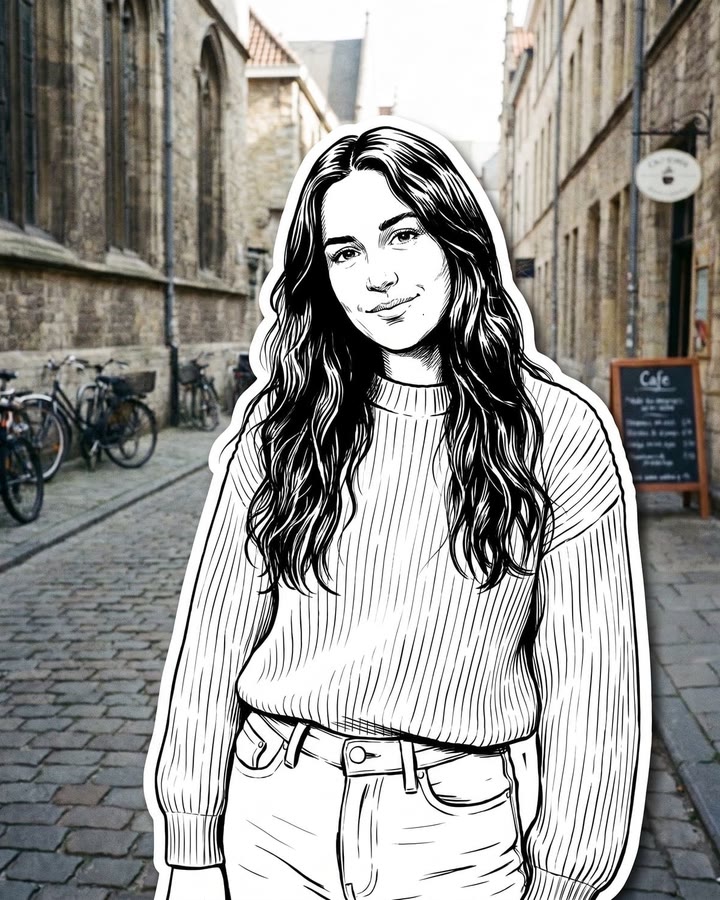
You, redrawn as a bold black ink character with a white sticker edge, standing in your own street photo while the street stays real. One photo of you is all it takes.
Updated : Page published.
1Add your photo
What you'll get
Front-facing, well-lit selfies work best. One face per photo.
By generating you confirm you have permission to use the people in your photos. Terms
No subscription needed · Ready in about a minute · Failed renders are free
The street character collage is a 2:3 picture in which the person in a real street photo is redrawn as a bold black ink character with a white sticker outline while everything else stays a photograph; videosi makes it from one photo of you.
- Fast facts
- First seen
- Stage
- Just starting
- Started on
- Other (unconfirmed)
- Sound
- A still-image look; no single sound.
- Meaning
- "Street character collage" refers to an AI picture in which a real street photo stays photographic and the person in it is redrawn as a black ink character with a white sticker outline.
Page updates
- November 1, 2026 — Page published.
The Street Character Collage AI prompt and model
Street Character Collage AI is made with GPT Image 2.5 by OpenAI. The prompt behind it has 5 parts, and the timing is what makes or breaks it.
- Model
- GPT Image 2.5
- Mode
- Photo to still image
- Length
- One 2:3 still image
- Input
- 1 photo
- Keep the photo The street, buildings, light and every passer-by stay exactly as photographed.
- Redraw the person Only the person becomes a black ink character with fine hatching and a clear likeness.
- Your details Hair, glasses, caps, jewellery, bag and clothes come from your photo as inked details.
- Sticker edge A thick white outline and a faint ground shadow make it look cut out and pasted on.
- Rules Adults only, five fingers, pure black and white, no text, no frame.
Edit Image 1 into one 2:3 portrait photograph. Keep the whole photo exactly as it was taken: the street, buildings, light, colours, camera angle…
Why it goes wrong when you do it yourself
- If you do not say the rest stays a photograph, the model redraws the whole street as a drawing.
- Without a likeness rule the ink figure becomes a generic cartoon with only your hair colour.
- Without the white outline and shadow, the drawing looks pasted flat instead of collaged.
- With several people in the photo, a loose prompt merges faces or redraws every passer-by.
Street Character Collage AI examples
How to make your Street Character Collage AI image
Upload a photo taken outside
One clear picture of you in a street, on a terrace or in a square, full or half body, with a background you like.
Generate
There is nothing to pick. Press Generate and the image is usually ready in about a minute.
Download and post
You get one 2:3 image, a tall portrait shape. Label it as AI-edited where the platform asks.
What is the Street Character Collage AI trend?
Updated · videosi is an independent tool. It is not affiliated with TikTok, Instagram, YouTube, or with the owners of any trend, song, game or brand named on its pages.
The street character collage is an AI picture that mixes two layers: a real photograph of a street, a terrace or a square, and a black ink drawing of the person standing in it. The drawing is pure black on white, with fine hatching in the hair and the folds of a sweater, and a thick white outline like a sticker, so it looks cut out of a sketchbook and pasted onto the photo. The cobbles, the bikes, the signs and the light behind stay exactly as photographed.
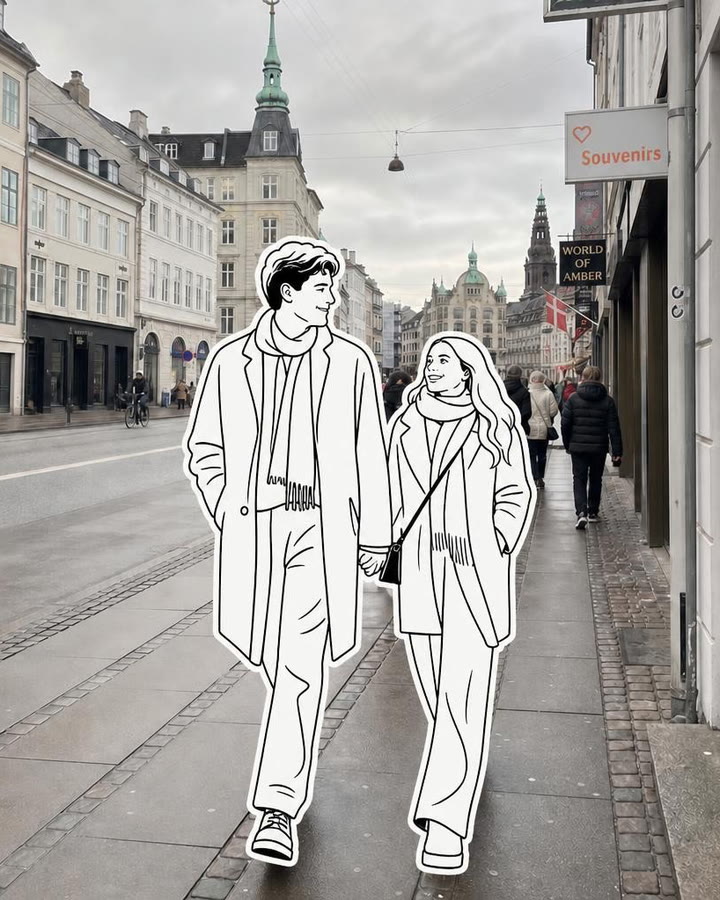
The name comes from AI image tools, where it appears as a ready-made 2:3 look that asks for one photo of you outdoors. We found it on a trend list of one AI image site on 1 November 2026, and a similar preset called Paper Cast describes the same black and white hand-drawn sticker cutout on a real street, including a couple walking hand in hand. Related prompt galleries show a looser pencil version, where a sketched copy of the person stands on a wall beside the real one. We did not find a dated TikTok or Instagram post under the exact name, so the origin is unconfirmed.
videosi makes the picture from one photo of you. Pick a photo taken outside with your whole body or at least half of it in view, press generate, and the result is one 2:3 still with you redrawn in ink: your hair, glasses, cap, jewellery and clothes become inked details, and the street behind you is untouched. If two people are in the photo, both become ink characters.
It is an emerging look, not a proven viral trend. As of 1 November 2026 we have only tool pages and no creator posts to show, so the pictures on this page are the style's examples from AI tool pages, shown with a slow zoom.
Tips for a better result
Show your whole outfit
Patterned or textured clothes give the ink linework more to draw; a flat plain outfit can look empty.
Add accessories
Glasses, a cap, jewellery and a bag become inked details and make the character look like you.
Choose a background you like
The street stays exactly as photographed, so pick a photo whose scene you want to keep.
Keep it sharp and evenly lit
Blurry or backlit pictures lose the face details the drawing needs for a likeness.
Good to know before you make a Street Character Collage AI image
- The result is a still image, not a video, and it has no sound.
- The look is fixed: black ink with a white sticker outline. You cannot pick colour or another drawing style on this page.
- The character is a drawn likeness, so small details such as tattoos, thin jewellery or text on clothes can change.
- The street is kept, but the model may soften small details in the background.
- A failed or blocked generation returns its credits automatically.
Street Character Collage AI: questions
What is the street character collage AI trend?
The street character collage is an AI picture in which the person in a real street photo is redrawn as a black ink character with a white sticker outline. As of 1 November 2026 it is an emerging look found on AI image tools. videosi makes it from 1 photo of you.
How do I make a street character collage from my own photo?
Upload 1 clear photo of yourself outdoors on the videosi street character collage page and press Generate. There is nothing to pick and no prompt to write. It costs 1 credit, takes about a minute and returns one 2:3 image with you drawn in ink on your real background.
Is there a street character collage AI generator?
Yes. videosi (videosi.io) is a web generator for the street character collage: 1 photo in, 1 finished 2:3 still out. It runs in a phone or desktop browser with no app to install, and you never have to write or paste a prompt.
What is the street character collage prompt?
Most prompts for this look ask the model to keep the real photo and redraw only the person as a bold black ink figure with a thick white sticker outline. videosi keeps its exact 1 prompt private and applies it for you, so the only input is your photo.
Is there a TikTok filter or CapCut template for the street character collage?
We found no TikTok filter or CapCut template under this name as of 1 November 2026; the look appears on AI image tools. videosi is independent and not affiliated with TikTok or CapCut. Its page is a separate web tool that returns 1 still image from your photo.
What AI model makes the street character collage?
The videosi page runs on GPT Image 2.5, an image model made by OpenAI, with your photo as the only source for the person. It returns 1 vertical 2:3 still at about 1K. The full prompt stays private; the structure and common mistakes are in the how it is made section.
How much does the street character collage cost?
One street character collage image costs 1 credit on videosi. Credit packs start at $6.99 for 10 credits and do not expire, and plans start at $29.90 a month. There is no free generation on this page. A failed generation returns its credits automatically.
Why doesn't the ink character look like me?
The drawing is built from your face, hair and outfit, so a small, blurry or backlit photo gives it little to copy. Use 1 sharp, evenly lit photo with your face and whole outfit visible, and avoid sunglasses and heavy filters. Generate again if the first likeness is off.
Can I use a photo of someone else, a pet or my family?
Use photos of adults who agreed, such as yourself or a friend. If 2 adults are in the picture, both are redrawn as ink characters side by side. Children and pets are not supported on this page.
Can I get the ink character in colour or another style?
No. The videosi street character collage is always black ink on white with a white sticker edge. For a coloured pencil version of the same idea, see the doodle street portrait page, which redraws you as a doodle instead.
What does street character collage mean?
Street character collage is the name of an AI picture style in which a real street photo stays photographic and a person in it becomes a hand-inked character pasted on top like a sticker. As of 1 November 2026 the name comes from AI image tools, not from one creator, and its origin is unconfirmed.
What song or sound is used in the street character collage?
No song is tied to the street character collage as of 1 November 2026: it is a still picture, not a video trend. The videosi result is 1 image with no sound, so you choose the music yourself when you post it.
Is the street character collage still trending?
As of 1 November 2026 it is emerging: we found the name on AI tool pages but no dated viral post. Similar sketch and sticker looks have spread in 2026, so it may grow. videosi will update this page if the stage changes.
Is the result a video or an image?
An image. The page produces 1 still 2:3 picture per generation, not a video, and it has no sound. The moving clips on this page are slow zooms of example pictures from AI tool pages, shown for reference.
Trending this week
All trends this week
More effects like this
All viral effects
Make your Street Character Collage AI image
Upload a photo and press Generate. 1 credits, refunded if it fails.
Get the next trend first
One email when new trends land on videosi, about once a week. Unsubscribe in one click.
See videosi first on Google
Add videosi as a preferred source and our trend pages show up first in your Top Stories and AI answers on Google.