AI Whiteboard Video: Your Subject, Drawn in Marker
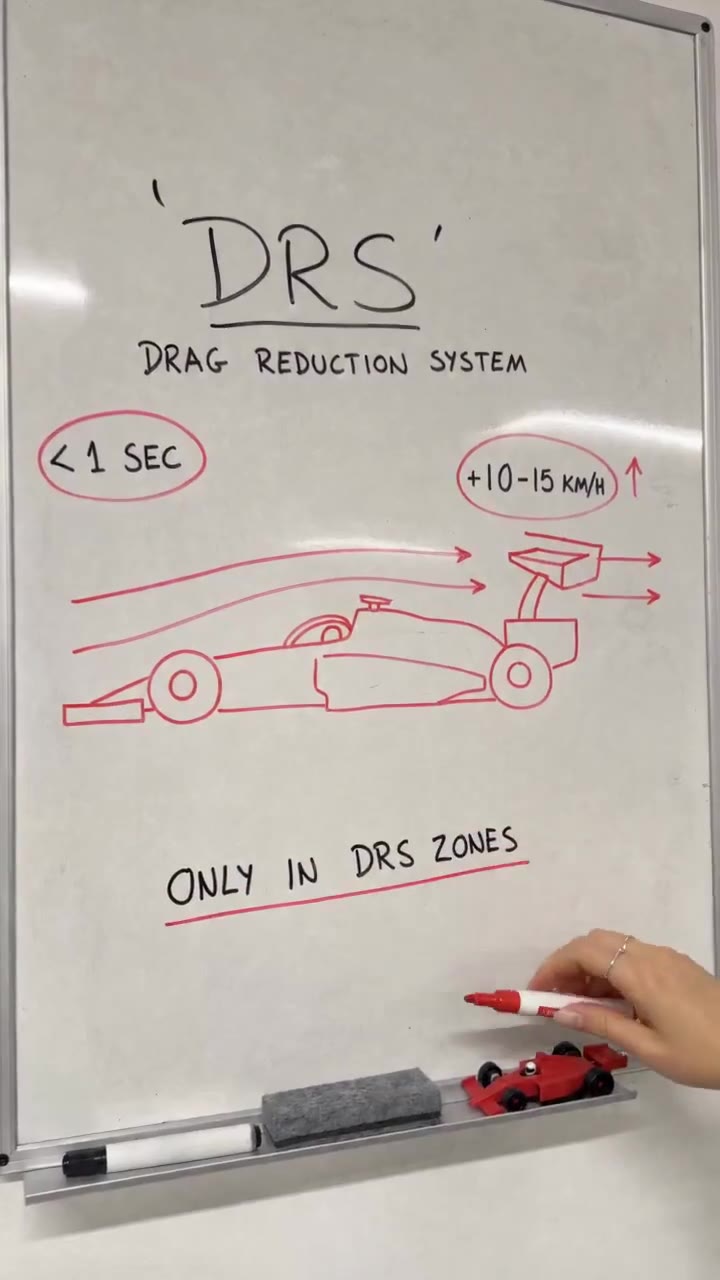
A hand letters a title, sketches your subject in red marker, circles two notes and underlines the point, all in one 15-second take. One photo of what you want explained is enough.
Updated : Page published.
1Add your photo
What you'll get
Front-facing, well-lit selfies work best. One face per photo.
2Choose quality
By generating you confirm you have permission to use the people in your photos. Terms
No subscription needed · Ready in about 3 minutes · Failed renders are free
The whiteboard explainer AI video is a 15-second clip in which a hand letters a title, sketches one subject in red marker and underlines the key point on a whiteboard; videosi makes it from one photo of your subject.
- Fast facts
- First seen
- Stage
- Just starting
- Started on
- Instagram (unconfirmed)
- Sound
- The reference clip has no sound track and no single sound is tied to the format; the videosi video is silent.
- Meaning
- The whiteboard explainer is a short vertical video format in which one hand letters a title and sketches one idea in marker on a whiteboard in a single take, usually in about 15 seconds.
- Related trends
- Instagram Profile Cleaning AI Video, Birthday Champagne Trend
Page updates
- November 1, 2026 — Page published.
The AI Whiteboard Video prompt and model
AI Whiteboard Video is made with Seedance 2.0 / 2.5 (you pick the tier) by ByteDance. The prompt behind it has 5 parts, and the timing is what makes or breaks it.
- Model
- Seedance 2.0 / 2.5 (you pick the tier)
- Mode
- Photo + motion reference to video
- Length
- 15 seconds, 9:16, 1:1 or 16:9
- Input
- 1 photo
- Subject lock Your photo is the only source for what gets drawn, so the marker sketch keeps its shape, proportions and main colours.
- Motion reference A short whiteboard clip supplies the hand, the camera angle and the order and pace of every stroke.
- Board A plain whiteboard with pens, eraser and a small toy of your subject on the tray, lettering in neat black capitals.
- Timeline Five beats over 15 seconds: title, subtitle, the drawing, two circled notes and one underlined closing line.
- Rules One hand, five fingers, no other people, short correctly spelled words, no logos or watermark.
Replace the topic on the whiteboard in Video 1 with the subject of Image 1. Keep the same hand, pens, camera angle, order, pace and length…
Why it goes wrong when you do it yourself
- Ask a video model for a whiteboard explainer with no reference and you get a talking presenter or a slide, not one hand drawing in one take.
- Without a subject lock the model draws a generic picture instead of your car, pet or product.
- Text is the weak spot: long labels, numbers and small print warp, so the instructions have to force short plain words.
- Every try costs model credits and several minutes, and the drawing beat is the one that most often goes wrong.
How to make your AI Whiteboard Video video
Upload one photo of your subject
A clear photo of the thing you want explained: one car, product, pet, place or person, with the whole subject in view.
Pick a format
Choose 9:16 for Reels, TikTok and Shorts, 1:1 or 16:9. There is nothing to type: the title and notes are written for you.
Generate
Press Generate. The 15-second MP4 has no watermark and takes a few minutes; it is also saved in My creations.
Add your sound and post
The clip is silent. Lay your own music or a voiceover on it in your editor, then post it and label it as AI-generated.
What is the AI Whiteboard Video trend?
Updated · videosi is an independent tool. It is not affiliated with TikTok, Instagram, YouTube, or with the owners of any trend, song, game or brand named on its pages.
The whiteboard explainer is a short vertical clip with one idea and one hand. A marker letters a title on a clean whiteboard, a small subtitle goes underneath, then a red marker drawing grows line by line with arrows around it. Two circled notes and one underlined closing line finish the board. Nothing else moves: no face, no voiceover on screen, just the pen and the page. The version we studied explains an F1 racing term with a drawn car, and the format works for any subject you can sketch.
It spread as an Instagram Reels style in autumn 2026, where creators explain a sport, a product or a rule in about fifteen seconds with a whiteboard. We could not identify the original creator or the exact date of the first post, and TikTok searches for the format mostly return sketching and business explainer videos rather than one single trend, so videosi treats it as a new format that has only just started spreading and has no confirmed sound.
The AI version works in reverse of the real thing. In the real clip someone drew by hand for ten minutes and sped it up. Here you give videosi one photo of the subject (a car, a pet, a product, a landmark, a person) and it renders a new 15-second board in the same style: a title naming your subject, a red marker sketch that follows your photo, two circled notes and a closing line.
The lettering is generated by the model, so keep expectations modest: short plain words usually come out right, long phrases and numbers can warp. The clip is silent, so add your own music or voiceover when you post it.
AI Whiteboard Video: shot by shot
- 0–3 s
Title
The hand letters a one or two word title in black capitals and underlines it.
- 3–6 s
Subtitle
A small line of two to four words goes under the title as the explainer's subject.
- 6–10 s
The drawing
The red marker sketches your subject from your photo, then adds arrows around it.
- 10–13 s
Circled notes
Two short notes appear and get circled, one on each side of the drawing.
- 13–15 s
The point
A closing line is written below, underlined, and the pen leaves the board.
Tips for a better result
One subject, whole in frame
A single object centred in the photo gives the cleanest sketch. Crowded scenes force the model to guess what the board is about.
Simple, recognisable shape
Cars, bottles, shoes, animals and landmarks sketch well because the outline carries the idea. Fine patterns turn into scribbles.
Plain background
A neutral background keeps the model from drawing the clutter around your subject as part of the diagram.
Side or three-quarter view
The drawing in the original is a side view, so a side or three-quarter photo matches how the marker sketch is built.
Good to know before you make a AI Whiteboard Video video
- The title, notes and closing line are written by the model from your photo; you cannot choose the exact words, and long words or numbers can come out misspelled.
- The hand, sleeve and watch belong to the reference clip, so it is always the same style of hand and never your own.
- The drawing is a marker sketch of your photo, not a copy: expect simplified lines and colours.
- The clip is silent. A failed, timed-out or blocked render returns its credits automatically.
AI Whiteboard Video: questions
What is the whiteboard explainer trend?
The whiteboard explainer is a 15-second vertical video in which one hand letters a title, sketches a single subject in red marker and underlines the point on a whiteboard. videosi makes the AI version from one photo. We first saw the format on 2026-11-01, no original creator is confirmed, and it has only just started to spread.
How do I make a whiteboard explainer video with AI from a photo?
Upload one photo of your subject to videosi, choose 9:16, 1:1 or 16:9 and press Generate. The 15-second whiteboard explainer video needs no prompt: a marker letters a title, sketches your subject, circles two notes and underlines a closing line. Rendering takes a few minutes and the result is saved in My creations.
Is there a website or generator for AI whiteboard explainer videos?
Yes. videosi (videosi.io) makes the whiteboard explainer video from one photo of your subject. The whiteboard, the hand, the camera and the prompt are built in, so you only pick the photo and the format. A standard 15-second video (Standard model, 720p) is 13 credits and the MP4 has no watermark.
Is there a TikTok filter or CapCut template for the whiteboard explainer?
We did not find a filter or a template that draws your own subject. Real whiteboard explainers are filmed by hand and sped up, and drawing animation apps are a different style. videosi renders a 15-second clip from your photo instead, so there is nothing to film, speed up or draw yourself.
Which AI model and prompt does the whiteboard explainer use?
videosi uses ByteDance's Seedance, 2.0 or 2.5 depending on the tier you pick, with a short whiteboard clip as the motion reference and your photo as the subject. The full prompt is not published. It tells the model to keep the hand, camera and stroke order and to swap the topic for yours.
How much does a whiteboard explainer video cost on videosi?
A standard 15-second whiteboard explainer on videosi (Standard model, 720p) costs 13 credits. Higher resolutions and tiers cost more, and the price shows before you press Generate. There is no free generation, and a failed or timed-out render returns its credits automatically.
Why is the text on my whiteboard video misspelled or the drawing wrong?
AI video models are weakest at text, so on videosi a long label or a number on a 15-second whiteboard can warp. A cluttered photo also makes the sketch drift. Use one clear subject on a plain background, then generate again. Typing in your own title or notes is not possible on this page yet.
Can I explain something other than a car, like a pet or a product?
Yes. The photo only has to show one clear subject: a product, a pet, a landmark, a car or a person, who is drawn as a marker portrait. The whiteboard explainer on videosi sketches what the photo shows in 15 seconds, and the hand and pens always stay the same.
What does "whiteboard explainer" mean?
A whiteboard explainer is a short video that explains one idea by drawing it in marker while the viewer watches; videosi makes the trend version from a photo. It is vertical, about 15 seconds and silent or set to music, with a hand, a title, one sketch, two circled notes and one underlined line.
What song or sound is used in the whiteboard explainer?
No single sound is tied to the whiteboard explainer. The reference clip we studied, dated 2026-11-01, has no sound track at all, and creators use their own music or voiceover. The videosi video is silent, so lay any track you like over it in your editor.
Is the whiteboard explainer trend still trending?
As of November 2026 the whiteboard explainer is an emerging format: we first saw it on 2026-11-01 and it has only just started spreading. We could not find one viral original, so how big it grows is unknown. Check the videosi trending page for updates.
Do I have to label a whiteboard explainer video as AI-generated?
Yes, it is good practice and often required. Instagram, TikTok and YouTube ask you to label realistic AI-made video. The videosi whiteboard explainer is a 15-second AI-generated clip, so tick the AI label when you post it and do not present it as footage of a real person drawing.
Trending this week
All trends this week


More effects like this
All viral effects
Go deeper on AI Whiteboard Video
Make your AI Whiteboard Video video
Upload a photo and press Generate. 13 credits, refunded if it fails.
Get the next trend first
One email when new trends land on videosi, about once a week. Unsubscribe in one click.
See videosi first on Google
Add videosi as a preferred source and our trend pages show up first in your Top Stories and AI answers on Google.