Old Photo Animation AI Generator
Upload an old photograph and see the person in it blink, smile and move for a few seconds.
Updated
1Add your photo
Front-facing, well-lit selfies work best. One face per photo.
2Movement
3Choose quality
By generating you confirm you have permission to use the people in your photos. Terms
In one sentence
The old photo animation trend is a five-second video in which a person in a still portrait blinks, smiles and moves slightly, as if the photograph came alive; videosi makes it from one photo.
- Fast facts
- First seen
- Sound
- Not recorded on this page.
- Meaning
- Old photo animation is a short video in which a person in a still photograph blinks, smiles and moves slightly, as if the photo came alive.
- Related trends
- AI Anime Filter
Old Photo Animation examples
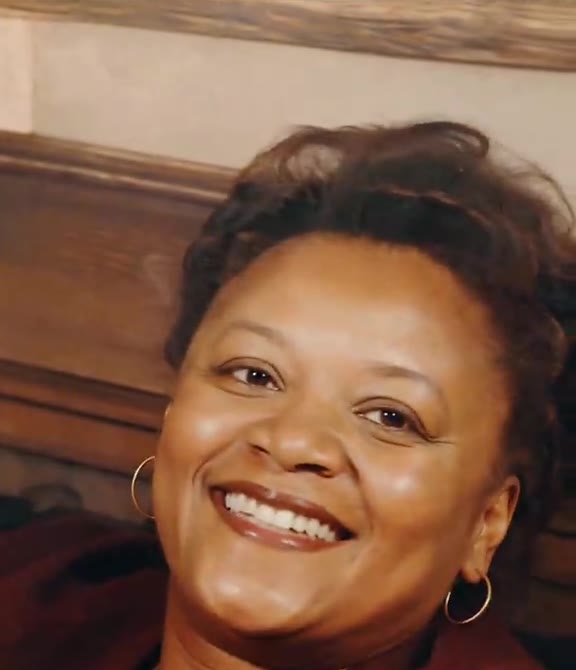
Woman smiles back
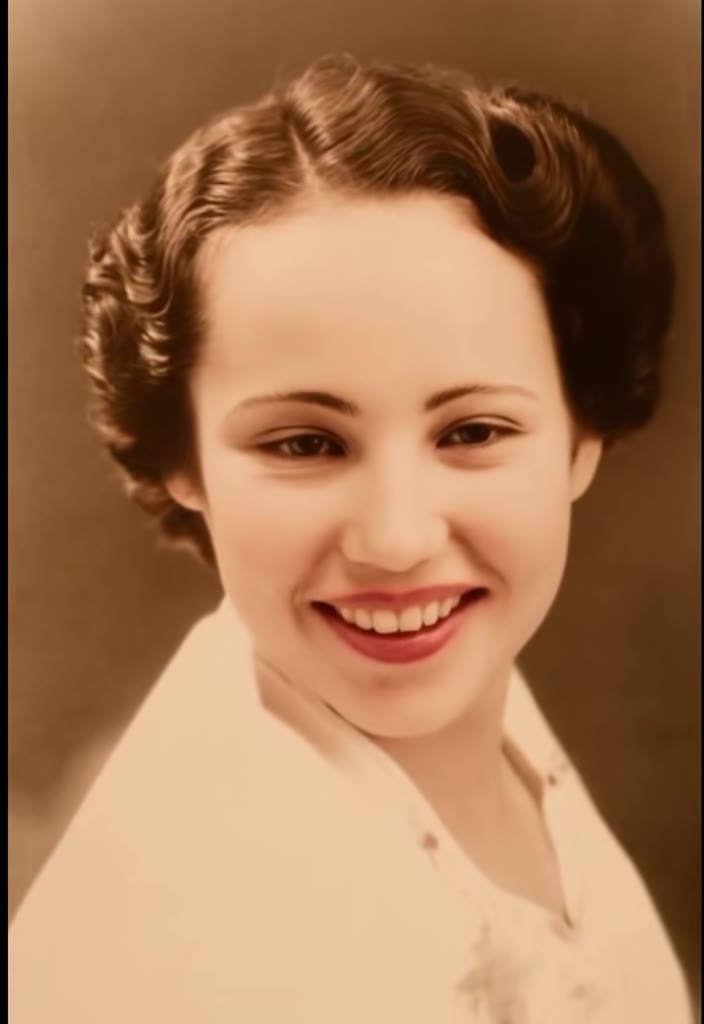
Vintage portrait smiles
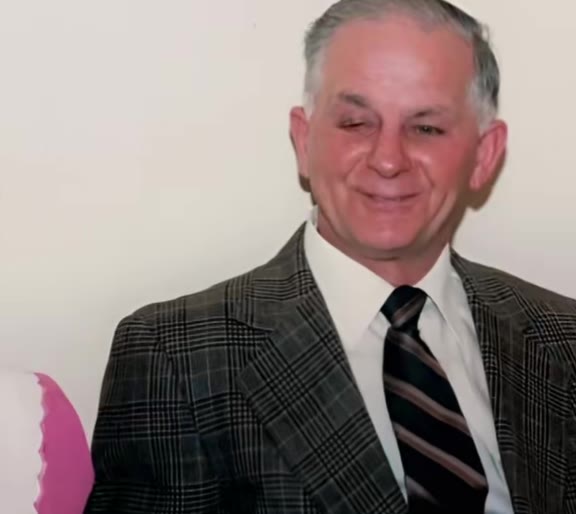
Grandpa grins
How to make your Old Photo Animation video
Upload the photograph
A scan or a phone photo of the print. Crop out the border and anything written on it.
Choose the movement
A soft smile or a look around the room.
Generate and download
The five-second video is usually ready in one to three minutes.
What is the Old Photo Animation trend?
Updated · videosi is an independent tool. It is not affiliated with TikTok, Instagram, YouTube, or with the owners of any trend, song, game or brand named on its pages.
Animating old photographs became a public phenomenon in February 2021, when the genealogy company MyHeritage released a feature called Deep Nostalgia. It made the face in a still portrait blink and turn, and within days people were posting moving versions of great-grandparents they had only ever seen in a frame on the wall. The reactions were split between people who found it moving and people who found it unsettling, and both groups shared it.
The idea has stayed popular because the need behind it does not go away. Families have boxes of prints of people who were never filmed. A few seconds of natural movement is the closest those photos can come to a video, and the clips are passed around at anniversaries, memorials and birthdays.
Today's photo-to-video models go further than the first face-only animations. They can move the shoulders and hands and keep the paper grain and tone of the original, so the result still looks like the photograph and not like a new picture.
Tips for a better result
Photograph the print properly
Lay it flat in daylight, no flash, and shoot from straight above. Glare across the face is the most common reason for a poor result.
One person works best
Group portraits can be animated, but each face gets less detail. Crop to one or two people if you can.
Keep it subtle
Smile is the gentlest option and keeps the likeness best. Keep the movement small: hands are where older, low-detail photos struggle.
Damage across the face
Creases and tears over the eyes or mouth are guessed at by the model. Use an undamaged copy if the family has one.
Good to know before you make a Old Photo Animation video
- Glare, creases and tears across the face or eyes are guessed at by the model, so use an undamaged copy if one exists.
- Group portraits can be animated, but each face gets less detail than in a single portrait.
- Hands are where old, low-detail photos struggle. Smile keeps the likeness best.
- Likeness is not guaranteed. A failed or blocked generation returns its credits automatically.
Old Photo Animation ideas and prompts
| Idea | Prompt | |
|---|---|---|
| Grandparent's portrait | The person in the old photograph blinks, breathes and smiles softly, turning their head slightly. | |
| Wedding photograph | The couple in the old photograph look at each other calmly and nod, then look back to the camera. | |
| Military or school portrait | The person in the formal portrait blinks, breathes and smiles softly. |
Old Photo Animation: questions
What is old photo animation and where did it come from?
Old photo animation is a short video in which a person in a still photograph blinks, smiles and moves. The videosi page traces the public trend to February 2021, when MyHeritage released Deep Nostalgia. Today's photo-to-video models can also move shoulders and hands. videosi is not affiliated with MyHeritage.
How do I animate an old family photo?
Take a photo of the print in daylight from directly above, crop the border, and upload it to videosi as a JPG, PNG, WEBP or HEIC. Choose a soft smile or a look around. The old photo animation is usually ready in one to three minutes as a five-second video.
What is the best website to bring an old photo to life?
videosi (videosi.io) is a web tool that does old photo animation from one photo, with no prompt and no app to install. It keeps the paper grain and tone of the original, so the result still looks like the photograph. A standard 5-second video (Standard model, 720p) is 5 credits and downloads without a watermark.
Is there a TikTok or CapCut filter that animates old photos?
Those apps have their own photo-animation effects, which change often, so check inside them. videosi is independent and not affiliated with TikTok or CapCut. The videosi old photo animation is a separate web tool: you upload a scan, download an MP4, and add any music in the app where you post.
Which AI animates old photos, and can I do it myself?
The videosi old photo animation runs on a third-party AI video model that videosi chooses and lists on videosi.io/about. Doing it yourself in another tool needs a good scan, a written prompt and several tries to keep the face unchanged. In videosi the instructions are built in and you only pick the movement.
Can I animate old photos for free?
Old photo animation on videosi is not free: there is no free generation and no free trial. A standard 5-second video (Standard model, 720p) is 5 credits; better models and higher resolutions cost more. Credit packs start at $6.99 for 10 credits and never expire; plans start at $29.90 a month. Purchases are final; a failed render returns its credits automatically.
Why does the person in my animated old photo look different?
Likeness drifts in old photo animation when the face is small, blurred, damaged or covered by glare. videosi keeps the face best from a flat, daylit scan with no flash, and from the gentle smile option. Likeness is not guaranteed. A failed or blocked generation returns its credits automatically.
Trending this week
All trends this week
More effects like this
All transformation effects
Make your Old Photo Animation video
Upload a photo and press Generate. 5 credits, refunded if it fails.
Get the next trend first
One email when new trends land on videosi, about once a week. Unsubscribe in one click.
See videosi first on Google
Add videosi as a preferred source and our trend pages show up first in your Top Stories and AI answers on Google.