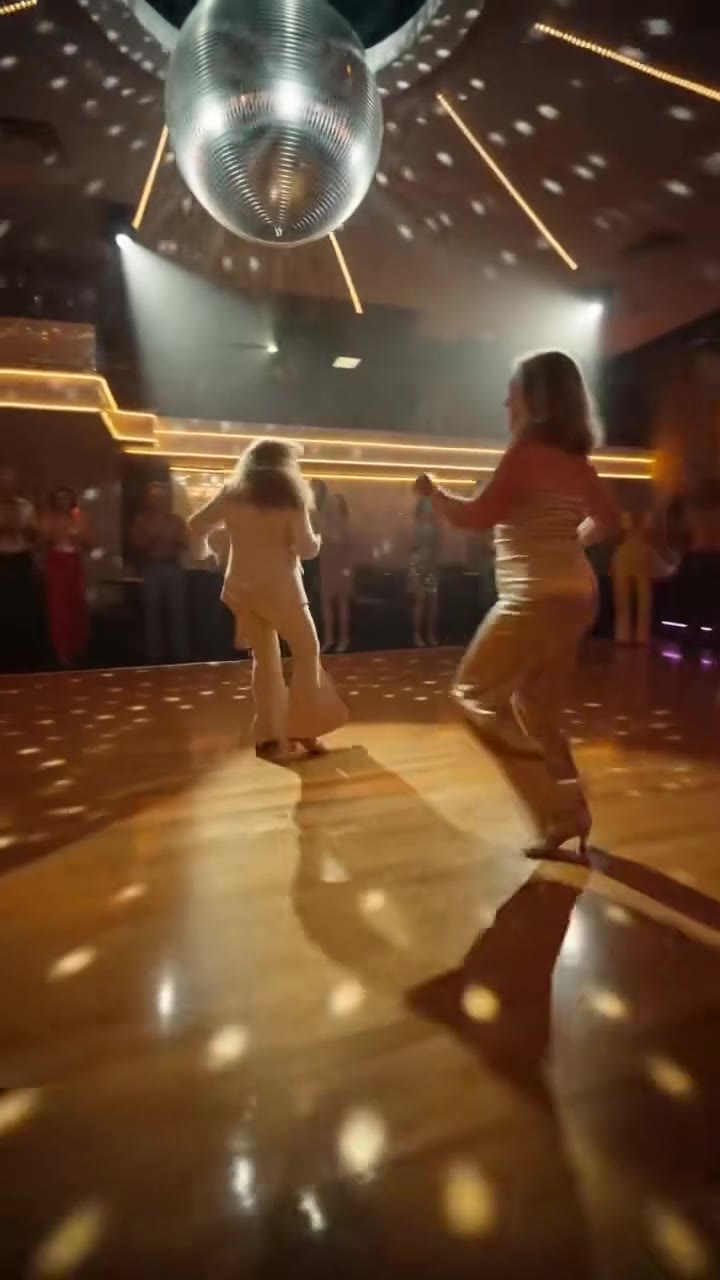
The Uptown Funk AI video is an 11-second clip in which one photo of you leads a line of backup dancers down a retro city street, styled after the 2014 music video. You upload the photo, pick a crew and press Generate; the clip comes back with the Uptown Funk sound already on it.
This guide answers the questions that come up after the first look: what the trend is called, why this video works as a template, which crew and photo to choose, and how to post it. The tool itself is on the Uptown Funk AI video page.
Key takeaways
- "Uptown Funk" is the song; "Uptown Groove" is the name TikTok tutorials use for the same one-photo edit.
- You are the only lead dancer. The crew is either a suited street crew or fluffy cats in waistcoats.
- A front-facing, upper-body photo in soft light gives the best likeness, especially in the two wide shots.
- The clip has the song on it, but your mouth moves loosely and does not match the lyrics.
- A standard 11-second video is 10 credits, there is no free tier, and a failed render returns its credits.
In this guide
- Is it Uptown Funk or Uptown Groove?
- Why does this music video work as a template?
- What changes and what stays the same in the clip?
- Suited crew or cat crew: which should I pick?
- Which photo works best for the wide shots?
- Why does my mouth not match the lyrics?
- How do I post it with an AI label?
- Why are celebrity parodies not allowed?
- What does it cost, and what if the render fails?
Is it Uptown Funk or Uptown Groove?
Both names point to the same trend. "Uptown Funk" is the 2014 song by Mark Ronson featuring Bruno Mars, and its Wikipedia page lists the music video as directed by Cameron Duddy and Bruno Mars. "Uptown Groove" is the label that TikTok tutorials started using from about 22 October 2026 for the one-photo version of the dance.
The earliest AI remakes were dated from 8 October 2026 and were parodies with famous faces. The one-photo version for ordinary people came later, and the name changed with it. If you search for either term you will find the same kind of clip, and the Uptown Funk AI video page covers both.
Why does this music video work as a template?
It is built from a small set of clear shots. The clip opens with a close-up of the lead singing along, cuts to a wide strut toward the camera, then a medium shot with a fist and a point at the lens, a close-up shoulder shimmy under a striped awning, a wide step-kick, and a finish of fist pumps. That is six cuts in 11 seconds, each with one obvious move.
Two other things help. The lead is always in front and in the centre, so swapping one person is enough to change the whole clip. And the setting is a retro city street with shop fronts, so any outfit in your photo looks like part of the scene. A motion reference keeps the cuts and timing, which is why a typed description alone usually loses the strut and the crew.
What changes and what stays the same in the clip?
The lead dancer is replaced by the person in your photo, with your face, hair, build and outfit. Everything else follows the reference: the street, the crew behind you, every cut, the camera distances, the timing and the length. Nothing from the original lead is kept, and nothing is added to your clothes that is not in your photo.
Your face width, jaw and build are meant to stay as they are in your photo, so the close-ups should not slim you toward the reference dancer. Likeness is not guaranteed, though, and it drifts most in the wide shots, where your face is small.
Suited crew or cat crew: which should I pick?
The suited street crew keeps the look of the music video: adult men in suits, ties and loud retro shirts dancing in step behind you. Pick it when you want the clip to read as a straight tribute to the song and you want the focus on your own outfit.
The cat crew turns every backup dancer into a fluffy white-and-grey cat head on a dancer's body in a white shirt, grey waistcoat and grey trousers, doing the same moves. Pick it when you want a clip that stands out in a feed full of similar edits. In both cases you stay the human lead, and the backup dancers are new figures made by the model, not your friends. The choice does not change the price.
Which photo works best for the wide shots?
Use one front-facing photo with your eyes visible, upper body or waist-up in frame, in even, soft light. The clip opens on a close-up, but about half of it is wide shots, and a photo that shows your clothes and build helps the outfit stay the same in every cut.
- Wear something bold if you like: a patterned shirt, a blazer or a hat that is already in the photo suits the retro street look.
- Avoid sunglasses, masks and hands in front of the face; clear glasses are fine.
- Avoid group shots, side angles and dark or grainy pictures.
Photos upload as JPG, PNG, WEBP or HEIC up to 10 MB. If the result does not look like you, the photo is the usual cause, so try a sharper, straighter one before anything else.
Why does my mouth not match the lyrics?
The video comes with the Uptown Funk sound already on it, but the mouth is made to move loosely as if you are singing along, not to speak the words. This is deliberate: it keeps the close-ups looking natural instead of showing a clearly wrong lip-sync.
So do not expect a perfect karaoke match. The effect works because of the dance, the cuts and the crew, and viewers read the mouth as someone enjoying the song. If you want a different track, you can swap the sound from the sound library in TikTok or Instagram when you post.
How do I post it with an AI label?
Label the clip as AI-generated before you publish. TikTok's announcement on AI labels says its synthetic media policy requires labelling realistic AI-generated images, audio or video, and that creators can do it with a label, a sticker or a caption. It also says TikTok is testing an automatic "AI-generated" label for content it detects as AI-made.
In practice: download the MP4, which has no watermark, upload it in the format you made (9:16 suits TikTok, Reels and Shorts), switch on the AI label, and say in the caption that it is an AI edit. Only post clips of yourself or of an adult who has agreed to it.
Why are celebrity parodies not allowed?
The first wave of AI Uptown Funk clips swapped famous tech and political figures into the video as parodies. videosi does not accept photos of celebrities, public figures or minors for this effect, so those versions are not possible here. The clip also never uses the singers' faces; you may name the artists, but their likeness is not part of it.
There is a practical reason as well. Most tools block celebrity names in a prompt, and when a request does get through you get a look-alike that you should not post. A clip of a real person who has not agreed to it can mislead viewers, so the rule is simple: an adult, with their OK. Photos and results are deleted within 30 days.
What does it cost, and what if the render fails?
There is no free generation and no free trial. A standard 11-second video (Standard model, 720p) is 10 credits; better models and higher resolutions cost more. Credit packs start at $6.99 for 10 credits and never expire, and plans start at $29.90 a month.
A failed, timed-out or blocked render returns its credits automatically. Rendering takes several minutes, so start it before you open your posting app. Ready to try it? Open the Uptown Funk AI video generator, upload one photo and choose your crew.